Claude Cowork Video Editing for Editors (First Look)
Last updated: March 2026
Author: Greg Preece — I test AI video tools hands-on and show creators how to get usable results fast (without turning your workflow into chaos).
If you’ve been wondering whether Claude Cowork can actually help with video editing, this is the practical answer. I tested it on two real clips to see whether it could find visual moments inside footage and turn those moments into a usable edit.
TL;DR: Claude Cowork looks more useful as a visual footage finder and rough-cut assistant than a finished-video editor.
Best for: editors who waste time hunting through footage for a person, shot type, or visual moment.
Not ideal for: anyone expecting a clean final edit with zero mistakes.
My take: the idea is strong enough that I’d absolutely keep testing it.
Table of Contents
- What Claude Cowork did in my test
- How I used Claude Cowork for video editing
- Where this could save editors time
- What worked and what did-not
- Should you use it
- FAQ
Prefer to watch? Here’s the video. Prefer to skim? The full breakdown is below.
Quick link
- Claude Cowork: Try it here: Try Claude Cowork →
What Claude Cowork did in my test
The reason this stood out to me is simple: I wasn’t asking for a transcript-based highlight reel. I was asking for visual decisions. Claude did them successfully.
What I tested
In the first test, I gave Claude Cowork a 2.5-minute clip with multiple people on screen and told it to edit together only the moments containing one specific woman in a red dress.
It returned an eight-second clip containing the only moment where she appeared clearly on screen. That is a very specific visual search request, and it got surprisingly close to the mark.
 Caption: In the first test, the goal was simple: find only the woman in the red dress and return just that section as a separate clip.
In the second test, I used one of my own YouTube videos. The original video was about 10.5 minutes long and included a mix of full-screen talking-head shots, screen recordings with me in the corner, and sections where I wasn’t visible at all.
I uploaded a still image of myself, told Claude Cowork that the image was me, and asked it to pull out only the moments where I was alone and full screen.
It came back with a new cut that was about 4.5 minutes long.
That matters because it means Cowork wasn’t just finding a single moment. It was scanning the footage, identifying a repeated visual condition, and compiling multiple matches into one output.
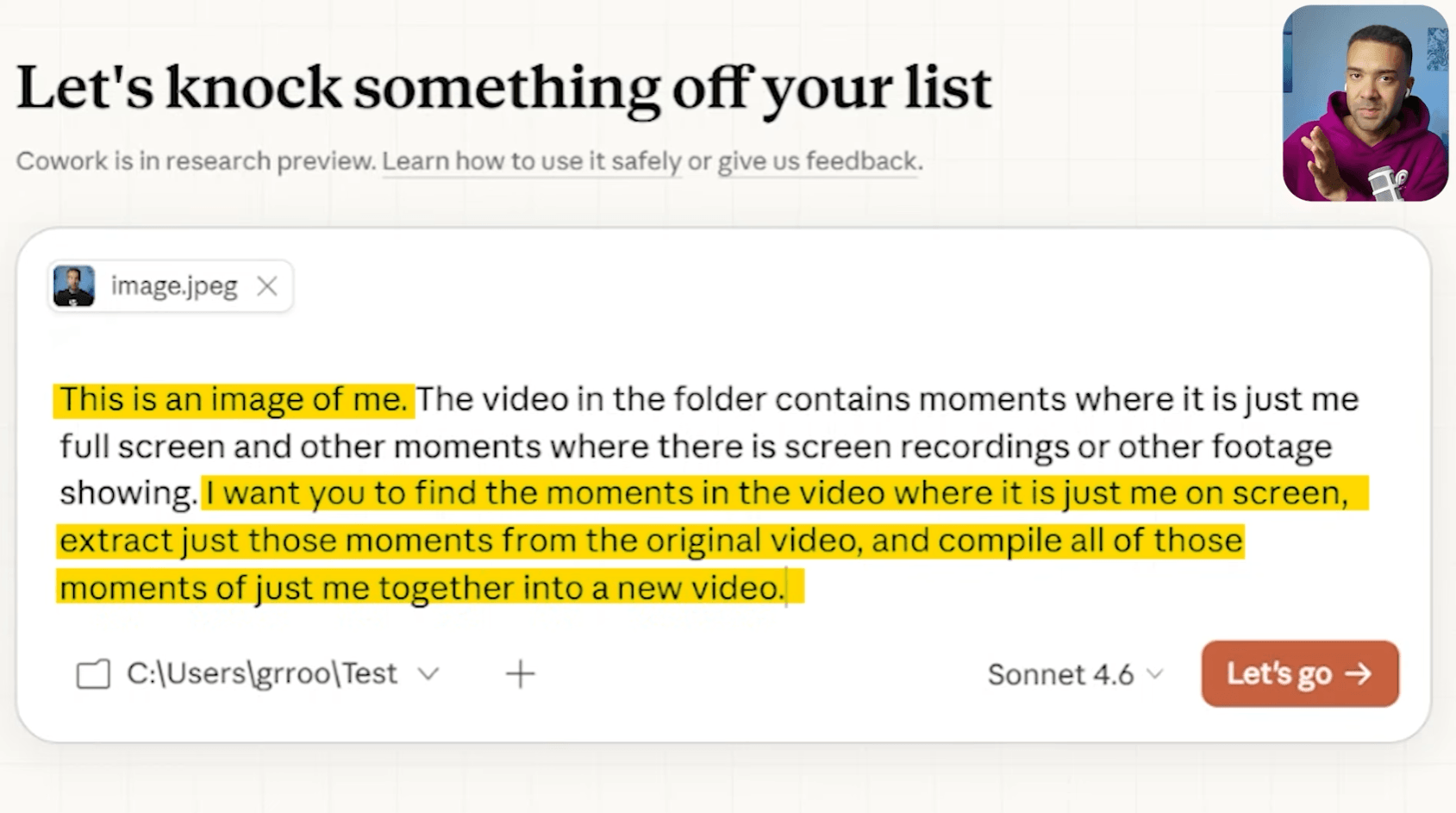
Caption: The second test used a reference image to help Cowork find only the full-screen moments where the presenter appeared alone.
How I used Claude Cowork for video editing
This is the basic workflow I used.
- Open Claude Cowork and point it to the folder containing the footage.
- Give it a very specific visual instruction, not a vague prompt.
- If needed, upload a reference image so it knows exactly who or what to look for.
- Ask it to extract only those moments and compile them into a separate clip.
- Review the result like a rough cut, not a final export.
That last part is important.
The smartest way to think about this, based on my test, is not “AI has edited the whole video for me.”
It’s more like this:
Claude Cowork may be able to do the tedious pre-editing work of searching footage, finding the relevant moments, and handing you a first pass that you can refine.
For editors, that can still be a big deal.
Where this could save editors time
This wedding example is a clear one.
If you come back with hours of footage and want every laughing moment from the day, that is usually a manual hunting job. You scrub. You skim. You mark selects. You build a sequence. It takes time.
This kind of workflow suggests Claude Cowork could help with jobs like:
- pulling every appearance of a specific person
- isolating presenter-only talking-head sections
- finding reaction shots or emotional moments
- creating a rough selects sequence from a larger footage folder
- separating usable A-roll from mixed recordings that include screens, B-roll, and cutaways
That doesn’t replace editing judgment.
But it could reduce one of the most repetitive parts of editing: finding the bits before the real editing even starts.
What worked and what did-not
This is where the review gets more realistic.
What worked
The most impressive part was that Claude Cowork generally understood the visual assignment.
In both tests, it did not just return random chunks. It seemed to understand the difference between the footage I wanted and the footage I did not want.
It also compiled the matches into a single edit instead of simply pointing me to timestamps. That makes it much more useful in practice.
What did not
It was not perfect.
In the second test, there were false positives. A few wrong frames slipped in. Some B-roll appeared even though I asked for only full-screen moments of me. There was even a moment where it looked like it may have confused me with someone else.
So the output still needed review.
That means this is not a “one click and publish” editing tool from what I saw. It is closer to a rough-cut assistant that still needs a human editor to check the results.
Caption: The output was usable as a first pass, but it still included a few mistakes and false positives that would need manual cleanup.
Should you use it
My verdict is yes, if your bottleneck is footage discovery.
If your editing process involves repeatedly asking questions like:
- where are all the shots of this person?
- where are the full-screen presenter moments?
- where are the reaction shots?
- where are the clips that match this reference?
…then Claude Cowork looks genuinely promising.
If your goal is polished final editing with perfect scene judgment, it is not there yet from this test.
So I would frame it like this:
Claude Cowork is interesting right now because it looks like a promptable footage-search and rough-assembly tool.
That alone could save real time.
FAQ
Can Claude Cowork edit video automatically?
Based on this test, it can help assemble clips automatically from visual instructions. I would still treat the result as a first pass that needs review.
Can Claude Cowork find a specific person in footage?
In my test, yes. It found a woman in a red dress from a busy clip, and it also used a reference image of me to pull full-screen shots from a longer video.
Is Claude Cowork accurate enough for final delivery?
Not from what I saw. It made some mistakes, so I would use it for selects and rough cuts rather than trusting it as the final editor.
Who is this most useful for?
Editors, videographers, and creator teams dealing with longer footage libraries where finding the right visual moments is a time sink.
Final take
The reason I think this matters is not that Claude Cowork suddenly replaces an editor.
It’s that it points toward a different kind of AI editing help.
Most AI video tools have been strongest when they work from speech, transcripts, captions, or pre-defined highlight logic. What grabbed me here was the feeling that I could ask for a visual condition and get back a rough edit built around it.
If that keeps improving, that is a very useful editing workflow.