Grok 4.5 vs Fable 5: I Tested Both for SaaS Motion Graphics
Last updated: July 2026
Author: Greg Preece — I test AI video tools hands-on to find workflows that help creators and SaaS founders build high-converting marketing assets without the complexity.
Creating professional motion graphics for SaaS landing pages and promo videos used to require hours of meticulous keyframing in Adobe After Effects. Today, frontier models like xAI's Grok 4.5 and Anthropic's Claude Fable 5 can automatically generate these high-quality visual assets from a text prompt, a reference video, or even a raw website URL.
To find out which model handles creative video workflows best, I ran both models side-by-side through a series of hands-on tests.
TL;DR: Which Model Wins?
While both models delivered highly usable results, Claude Fable 5 is the overall winner. Claude Fable 5 consistently demonstrated superior instruction-following, smoother motion interpolation, and much stronger visual storytelling.
However, Grok 4.5 is a highly capable runner-up that excelled in raw aesthetic design, font selection, and static visual appeal. If you need clean, stylized layouts, Grok 4.5 is an excellent option; if you need complex sequential motion and precise prompt adherence, Claude Fable 5 takes the crown.
| Test Scenario | Winner | Key Takeaway |
|---|---|---|
| Test 1: Video Recreation | Grok 4.5 | Grok flawlessly executed a logo and text swap; Fable 5 missed the key highlight effect and hallucinated a cursor. |
| Test 2: Complex Loop | Claude Fable 5 | Fable 5 rendered a silky-smooth rotation cycle; Grok 4.5 stuttered and repeated frames. |
| Test 3: Prompt from Scratch | Grok 4.5 | Grok 4.5 chose much cleaner typography and subtle, modern pulsing animations. |
| Test 4: URL to Video | Claude Fable 5 | Fable 5 followed the "single feature focus" spec perfectly; Grok 4.5 ignored the instructions and made a generic montage. |
Prefer to watch? Here's the video. Prefer to skim? The full breakdown is below.
Try Higgsfield AI here: Try Higgsfield AI →
Table of Contents
- Recreating SaaS Visuals with Higgsfield Supercomputer
- Test 1: Modifying an Existing Video (Apple Promo Style)
- Test 2: Complex Motion Handling (The Tool Wheel Loop)
- Test 3: Generating Visuals from Text Prompts (From Scratch)
- Test 4: Creating a Graphic from a Website URL
- Grok 4.5 vs. Claude Fable 5: Direct Comparison
- Which Model Should You Use?
- SaaS Motion Graphics FAQs
Recreating SaaS Visuals with Higgsfield Supercomputer
To put these models to the test, I used the Supercomputer workspace inside Higgsfield AI.
Higgsfield AI acts as an underlying video-generation engine that allows you to easily route your instructions through different leading frontier models. Within the Supercomputer interface, you can toggle between Grok 4.5 and Claude Fable 5 with a single click.
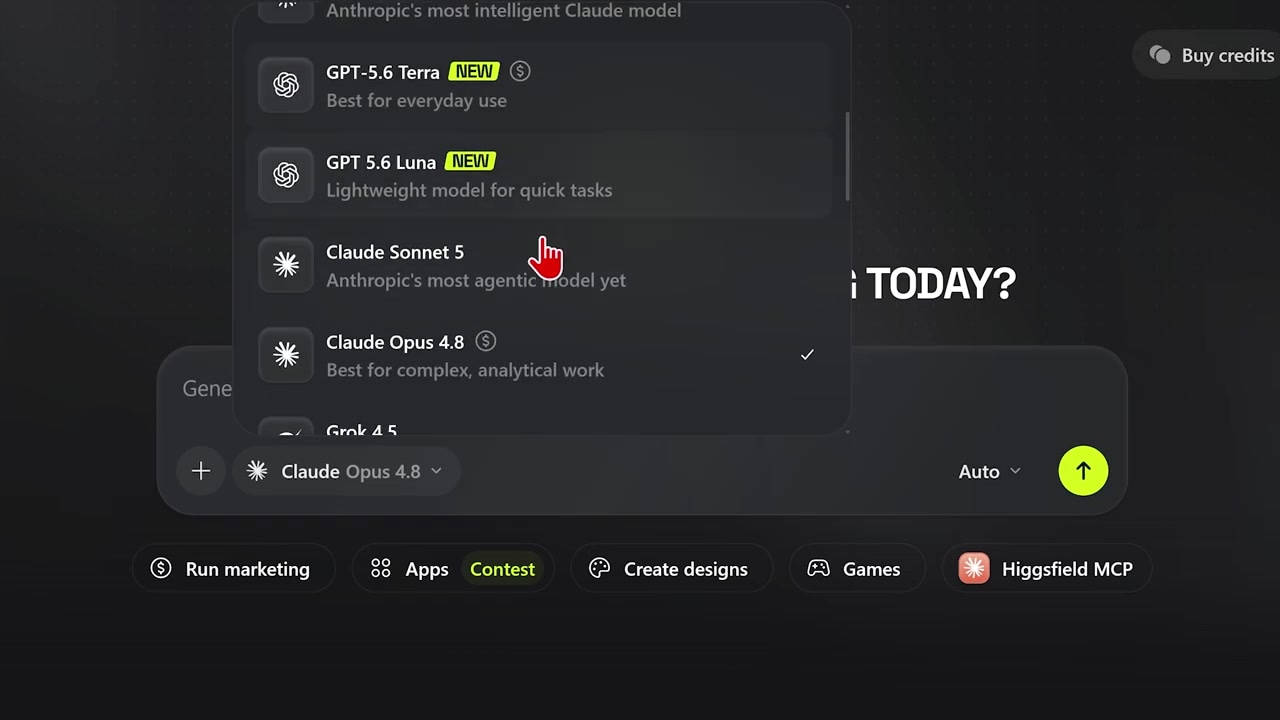
Caption: The model selector in Higgsfield AI's Supercomputer dashboard, where you can toggle between Grok 4.5 and Claude Fable 5.
This setup allows for a true head-to-head comparison because you can feed the exact same visual inputs and text prompts into both engines and analyze the resulting output side-by-side.
Test 1: Modifying an Existing Video (Apple Promo Style)
For my first experiment, I wanted to recreate a highly recognizable SaaS motion graphic: the classic Apple promo video style. This is a common effect where text is typed out, highlighted, and then visually transformed.
The Setup
- I uploaded a reference clip of the original Apple animation using the upload feature in the Supercomputer workspace.
- I uploaded a static image of my face to use as a replacement logo.
- I entered a prompt asking the models to recreate the original animation but to swap the word "Mac" with my name ("Greg") and the Apple logo with the uploaded photo of my face.
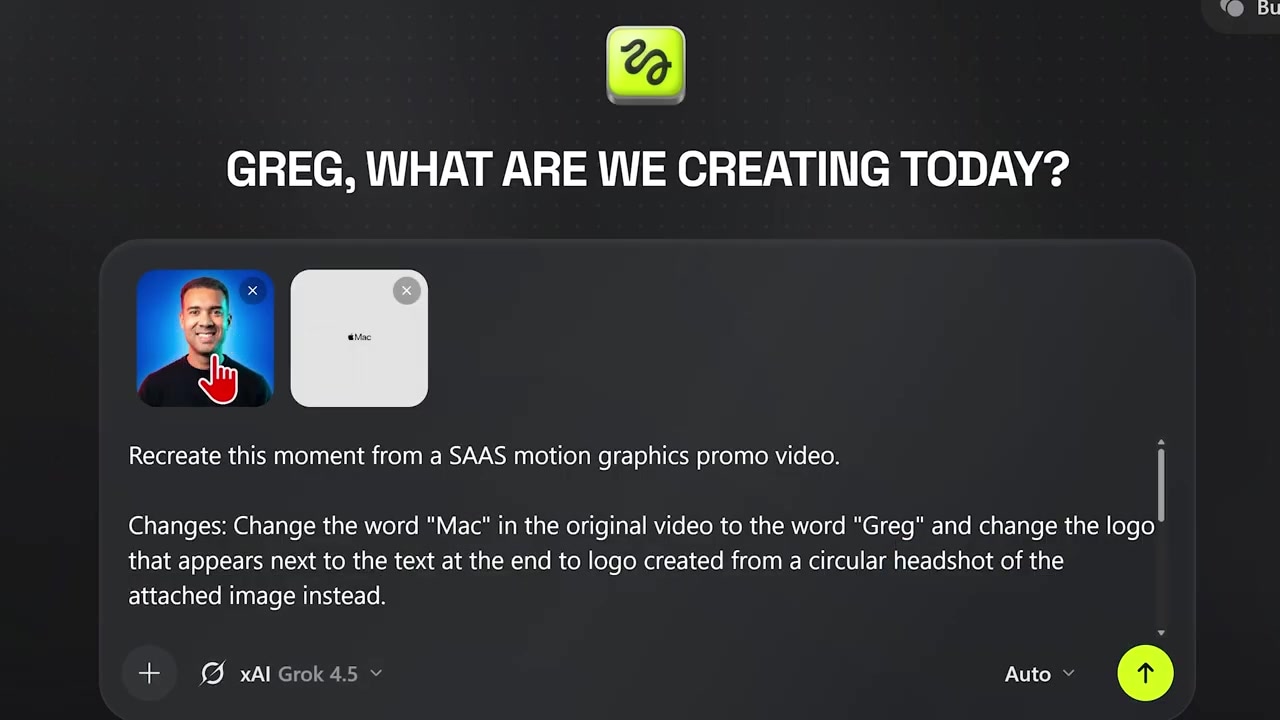
Caption: Uploading the reference Apple promo video and logo assets into Higgsfield AI's Supercomputer to set up the recreation test.
The Results
When I compared the two generated outputs side-by-side, both models produced respectable results, but Grok 4.5 was the clear winner.
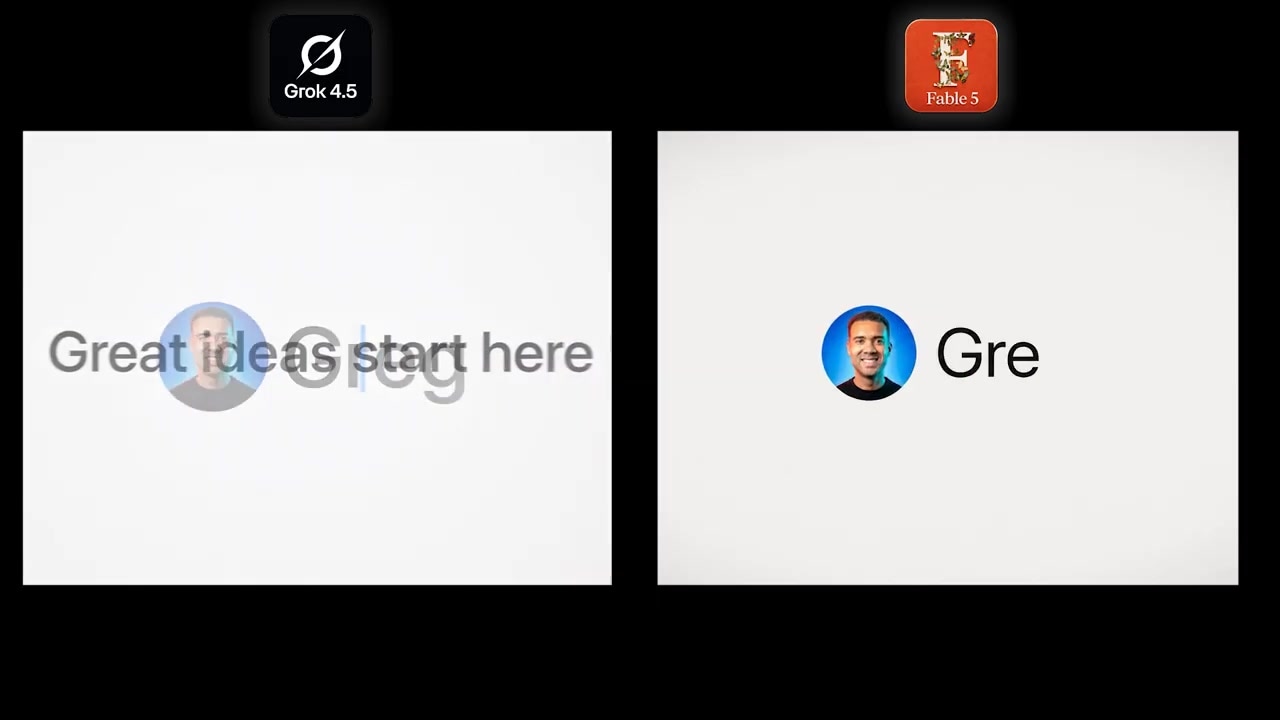
Caption: A side-by-side output comparison shows Grok 4.5 cleanly replacing the logo and text, while Claude Fable 5 failed the highlight animation.
- Grok 4.5: Successfully swapped the text and logo while maintaining the core timing and highlighting effect of the original reference clip.
- Claude Fable 5: Failed to render the highlight animation over the text and randomly hallucinated a blue mouse cursor that was not present in the original video.
Winner: Grok 4.5
Test 2: Complex Motion Handling (The Tool Wheel Loop)
For the second test, I wanted to push the models' ability to replicate highly complex, geometric motion paths—specifically, an interactive tool wheel cycle.
The Setup
I uploaded a video clip showcasing a slick UI element: an animated, rotating wheel of SaaS tools cycling sequentially on screen. I instructed both models to copy the animation style and motion mechanics of the original video.
The Results
Unlike the first test, this experiment showed a massive gap in motion interpolation quality.
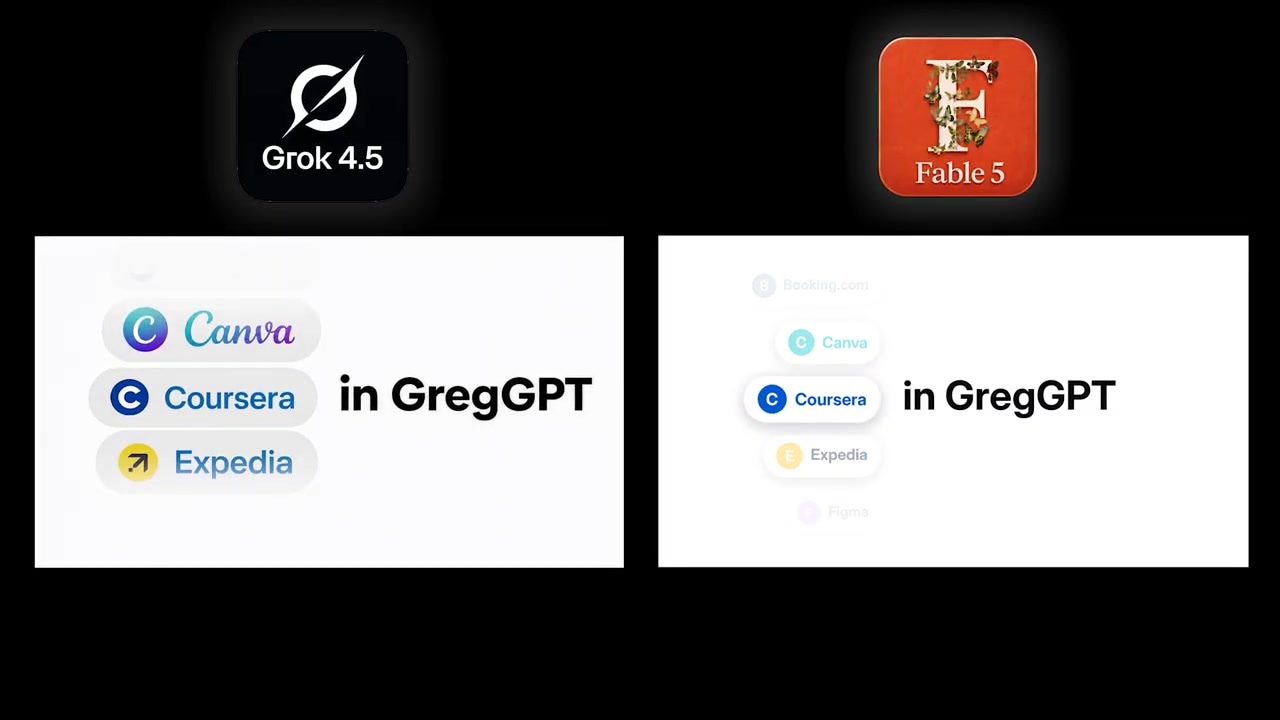
Caption: The side-by-side comparison of the rotating wheel cycle reveals smoother motion from Claude Fable 5.
- Claude Fable 5: Handled the geometric complexity perfectly, rendering a silky-smooth, continuous rotation with clean visual transitions.
- Grok 4.5: Had noticeable issues looping the animation. The movement was blocky and stuttered, resulting in awkward frame repetitions.
Winner: Claude Fable 5
Test 3: Generating Visuals from Text Prompts (From Scratch)
Next, I wanted to see how well these models could translate a creative idea into a polished SaaS graphic purely from a text prompt—without a reference video to copy.
The Setup
I used a prompt I’ve previously run on other animation platforms to generate a stylized, interactive SaaS dashboard widget showing mock analytics data.
- I pasted the detailed text prompt outlining the colors, duration, dashboard elements, and animation style.
- I ran the prompt on Claude Fable 5 first.
- I switched the toggle to Grok 4.5 and executed the exact same prompt.
The Results
Both models generated highly professional, production-ready SaaS mockups. However, Grok 4.5 stood out in its design sensibilities.
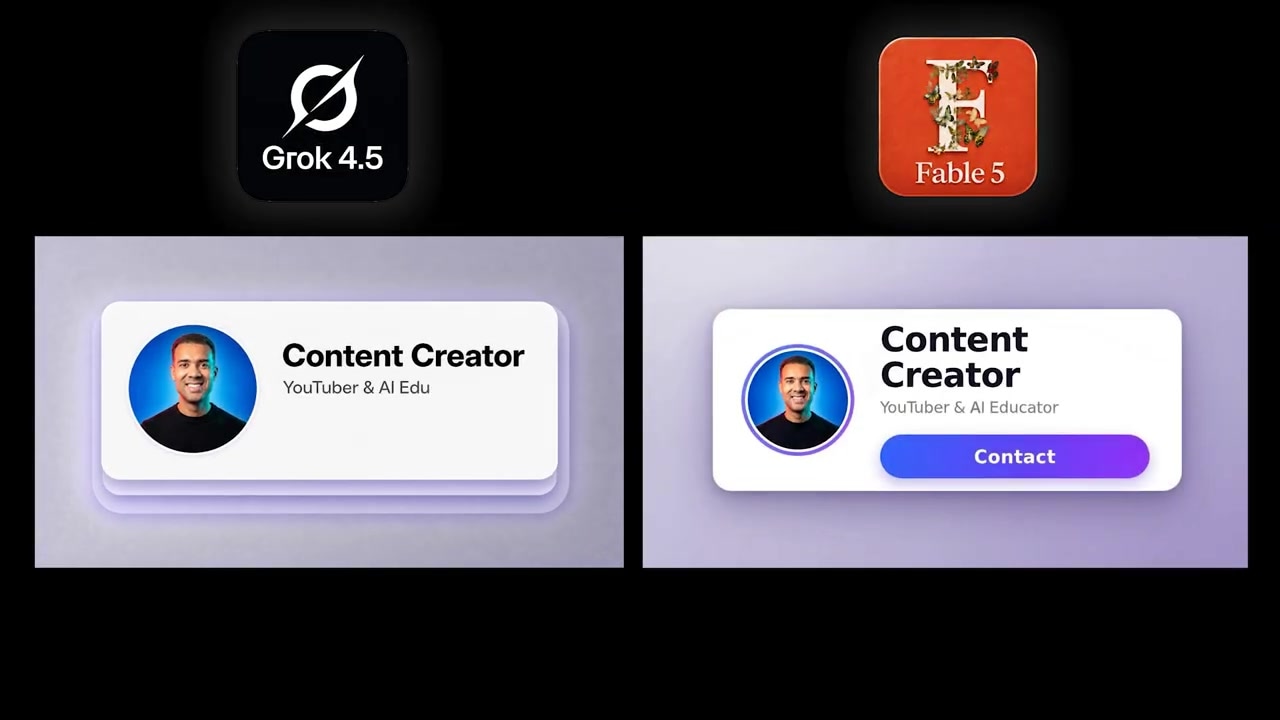
Caption: In the pure text-to-video comparison, Grok 4.5 rendered a dashboard with superior font choices and more cohesive styling.
- Grok 4.5: Chose modern, highly readable typography. The visual hierarchy was polished, and it added subtle, satisfying pulsing animations to the charts.
- Claude Fable 5: Rendered a clean interface, but the design felt slightly more generic, and the animations lacked the dynamic polish of Grok's output.
Winner: Grok 4.5
Test 4: Creating a Graphic from a Website URL
For the final and most difficult test, I wanted to evaluate how well these models could interpret a live SaaS marketing website and turn it into a targeted marketing video.
The Setup
I found the live website of a popular speech-to-text SaaS product. I asked both models to analyze the URL and design a motion graphic.
Crucially, I included a specific guardrail in the prompt: "Pick exactly one feature of this tool and build the motion graphic around that feature."
The Results
This test highlighted a critical difference in reasoning and prompt compliance between the two models.
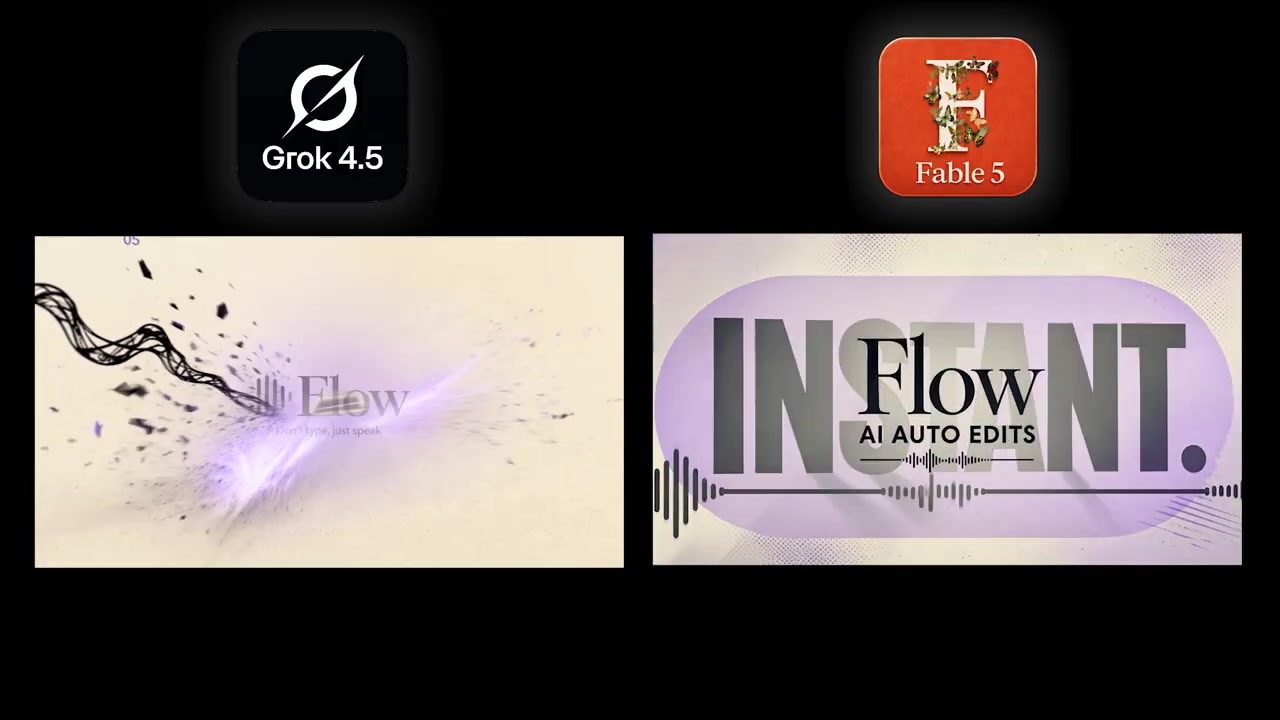
Caption: Claude Fable 5 successfully focused its video on a specific "auto edits" feature, whereas Grok 4.5 generated a generic montage.
- Claude Fable 5: Read the site, identified a specific feature called "auto edits," built a visual narrative explaining how that feature works, matched the website's brand color scheme, and chose appropriate fonts.
- Grok 4.5: Created a stunningly cinematic sequence with high-end, 3D-looking shots, but completely ignored the spec. Instead of focusing on one feature, it produced a generic promo with zero narrative structure or clear storytelling.
Winner: Claude Fable 5
Grok 4.5 vs. Claude Fable 5: Direct Comparison
| Feature | Grok 4.5 | Claude Fable 5 |
|---|---|---|
| Aesthetic Design | Modern, premium typography and polished color choices out of the box. | Clean and professional, but sometimes relies on generic UI elements. |
| Motion Physics | Can struggle with complex, continuous, or geometric loops (e.g., stutters). | Incredibly smooth, high-fidelity motion interpolation. |
| Prompt Adherence | Strong on straightforward visual tasks, but prone to ignoring complex visual rules. | Elite reasoning; handles complex multi-step instructions and technical parameters flawlessly. |
| Best For | Fast, gorgeous text-to-video UI mockups and simple graphic replacements. | Narrative explainer videos, complex product loops, and highly customized promos. |
Which Model Should You Use?
Your choice between these two models comes down to your primary production goal:
- Use Grok 4.5 if you want to generate stylized, highly polished dashboard previews purely from text prompts, or if you need to run straightforward video modifications (like swapping logos or editing text headers).
- Use Claude Fable 5 if you are building complex motion graphics from scratch, need absolute compliance with specific brand rules, or want to generate narrative-driven product videos that explain distinct features clearly.
Ready to try it yourself? Access both Grok 4.5 and Claude Fable 5 inside the Supercomputer dashboard by visiting Try Higgsfield AI →.
SaaS Motion Graphics FAQs
Can I upload my own custom fonts into Higgsfield?
Yes, depending on your account plan inside the Higgsfield AI workspace, you can upload custom brand assets, including custom typography and vector logos, to ensure your generated animations match your existing brand guide perfectly.
What is the difference between image-to-video and text-to-video in Higgsfield?
Text-to-video generates a motion graphic completely from a written prompt, allowing the AI to design the UI layout and movement from scratch. Image-to-video (or video-to-video) allows you to upload a static screenshot of your actual software dashboard or a reference animation clip to guide the layout, colors, and motion paths of the final output.