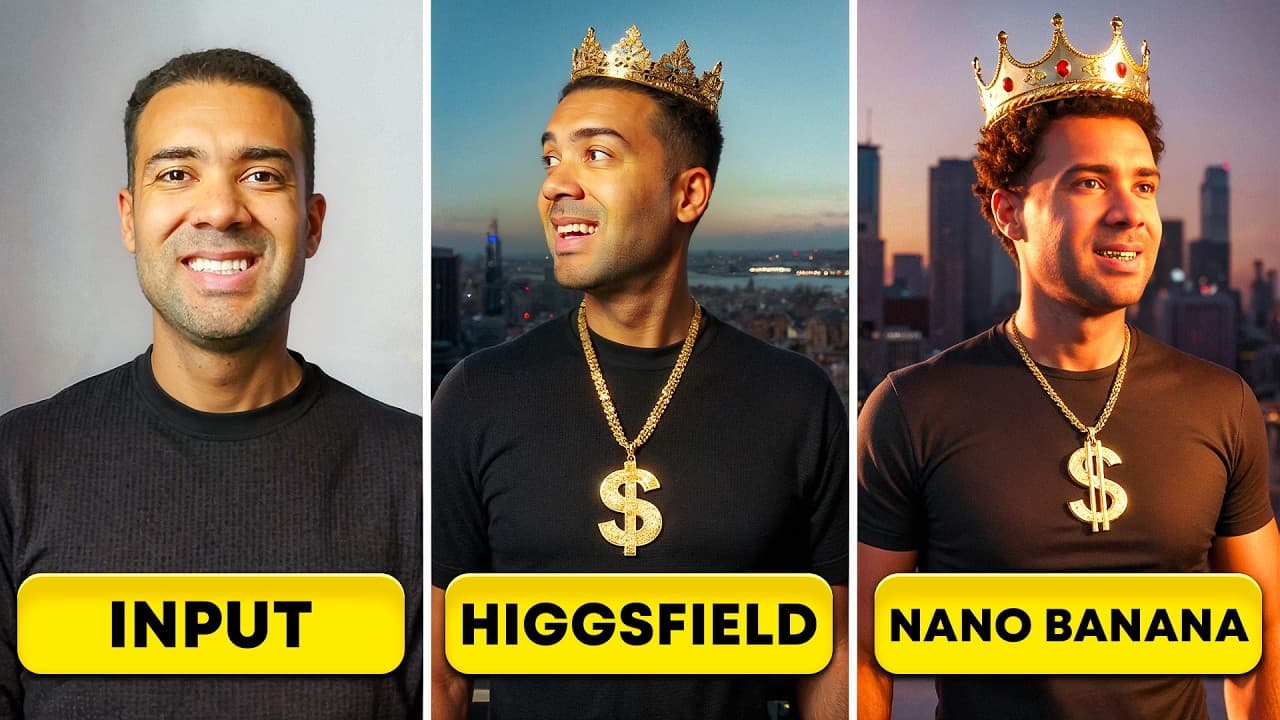
Higgsfield AI vs Nano Banana: I Tested Which Beats Identity Drift
Last updated: 24 September 2026
Author: Greg Preece — I test AI video and image tools hands-on and show creators how to get highly consistent, usable results fast.
For content creators, animators, and AI filmmakers, generating a realistic avatar is only half the battle. The real challenge is character consistency—keeping the exact same face across different scenes, outfits, and visual styles without having it slowly morph into someone else.
In this head-to-head review, I put Google’s highly-hyped Nano Banana AI against Higgsfield’s Soul ID across six demanding tests to see which engine truly reigns supreme for consistent character creation.
At a Glance: Higgsfield AI vs. Nano Banana
| Feature | Higgsfield AI (Soul ID) | Google Nano Banana AI |
|---|---|---|
| Workflow Style | Trained Personalization (Marathon) | One-Shot Reference (Sprint) |
| Reference Images Needed | Batch upload (20–30 photos) | Exactly 1 photo |
| Processing Setup Time | ~5 minutes for initial model training | Instantaneous (seconds) |
| Long-Term Face Accuracy | Excellent (No identity drift) | High drift risk over multiple generations |
| Background Crowd Handling | Poor (clones character face onto bystanders) | Excellent (keeps background characters distinct) |
| Aesthetic / Style Variety | Realistic camera presets only | Unlimited (Pixar, Ghibli, Pixel Art, etc.) |
| Product Mockup Support | Limited (prompt restricts image inputs) | Excellent (character can hold objects naturally) |
Table of Contents
- Understanding the Workflows: One-Shot Speed vs. Trained Personalization
- Head-to-Head Tests: Putting Consistency to the Test
- Test 1: Location Changes and Background Crowd Control
- Test 2: Clothing Customization and Aesthetic Boundaries
- Test 3: The Ultimate Stress Test (Armor, Castles, and Identity Drift)
- Test 4: Facial Expressions and Close-up Textures
- Test 5: Style Transitions (Disney, Pixar, and Anime Ghibli)
- Test 6: Real-World Product Placement and Integration
- The Verdict: Sprinting vs. Marathons
- Frequently Asked Questions
Prefer to watch? Here's the video. Prefer to skim? The full breakdown is below.
Quick Links
- Higgsfield AI: Try Higgsfield AI →
- Nano Banana: Nano Banana
- Google Gemini: Try Gemini →
Understanding the Workflows: One-Shot Speed vs. Trained Personalization
To understand how these platforms maintain a consistent character, we must first look at their foundational technical structures. They use entirely different methods to "remember" what you look like.
Higgsfield's Soul ID: The Deep-Learning "Marathon" Approach
Higgsfield AI relies on what I call the digital clone method. Rather than just looking at a single reference image and trying to copy it, Higgsfield builds a deep, multi-dimensional profile of your face. It maps structural details like your bone structure, eye-to-nose distance, and skin textures.
This model is ideal for creators looking to establish a long-term AI avatar or virtual influencer that stays 100% consistent over hundreds of future generations.
Try it here: Try Higgsfield AI →
How to Set Up Your Soul ID Character in Higgsfield:
- Navigate to the Soul ID Character option in the Higgsfield image generator dashboard.
- Click the create button and upload a varied batch of reference photos of your subject (typically 20–30 portrait angles with clear lighting).
- Name your character model (e.g., "AI Greg") and press generate.
- Wait approximately 5 minutes for Higgsfield to train and lock in your permanent digital persona.
- Enter your prompt (referencing your character by name, e.g., "AI Greg stood on an empty subway car"), select your aspect ratio, and click generate to receive four distinct choices.
 Caption: Setting up a consistent character in Higgsfield AI requires a brief, 5-minute deep-training process using multiple reference images.
 Caption: Once trained, Higgsfield outputs four prompt options at a time, making it easy to select the best match.
Google's Nano Banana: The Lightning-Fast "Sprint" Approach
Google's Nano Banana AI (available natively within Google Gemini) uses a one-shot reference method. It doesn't require a long training process or dozens of photos. Instead, it extracts facial data on the fly from a single image and maps it directly onto your new scene prompt in seconds.
This model is built for fast-paced creators who need rapid drafts, concept art, or quick localized edits without setting up a dedicated character profile.
Try it here: Nano Banana
How to Use Nano Banana in Google Gemini:
- Open Google Gemini and ensure you are using the Nano Banana image model.
- Upload exactly one high-quality, clear reference photo of your subject.
- Write your prompt directly below the photo. Because Nano Banana does not save trained profiles, refer to your subject as "this man" or "this woman" instead of a custom name.
- Press submit and receive your completed generation in roughly 5 to 10 seconds.
 Caption: Nano Banana skips the training phase entirely, utilizing a single photo and a short text prompt to produce images in seconds.
Head-to-Head Tests: Putting Consistency to the Test
I ran identical test prompts across both platforms using my own face as the reference subject to evaluate their limits. Here is how they compared.
Test 1: Location Changes and Background Crowd Control
First, I tested placing my character on a subway train, then pushed the platforms by adding complexity: "Dozens of other people in the carriage behind the character."
- Nano Banana easily rendered the scene. It placed "this man" in the foreground while correctly generating generic, diverse bystanders in the background.
- Higgsfield struggled with the logic of crowds. While it successfully added dozens of background commuters, it mapped my Soul ID face onto every single person in the train car.
 Caption: When adding backgrounds with multiple people, Higgsfield suffers from a "cloning" glitch that maps your character's face onto every bystander, whereas Nano Banana handles crowds flawlessly.
Test 2: Clothing Customization and Aesthetic Boundaries
Next, I tested simple clothing changes ("wearing a red t-shirt") followed by a gender-breaking outfit change ("wearing a red dress") to see how the models handle unexpected styling.
- On the Red T-Shirt Test: Both models succeeded. However, Higgsfield preserved my facial likeness with much better accuracy and naturally brighter lighting, while Nano Banana's facial details began to look slightly soft.
- On the Red Dress Test: Nano Banana successfully rendered me in a red dress (though it struggled with anatomical logic and added some strange anatomical details). Higgsfield completely ignored the instruction, rendering me in the same red t-shirt as before.
 Caption: Higgsfield produces a much more accurate facial likeness on simple clothing swaps compared to Nano Banana.
 Caption: When pushed to unexpected clothing boundaries, Nano Banana attempts the dress swap, whereas Higgsfield's safety limits or model weights reject the prompt entirely.
Test 3: The Ultimate Stress Test (Armor, Castles, and Identity Drift)
To push both tools to their absolute limits, I combined an extreme clothing shift with a location change in a single prompt: "me in medieval steel-plated armor without a helmet, outside of a castle."
This test exposed a fatal flaw in Nano Banana's one-shot workflow: identity drift.
Because Nano Banana relies on a single image and doesn't have a deep-trained profile of the subject, making sequential edits over multiple generations causes the character's facial characteristics to slowly warp. By this third generation, Nano Banana's output no longer looked like me—it created an entirely different person.
The only way I could fix this was by opening a completely fresh chat thread in Gemini, re-uploading my reference photo, and running the prompt again from scratch.
Higgsfield, on the other hand, held strong. Because the Soul ID model is fully trained on my face, the armor-clad knight looked exactly like me without any degradation.
 Caption: Under heavy prompt stress, Nano Banana suffers from severe identity drift (left), whereas Higgsfield’s trained Soul ID (right) remains perfectly consistent.
 Caption: To correct identity drift in Nano Banana, you must reset your workspace, open a new chat, and re-upload your reference photo.
Test 4: Facial Expressions and Close-up Textures
A truly consistent character needs to show human emotion. I tested extreme close-up details along with three distinct emotions: joy, anger, and sadness.
- Skin Texture & Close-ups: Nano Banana won handily. When zooming in on macro-portraits, Nano Banana preserved hyper-realistic skin pores, wrinkles, and micro-details that looked incredibly organic. Higgsfield's output looked slightly smooth and airbrushed.
- Joy: Higgsfield produced a much more natural, realistic smile. Nano Banana's expression felt stiff and artificial.
- Anger & Sadness: Nano Banana dominated. It rendered convincing angry expressions and tear-streaked sad faces that maintained my likeness. Higgsfield struggled with facial geometry, creating strange lip warps on the "angry" prompt and a squinting expression on the "sad" prompt that looked nothing like me.
 Caption: Nano Banana captures superior organic skin textures and fine lines on close-up portrait tests.
 Caption: While Higgsfield handles simple smiles well, Nano Banana is far superior at translating complex emotions like anger and sadness without losing character likeness.
Test 5: Style Transitions (Disney, Pixar, and Anime Ghibli)
I wanted to see how easily these models could translate my consistent character into non-photorealistic art styles.
- Nano Banana was incredibly versatile. It successfully converted my face into distinct animation styles, including classic Disney, Pixar, Studio Ghibli, and retro pixel art, all while keeping my distinct features recognizable.
- Higgsfield does not allow arbitrary art style prompts. Its image generator is locked to realistic, camera-aware presets (e.g., street photography, studio lighting). There is currently no way to prompt the AI to transition your character into cartoon or illustration formats.
 Caption: If you need to translate your consistent character into cartoon, anime, or 3D animation styles, Nano Banana Pro is the option I reach for, though GPT Image 2 now handles this too.
Test 6: Real-World Product Placement and Integration
Finally, I tested product placement—essential for creators making AI-driven commercial ads or product reviews. I asked the models to have my character hold a specific bottle and a tub of moisturizer.
- Nano Banana easily ingested the product image uploads, allowing my character to hold the item and naturally apply the moisturizer to his face while maintaining my likeness.
- Higgsfield's Soul ID interface does not support dual-image inputs. When you attempt to upload a product reference photo alongside your character model, the interface replaces the prompt image with the new upload rather than combining them. It is currently impossible to get your Soul ID character to interact with a specific uploaded product.
 Caption: Nano Banana makes it incredibly simple to execute product mockups, whereas Higgsfield's prompt UI restricts combining characters with secondary object uploads.
The Verdict: Sprinting vs. Marathons
Choosing the right tool depends entirely on your production speed and project goals.
Use Higgsfield's Soul ID If:
- You are building a long-term AI influencer, virtual avatar, or consistent brand spokesperson.
- You need your character to remain 100% consistent across dozens of sequential scenes and heavy environmental edits.
- You are focused on high-fashion, realistic, or editorial-style portraiture.
Use Google's Nano Banana If:
- You need to generate quick, one-off images and want to skip a lengthy 5-minute model training phase.
- Your scenes require complex environments with multiple distinct background people.
- You want to convert your character into stylized art (such as Ghibli anime, Pixar 3D, or pixel art).
- You are creating product mockups or commercial ads where your character must hold specific real-world products.
The good news? If you use Higgsfield, you don't necessarily have to choose. Because Google's Nano Banana is now integrated directly inside Higgsfield's platform, you can seamlessly jump between the two technologies within a single workspace depending on what your current scene demands.
Frequently Asked Questions
What is identity drift in AI image generation?
Identity drift occurs when an AI image generator slowly warps your character's facial features over multiple consecutive prompt changes. This is common in one-shot models like Nano Banana. To resolve it, you must clear your chat history, open a new thread, and re-upload your original reference image.
Why does Higgsfield clone my character's face onto background people?
This is a known limitation of Higgsfield's Soul ID model weights. Because the model is intensely focused on maintaining the trained "Soul ID" identity, it struggles to differentiate between the primary subject and background bystanders, mapping your character's face onto every human figure in the image.
Can I train a Higgsfield Soul ID character with only one photo?
No. Higgsfield's Soul ID requires a deep training process that typically uses a batch of 20 to 30 varied reference photos. If you only have one reference photo of your subject, you should use Google's Nano Banana instead.