How I Built an N8N Video Generator (And Solved JSON & Wait Loop Errors)
Last updated: 29 September 2026
Author: Greg Preece — I build and test AI automation workflows hands-on, showing creators how to break through technical barriers and scale content production without code.
Automating your content production is the most effective way to scale your output, capture more traffic, and grow your revenue online. But if you have tried building an automated workflow using standard tutorials, you have likely run into overly technical documentation, broken endpoints, and loop configurations that completely stall your progress.
To solve this, I built a fully functional n8n video generator that takes simple prompts, pushes them to Google's Veo 3 Fast model, and saves the output cleanly back to a database. In this guide, I will walk you through exactly how I structured this workflow, the pricing nuances you must watch out for, and the two major technical bottlenecks I solved so your automation does not break.
TL;DR: Build Your Automated Video Engine
- What it does: Automatically generates AI videos from a Google Sheets idea list and writes the completed video URLs back to the sheet.
- Core tools: n8n (workflow automation), fal.ai (API connector to Google's Veo 3 Fast model), and Google Sheets (input database).
- Key troubleshooting: To make this work, you must structure your sheet inputs inside a JSON block and configure a status-polling loop in n8n.
- Cost warning: Generating automatically via the fal.ai API is convenient but costs about $0.75 for a five-second 1080p clip with audio on Veo 3.1 Fast. If you do not need hands-off scale, generating manually via Google Flow is cheaper still.
Table of Contents
- Why Automate AI Video?
- [The 4 Stages of the N8N Video Generator Workflow](#the-4-stages-of-the-n8n-video-generator-workflow)
- Step-by-Step Technical Setup Guide
- Troubleshooting: Solving the Two Crucial Breakpoints
- Cost Comparison: Automated fal.ai vs. Manual Google Flow
- Frequently Asked Questions
Prefer to watch? Here's the video. Prefer to skim? The full breakdown is below.
Quick Links
- n8n: Try n8n →
- fal.ai: Try fal.ai →
- Google Flow: Try Google Flow →
Why Automate AI Video?
There are faceless YouTube channels generating millions of views—ranging from 87 million to over 154 million—with fully AI-generated video assets. In theory, using an automated workflow lets you produce high-quality videos faster, more consistently, and at a scale manual creators simply cannot match.
However, actually building an automation engine can be a massive headache. While n8n is highly praised for its flexibility, the learning curve is steep. Tutorials are often intensely code-heavy, and website instructions can easily lead to broken nodes. As someone who is quite tech-savvy, I had real trouble building my first functioning video pipeline. This guide simplifies the process down to its foundational components so you can skip the friction and get your generator running immediately.
The 4 Stages of the N8N Video Generator Workflow
To keep the system reliable, I broke the automated video generator down into four sequential stages. This architecture isolates every function so you can easily swap out tools or change models.
- The Trigger: The automated catalyst (e.g., a timer, a Dropbox file upload, or a database update) that tells n8n to start running.
- Get Idea: The node that reads your video prompt or script from your database.
- Generate Video: The API step where n8n connects to an external generation engine to build the asset.
- Retrieve and Save: The final logic step that polls the generator, extracts the finished video URL, and writes it back to your database.
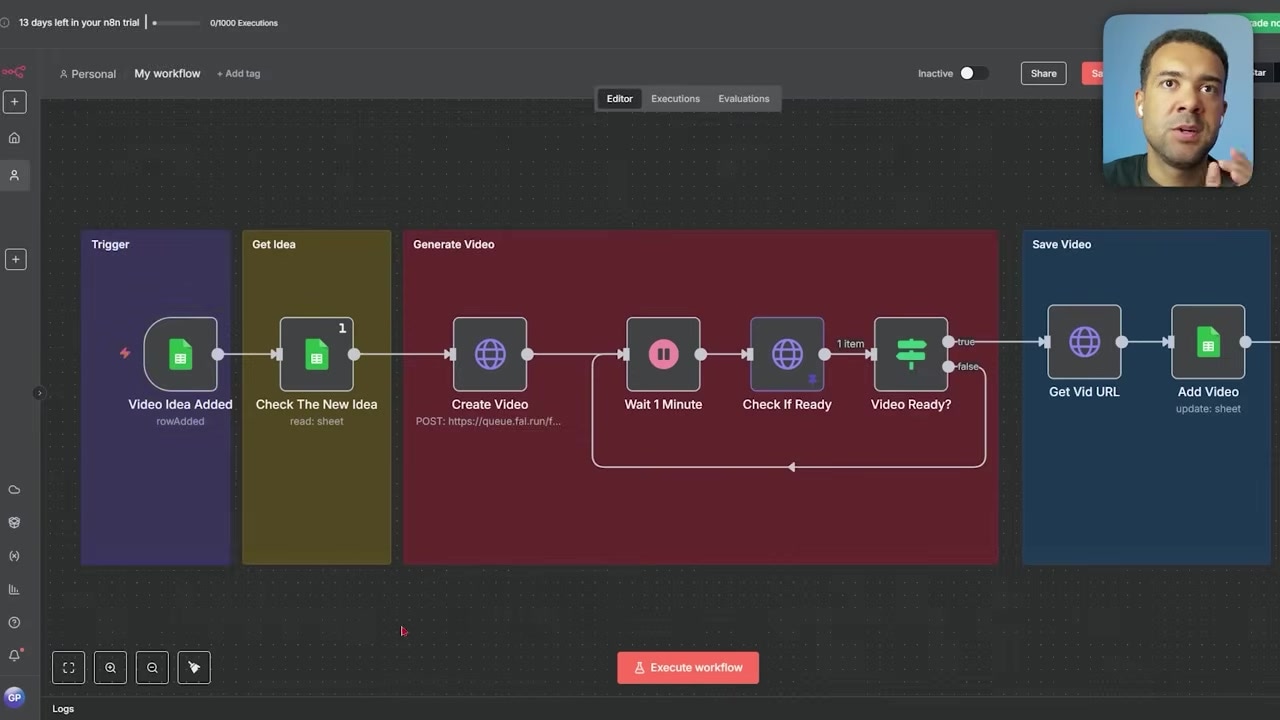
Caption: The completed 4-part automated video generation canvas constructed inside n8n.
Step-by-Step Technical Setup Guide
Building a robust automated pipeline requires linking your database, an orchestrator, and an API media platform. Here is how to configure each part.
1. The Trigger & Idea Fetch (n8n)
To run your automation hands-off, you need a workflow orchestrator that coordinates the hand-offs between your database and the video API.
n8n is an open, highly customizable node-based workflow manager designed for creators who need custom data-routing capabilities without managing local server scripts.
Try it here: Try n8n →
In my setup, the trigger fires whenever a new idea row is added to a designated Google Sheet. Using this trigger is incredibly powerful: it means you can have a separate AI (like ChatGPT) writing video concepts and dropping them into your spreadsheet, which instantly kicks off this generator without you ever opening the software.
2. The Generation Engine (fal.ai)
n8n orchestrates the workflow, but it cannot generate video files on its own. You have to connect a third-party developer platform via API to handle the actual creation.
fal.ai is an API-first generative media platform built for developers, letting you plug direct access to cutting-edge models like Kling, MiniMax, Pika, and Google's Veo 3 Fast directly into your n8n workspace.
Try it here: Try fal.ai →
For this build, I integrated the Google Veo 3 Fast model. Having generated AI videos for months now, I have found that Veo 3 is arguably the best model on the market for producing realistic high-quality videos that also feature realistic, built-in synchronized audio.
To set this up, add an HTTP Request Node to your canvas and configure it to point directly to the fal.ai API endpoint (fal.run).
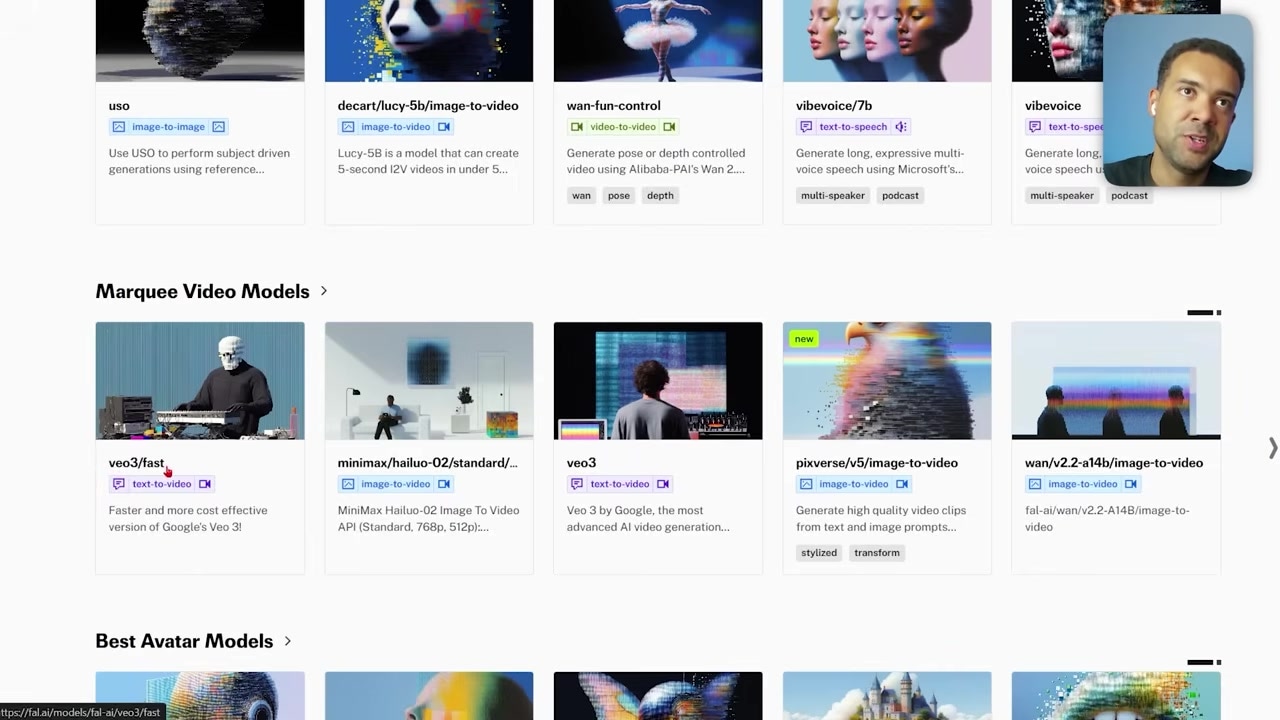
Caption: Accessing and selecting the Google Veo 3 Fast model API within the fal.ai library.
Troubleshooting: Solving the Two Crucial Breakpoints
Most basic tutorials show a linear connection: Google Sheet -> HTTP Request -> Save URL. If you build it that way, your workflow will fail every single time. Here are the two critical errors I encountered and exactly how to fix them.
1. The JSON Prompt Trap
When n8n passes your video idea from your Google Sheet to the fal.ai API, the server expects the payload to arrive in strict JSON format. If you write your raw video concept as standard text, the API request will crash immediately.
To resolve this, you must write your video prompts inside your Google Sheet using standardized JSON syntax.
The JSON syntax you must use:
{"prompt": "A close-up cinematic shot of a golden retriever playing in a field of sunflowers."}
Make sure your input starts with a curly bracket, labels the key "prompt" in quotation marks, uses a colon, wraps your actual prompt in quotation marks, and closes with a curly bracket.
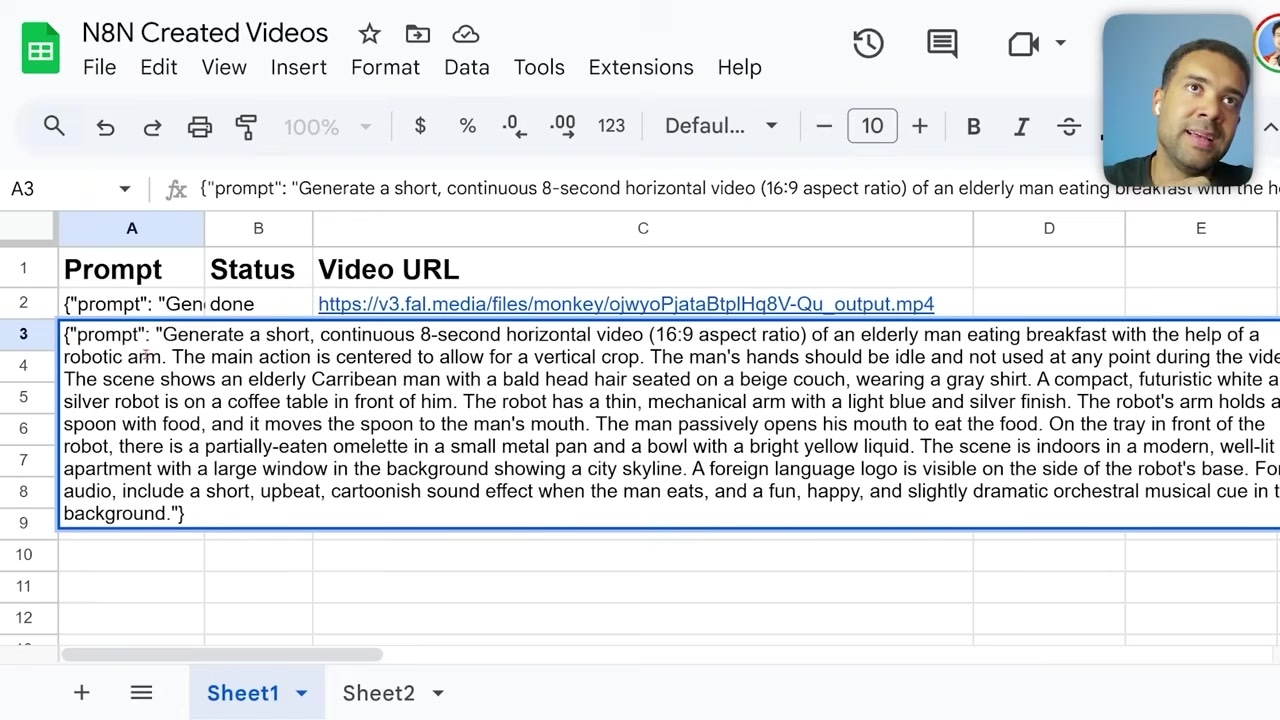
Caption: How the JSON payload must be structured in your Google Sheets trigger column to prevent API parsing errors.
2. The Wait and Poll Loop
AI video models do not generate files instantly; they take anywhere from 1 to 3 minutes to render. If your workflow runs in a straight line, n8n will immediately try to extract the video URL a split second after calling the API. Because the video is still processing, the URL will not exist, and the run will terminate.
To fix this, you must build a polling wait loop:
- Add a Wait Node: Place it directly after your fal.ai request and configure it to pause the workflow for 60 seconds.
- Add a Check Status Node: Use an HTTP Request node to check the status of your generation at the fal.run endpoint.
- Insert an If Node (Is Video Ready?): Set the condition to check if the returned status parameter equals
completed. - Create a False Route: If the status returns as
in progress(false), route the workflow back to the Wait Node to pause for another 60 seconds before checking again. - Create a True Route: Once the status returns as
completed, direct the workflow to pull the generated URL and write it back to your spreadsheet.
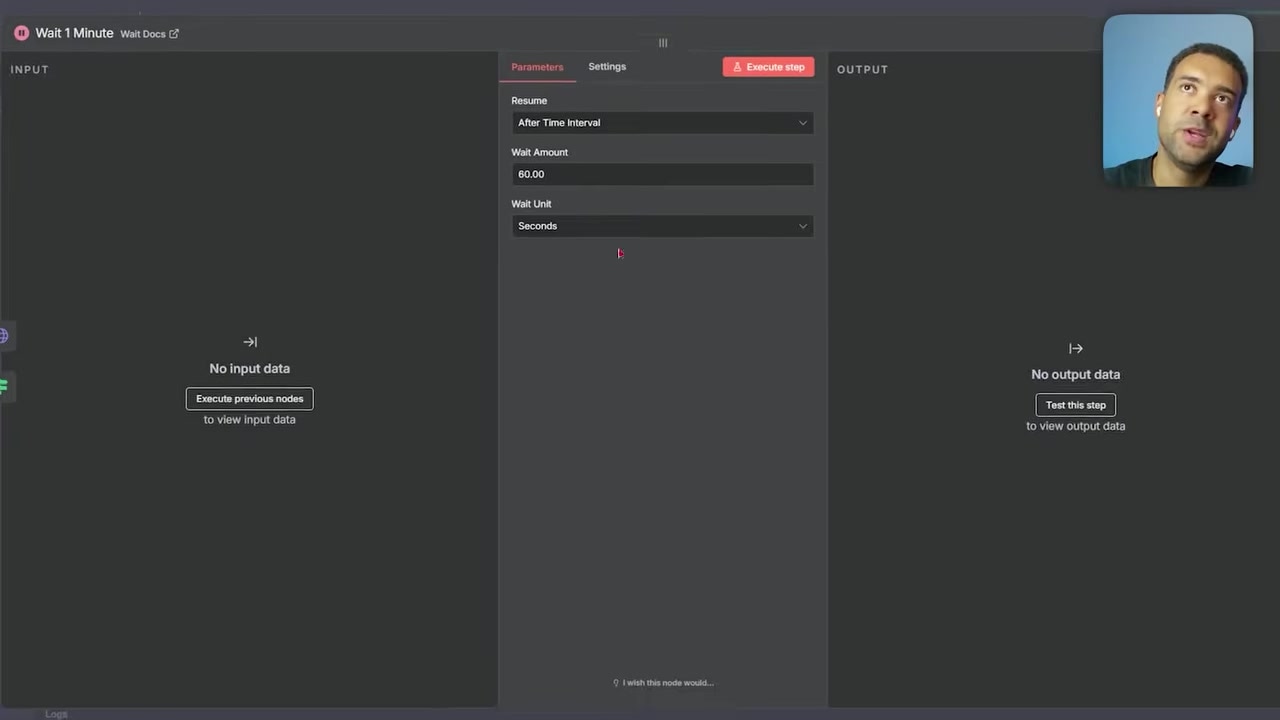
Caption: The recursive n8n wait-and-check loop configuration that manages asynchronous rendering times.
Cost Comparison: Automated fal.ai vs. Manual Google Flow
While automating video generation is highly efficient, it is not always the most cost-effective path. You need to weigh manual execution against automated scale depending on your budget.
The Automated Route (fal.ai + n8n)
- Cost: about $0.75 per five-second 1080p generation with audio (using Veo 3.1 Fast via the fal.ai API; the older Veo 3 Fast endpoint is now deprecated). how that compares per clip across platforms
- Best for: High-volume, fully autonomous video channels looking to push hundreds or thousands of uploads a day entirely hands-off.
The Manual Route (Google Flow)
If you do not need mass automation, Google Flow is a web-based creative filmmaking platform inside Google Labs that lets you generate Veo 3 assets in a dedicated workspace.
Google Flow is Google's official, visual filmmaking interface that lets you draft prompts, adjust camera motion, and generate Veo 3 videos with highly precise manual control.
Try it here: Try Google Flow →
- Cost: 50 free credits a day, and as little as 20 cents per manual generation of Veo 3 Fast.
- Best for: Creators who have the time to copy and paste their prompts manually one by one. If you are generating a dozen videos a day, doing it yourself in Google Flow will save you a massive amount of money.
Frequently Asked Questions
Can I use models other than Google Veo 3 Fast with this n8n setup?
Yes. Because fal.ai hosts a wide array of AI video models, you can easily change models (such as Kling, MiniMax, or Pika) simply by changing the target API URL (fal.run) inside your n8n HTTP request node.
Why is my wait loop looping infinitely?
Double-check the string evaluation in your "If" node. It must look for the exact lowercase or standard status string returned by your API (typically completed in fal.ai). If there is a typo in your condition, the workflow will never register the completion and loop forever.
Where else can I save the finished video files besides Google Sheets?
Because n8n has thousands of integrations, you can replace the final Google Sheets node with nodes that upload files straight to Dropbox, Google Drive, or send them over to a social media tool to publish them directly to your YouTube or TikTok channel.