How I Write Video Hooks with AI (Using a Proven 3-Step Formula)
Last updated: July 2026
Author: Greg Preece — I test AI video tools hands-on to help creators streamline their scriptwriting, build visual content systems, and grow their channels fast.
If you are tired of staring at a blank document trying to write video hooks that keep viewers glued to their screens, you are not alone. While growing my own YouTube channel to over 120,000 subscribers, I’ve learned that the algorithm rewards viewer retention above almost everything else. A strong hook can multiply your video's views by 10, while a bad hook can instantly kill your best content.
Below, I'll show you the exact step-by-step visual AI workflow I use to turn proven, high-performing hook psychology into custom hooks for any niche without having to memorize a million copywriting rules.
TL;DR: Build Your Ultimate Hook-Writing Engine
- The Blueprint: Ground your AI in elite content frameworks (like Kallaway's 3-step hook formula) instead of asking it to write from scratch.
- The Tool: Use Poppy AI, a multiplayer visual canvas workspace that lets you drag, drop, and link research cards directly to ChatGPT and Claude.
- Niche Scaling: Group source files (like competitive videos or research PDFs) onto your board to instantly generate highly specific hooks.
- Diagnostics: Feed underperforming hooks back into the canvas to diagnose why they failed and automatically generate an improved version.
Table of Contents
- The Psychology: The 3-Step Hook Formula
- Why Linear Chat Tools Fall Short
- Step-by-Step: How to Write Video Hooks with AI
- Poppy AI Pricing and Value: Is It Worth It?
- Frequently Asked Questions
Prefer to watch? Here's the video. Prefer to skim? The full breakdown is below.
Quick Link
- Poppy AI: Try it here: Try Poppy AI →
The Psychology: The 3-Step Hook Formula
Before touching any AI tool, you need to understand the psychology behind viral youtube hook psychology. You cannot rely on generic, robotic AI outputs if you want to write video hooks with ai that actually stop a user from scrolling.
The backbone of this workflow is based on a brilliant three-step process popularized by creator Kallaway in his masterclass, "How to Create Irresistible Hooks":
- Context Lean-In: The opening lines establish the video topic clearly so the target audience can self-select, while presenting a compelling benefit or fact that pulls them forward.
- Scroll-Stop Interjection: Act like a verbal "stun gun." Right after dragging them in, you hit the viewer with a sudden contrast word—like but, yet, however—to break their momentum.
- Contrarian Snapback: Snap the viewer in an entirely unexpected direction. Introduce counterintuitive information or hint at a hidden payoff that makes it psychologically impossible for them to look away.
Trying to manually apply these psychological triggers to every script you write can feel like juggling too many balls at once. This is where an ai hook generator for youtube is supposed to help—but traditional AI models have a critical layout limitation.
Why Linear Chat Tools Fall Short
Traditional platforms like ChatGPT and Gemini are strictly single-player, linear chat interfaces. When you attempt to write engaging video hooks with them, the workflow quickly becomes messy:
- You have to copy and paste extensive prompt instructions and source materials constantly.
- The model easily suffers from "context drift," forgetting the structural guidelines you established 10 messages ago.
- You cannot easily visually link different sources of inspiration—like competitor videos, PDF reports, or transcripts—to your prompt simultaneously.
To solve this friction, I transitioned my scripting workflow into a visual workspace called Poppy AI. Here is how to set up the system.
Step-by-Step: How to Write Video Hooks with AI
Step 1: Set Up Your Visual Workspace
Unlike a standard blank chat box, Poppy AI works like an infinite digital whiteboard.
First, navigate to your blank board canvas. On the left-hand panel, you can add inputs from websites, documents, images, and social media platforms. To train the AI on how to write hooks, we are going to feed it Kallaway’s YouTube video on writing irresistible hooks.
Copy the URL of the masterclass video, click the social media importer on the left side of your Poppy board, and paste the link to add it to your board.
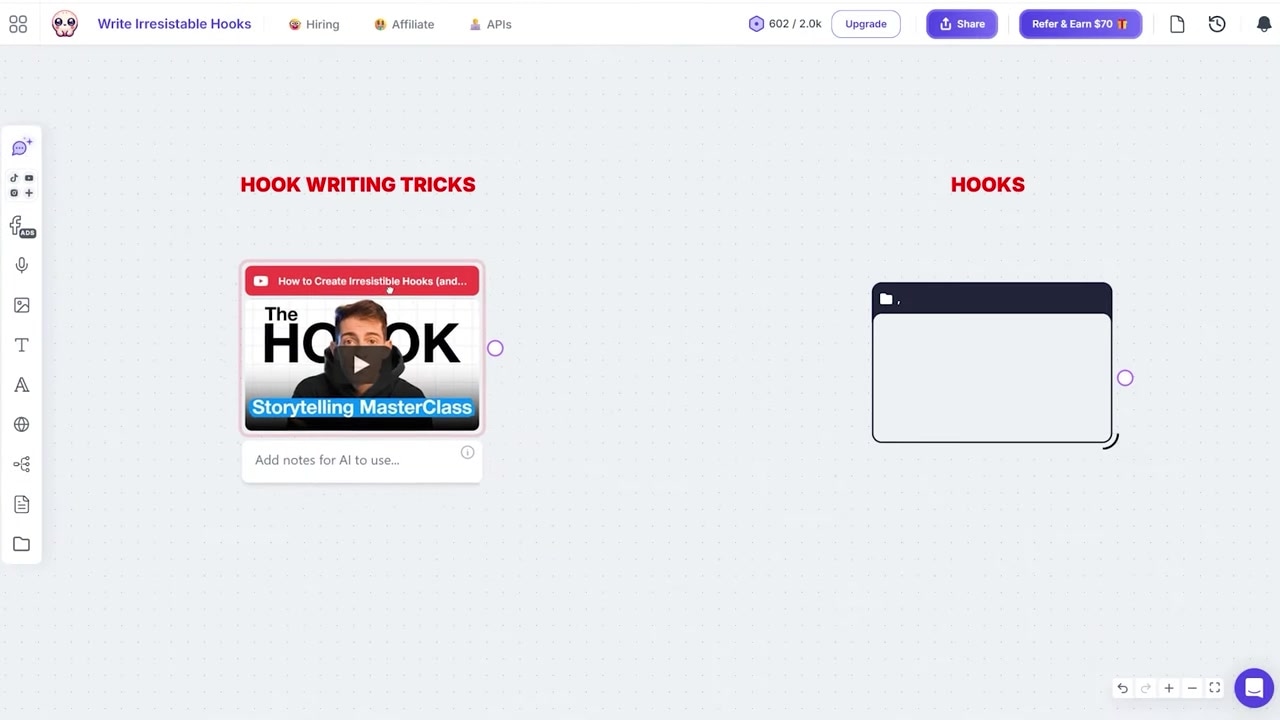
Caption: Dragging Kallaway's YouTube video link directly onto the visual whiteboard to extract its transcript and structural insights.
In a split second, Poppy AI transcribes and digests the entire video, instantly understanding the Context Lean, Scroll Stop, and Contrarian Snapback structure.
Step 2: Connect Your Source and Generate Hooks
Now we want the AI to write a hook based specifically on that masterclass.
Open the AI chat window on the right side of the whiteboard workspace. To make the AI read our imported video, simply click and draw a visual connection line from the video card directly to the chat interface.
Now that the two are connected, any prompts you type will be grounded entirely in that specific video.
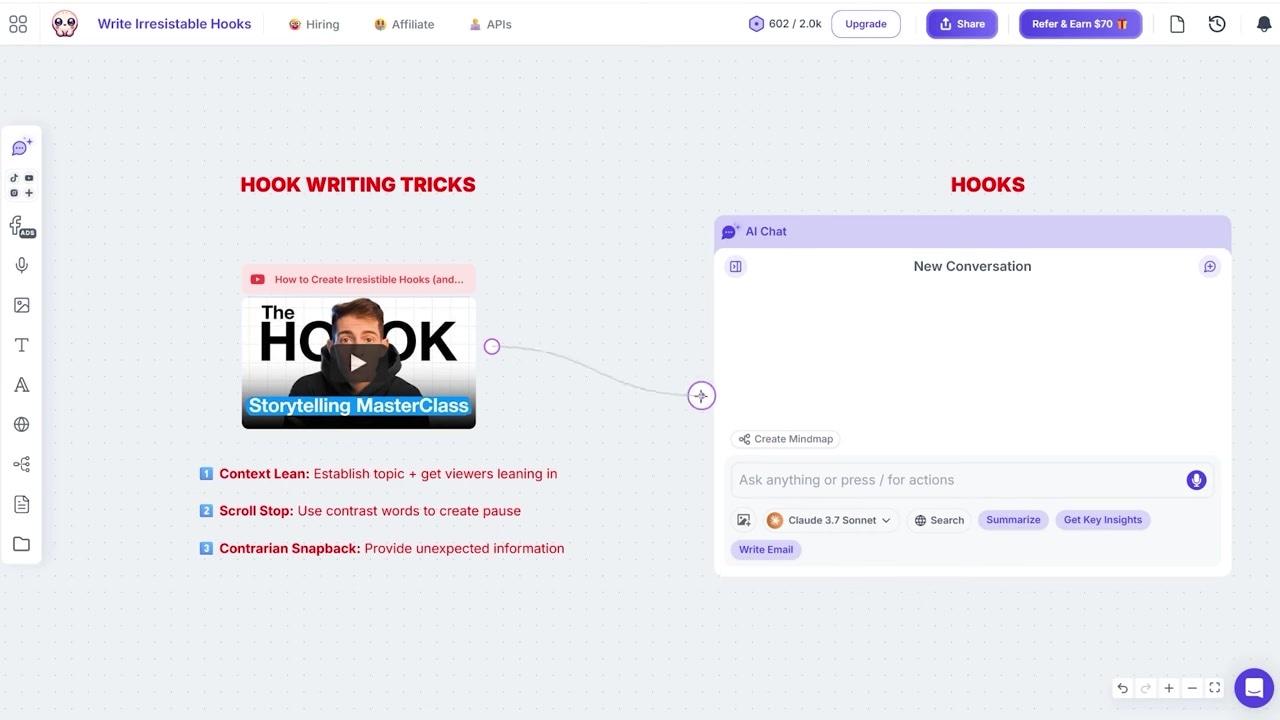
Caption: Connecting the masterclass video card to the chat window to instruct the AI to use its exact 3-step formula.
I tested this by asking the AI to write an opening hook for a hypothetical video about why Lamborghinis are the best supercars in the world, explicitly instructing it to use the three-step process and break down how it applied each step.
Here is the result Poppy AI generated:
- Context Lean: "Lamborghinis are engineering marvels that can reach 0 to 60 in just 2.8 seconds, making them some of the fastest production cars ever built."
- Scroll Stop: "But here's the thing: their legendary speed isn't actually what makes them the best cars in the world."
- Contrarian Snapback: "Because what truly separates Lamborghinis from every other supercar is something most people never even consider."
The AI successfully learned a complex copywriting masterclass and executed it flawlessly in seconds.
Step 3: Scale Your Strategy with Niche Groups
A great hook doesn't just need psychological structure; it needs highly accurate, niche-specific facts to draw the viewer in. Poppy AI’s secret weapon is its ability to organize and combine multiple sources of information using its Group tool.
For a gaming channel, I imported three top YouTube reviews evaluating the upcoming Nintendo Switch 2.
Because three different videos can make your whiteboard look cluttered, I clicked the "Group" button on the lower menu, created a visual box, dragged all three videos inside it, and named it "Gaming Videos."
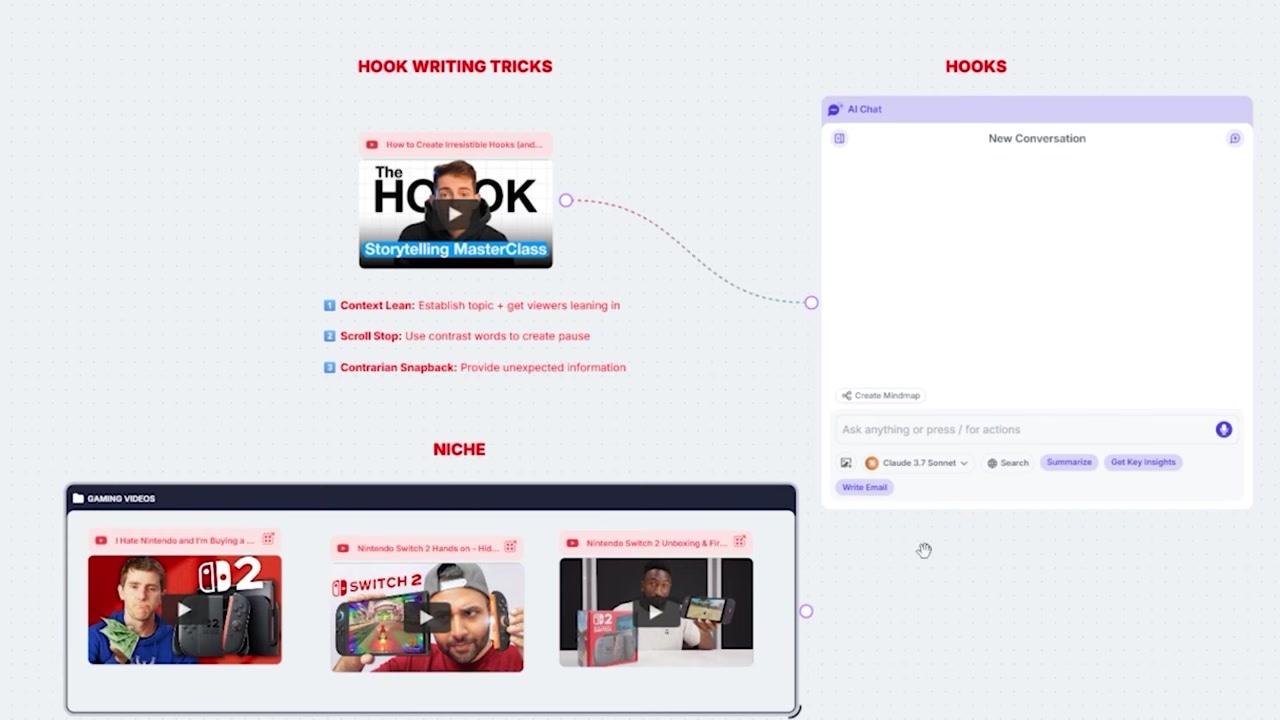
Caption: Organizing multiple YouTube videos into a single visual group called "Gaming Videos" on the workspace canvas.
By connecting just this single group card and our "Irresistible Hooks" masterclass video to the chat box, we can command the AI to cross-reference both sources.
I prompted the AI to write a hook about the Nintendo Switch 2 using the three-part process, drawing its technical data directly from our "Gaming Videos" group.
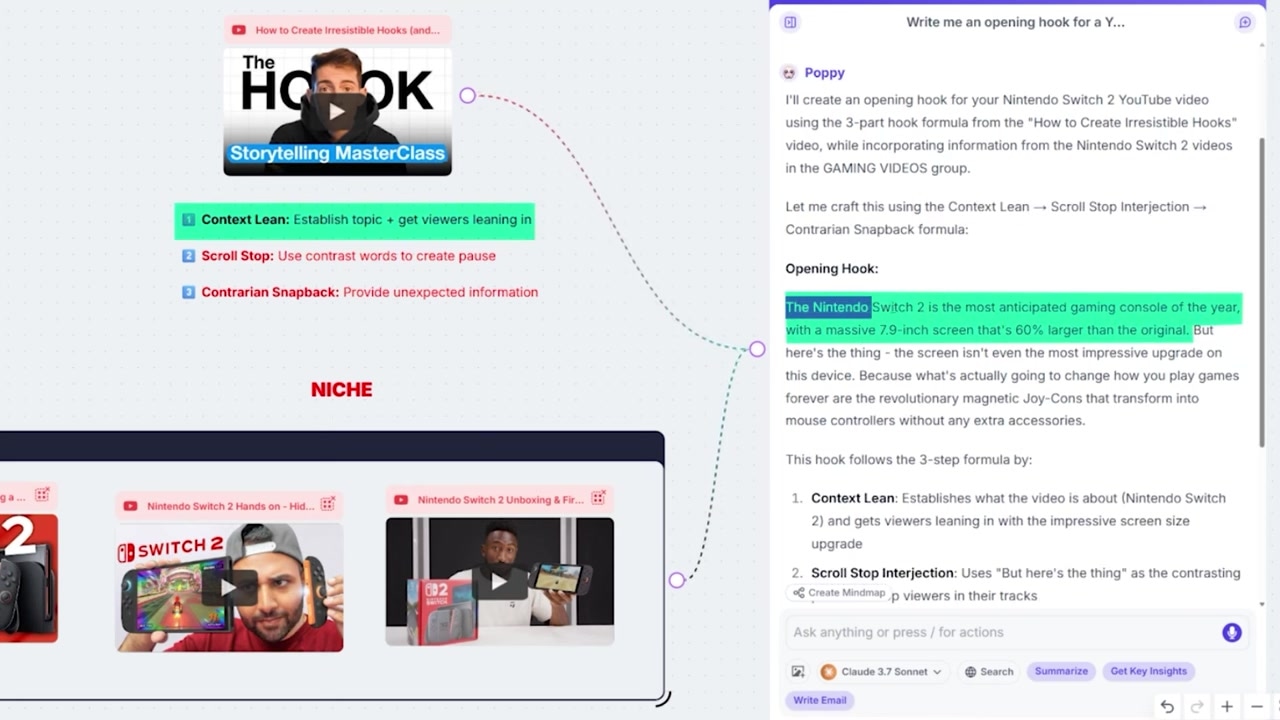
Caption: The generated Nintendo Switch 2 hook utilizing exact, verified details extracted from the linked niche videos.
The resulting hook was incredibly specific:
- Context Lean: "The Nintendo Switch 2 is the most anticipated gaming console of the year, with a massive 7.9-inch screen that's 60% larger than the original." (This technical detail was pulled straight from the niche videos in the group).
- Scroll Stop: "But here's the thing: the screen isn't even the most impressive upgrade on this device."
- Contrarian Snapback: "Because what's actually going to change how you play games forever are the revolutionary magnetic Joy-Cons that transform into mouse controllers..."
Testing a Different Niche
To prove how flexible this visual ai content system is, I swapped out the "Gaming Videos" group for a "Gardening Videos" group containing tips on beginner vegetable gardening.
Using the exact same prompt structure, Poppy AI instantly adapted and spit out a highly engaging gardening hook:
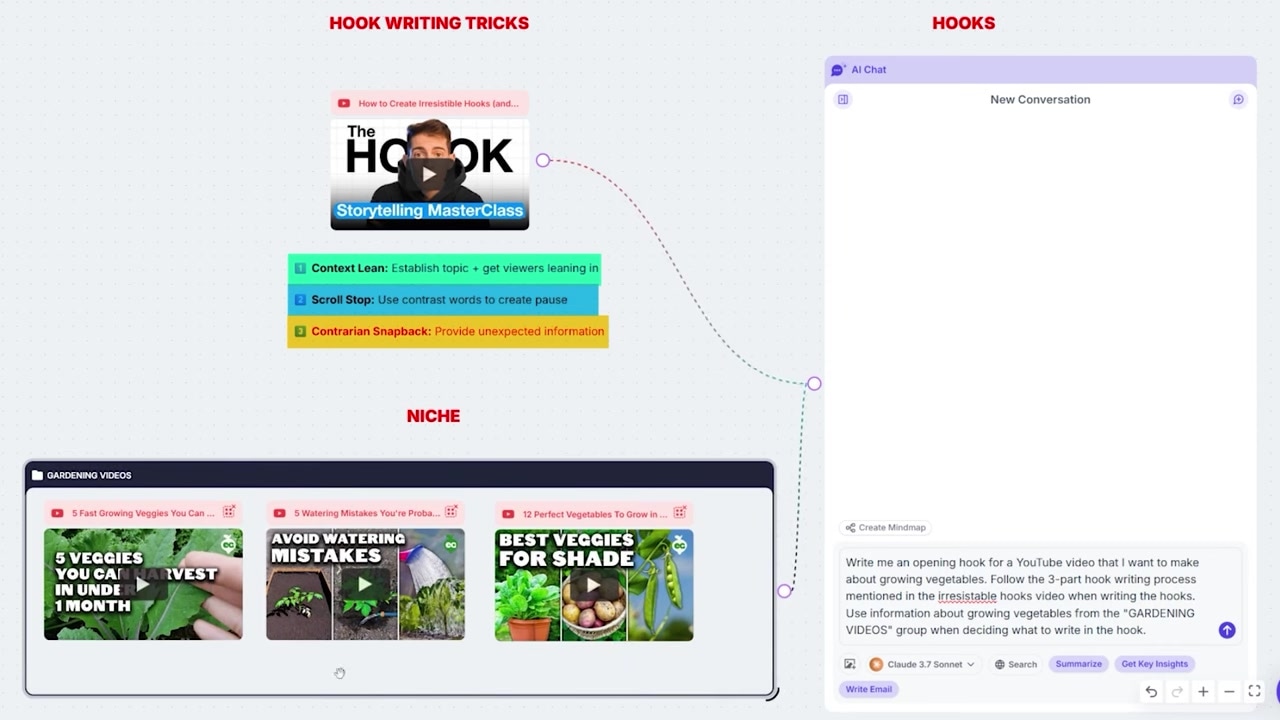
Caption: Swapping the gaming group for a "Gardening Videos" group to instantly write hooks for growing vegetables.
- Context Lean: "The biggest mistake new gardeners make isn't choosing the wrong plants; it's waiting too long to start growing."
- Scroll Stop: "But here's the thing: you don't need months of perfect weather to get an amazing harvest."
- Contrarian Snapback: "Because these five incredible vegetables can go from seed to your plate in less than 30 days, even if you only have a shady spot with minimal sunlight."
Step 4: Diagnose Your Failing Content
If you have a video that is underperforming, the problem is almost certainly your opening hook. In my own analytics, I looked at a recent low-performing video where only 40% of viewers were still watching after the first 30 seconds.
Instead of guessing what went wrong, you can use Poppy AI as a highly precise hook diagnostics tool.
I dragged my failing video’s transcript card onto the canvas and linked it to the chat window alongside our expert hook-writing video.
I prompted the AI: "Using the expert hook writing tips shared in the 'Irresistible Hooks' video, teach me why my hook failed and write me an improved hook."
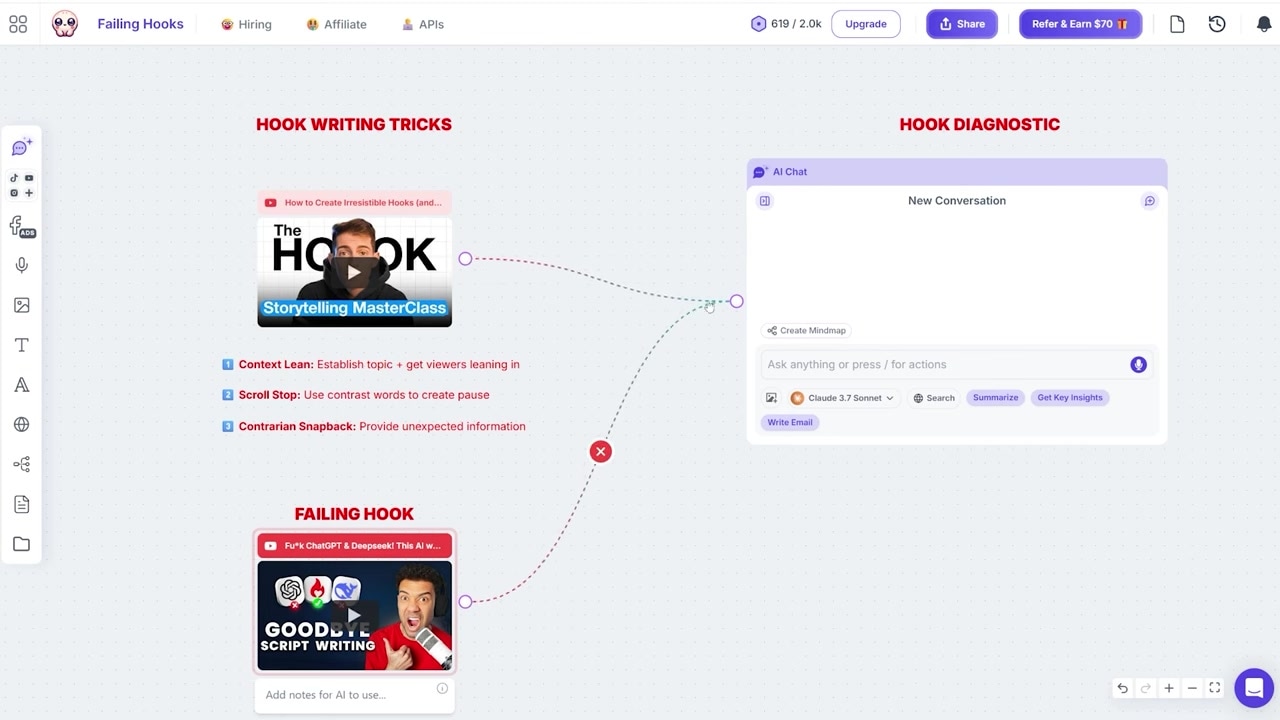
Caption: Feeding a low-performing video's script into Poppy AI alongside the expert masterclass video to diagnose why it failed.
The AI analyzed my script and pointed out exactly why it failed:
- The initial "lean-in" was incredibly weak.
- It completely lacked a scroll-stopping interjection to interrupt pattern recognition.
- There was no contrarian snapback to hook curiosity.
It then provided a fully re-engineered hook structure that immediately solved those friction points.
Poppy AI Pricing and Value: Is It Worth It?
Poppy AI bills annually rather than monthly, and also sells a one-off Lifetime Access plan. It no longer publishes prices publicly, so check the current cost on their site before you buy.
While this is slightly more expensive than standard solo AI platforms like ChatGPT Pro or Google Gemini Pro (which typically hover around $20 per month), the time saved and the visual, multi-source functionality make it well worth the slight premium for serious content creators.
| Feature | Poppy AI | ChatGPT / Gemini |
|---|---|---|
| Interface | Infinite Visual Whiteboard | Linear Chat History |
| Multimodal Inputs | Yes (Video, Audio, PDFs, Web links) | Limited (Linear uploads) |
| Source Grouping | Visual folders & Drag-and-drop linking | None |
| Collaborative Space | Multiplayer / Real-time | Solo-focused |
Think of the annual pricing as a one-year commitment to your content creation business. Consistency is the only true way to scale a channel—and if you get just one video that goes viral (for example, one of my recent videos reached 400,000 views and generated close to £2,000 in Adsense), it easily dwarfs the annual cost of the software.
Plus, Poppy AI offers a free 30-day refund window, allowing you to test out the visual workspace completely risk-free.
Try it here: Try Poppy AI →
Frequently Asked Questions
What AI models run inside Poppy AI?
Poppy AI integrates both advanced ChatGPT (GPT) and Claude AI models. This allows you to leverage the specific structural or creative writing strengths of both models inside a single visual whiteboard workspace.
What types of files can I drop onto the canvas?
You can import a wide variety of content media, including YouTube URLs, Instagram and TikTok links, PDFs, documents, audio files, voice notes, and images. Poppy AI will automatically transcribe and index these files so you can chat with them.
Is there a monthly subscription plan available?
No monthly plan is offered. Poppy AI bills annually, and also sells a one-off Lifetime Access plan. Prices are not published publicly, so check the current cost on their site. Every plan carries a 30-day money-back guarantee, so you can test it risk-free.