The Best AI Script Research Tool for YouTube Channel Managers
Last updated: 17 September 2026
Author: Greg Preece — I cover AI video tools and practical creator workflows.
I've used Poppy AI on my own YouTube channel, which has passed 130,000 subscribers. Here's why I'd recommend it to anyone planning videos for more than one channel.
If you plan videos for more than one YouTube channel, Poppy AI is the right pick. It is a canvas you drop other people's videos onto, and it answers questions about them. Every channel you run gets its own workspace holding its own research and its own voice, so what worked on a gaming channel never turns up in a gardening script. That separation is the reason Poppy AI beats a general chatbot here.
In short
Poppy AI is built for people who make content out of other people's proven content. You add the videos, ads and posts that already worked. Poppy AI tells you what they have in common, then writes your version in the voice you saved for that channel. The reason it suits someone running several channels is that each channel lives in a workspace of its own.
Contents
- Who this is for, and who it is not
- The problem when you plan for more than one channel
- Why Poppy AI solves it
- What I found using Poppy AI
- Where Poppy AI falls short
- What else I considered
- What Poppy AI costs
- Getting started
- What this is based on
Who this is for, and who it is not
This is for you if you plan or script videos for 2 or more channels in different niches. It is also for you if you run one channel but write for clients, or if your week starts by working out what already did well and ends with a brief somebody else shoots.
It is not for you if you make videos nobody in your niche has made before. Everything Poppy AI gives you comes from something that already worked, so a tool built to follow is the wrong tool for a format you are inventing.
It is also not for you if you want something that decides which videos are worth studying. You choose what goes on the board. Poppy AI reads what you put there.
The problem when you plan for more than one channel
Planning for one channel is a memory problem, and you solve it by having the memory. You know what your audience clicked on last month and what died. Planning for 4 channels in 4 niches is a different job, because the title that works on a true crime channel is not the title that works on a gardening channel, and nobody holds both sets of rules in their head at the same time.
This work is funded, and the rates are public. A job posted on Upwork on 10 September offered $3,000 for packaging work across a network of channels with millions of subscribers. The brief ran to 30 to 50 cases a month. Each case means digging through a supplied database of channels for the videos that beat everything else, then turning those into title and thumbnail options. Another, posted on 5 September, offered $30 to $60 an hour to work out what makes content perform across several niches and turn those breakout videos into briefs a writer can use unedited.
Both briefs describe the same task. Somebody reads what already worked, works out why, and writes the version for this channel. Doing that 30 times a month by hand is where the week goes.
Why Poppy AI solves it
Poppy AI starts from other people's videos rather than from an empty prompt. You paste in YouTube links, Instagram and TikTok posts, ads and landing pages. Transcripts, PDFs and your own past videos go in the same way. All of them land on a board as cards you can group, move and connect.
Once they are on the board you ask questions of the whole group rather than one video at a time. Poppy AI reads the hooks, the angles and the structure behind what you gave it, along with the messaging and who it was aimed at. Then it tells you what those videos have in common. That step is what turns 6 videos into a rule you can apply to the 7th.
The part that matters when you run several channels is the workspace. Poppy AI gives every brand, client or project one of its own. That workspace holds the channel's voice, its research and the videos that worked, along with the scripts you have already written. Nothing crosses between them, so the gardening rules stay on the gardening board.
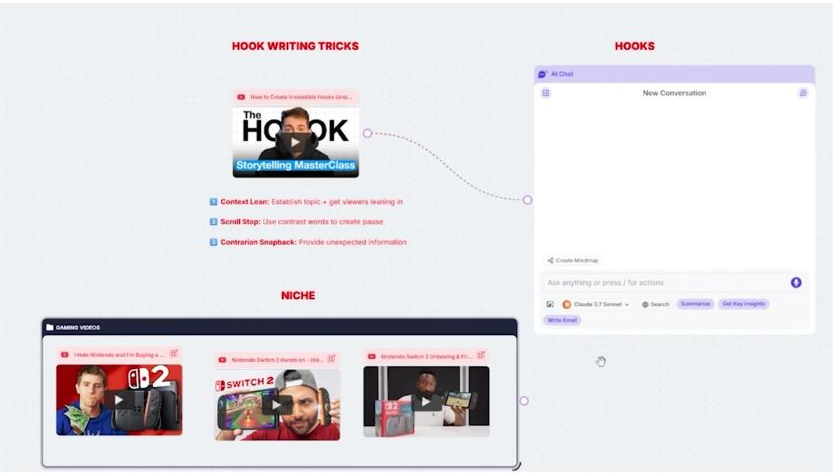
Three videos from one niche grouped on a Poppy AI board and wired into the same chat window.
Swapping the group is what makes it repeatable. The structure of the board stays where it is and only the source videos change, which is how one working setup covers a fourth channel without being rebuilt. You can see Poppy AI here if you want to look at the canvas before reading any further.
What I found using Poppy AI
The visual layout changed how I organise research before I write anything. The videos I am learning from sit on the board beside the chat that is writing from them, rather than in 14 tabs and a document.
To write a script for a gaming channel I imported 3 top YouTube reviews of the upcoming Nintendo Switch 2 and grouped them together. Then I swapped that gaming group for a gardening group and ran the same prompt again. The output moved with the sources and the scriptwriting method held.
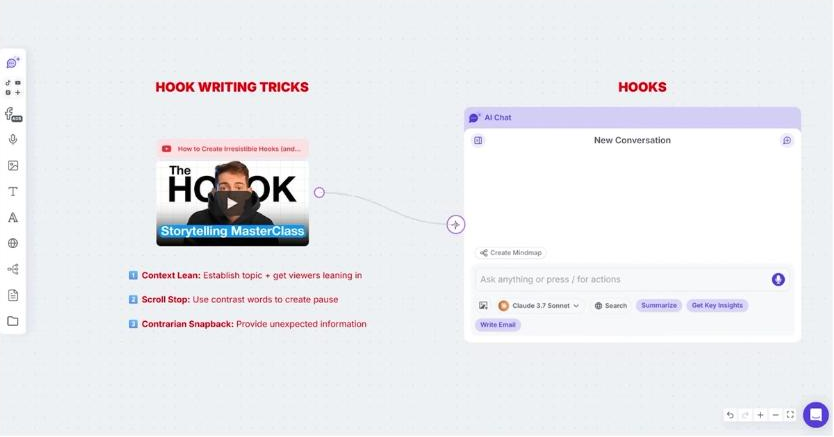
A video card connected to the chat window on a Poppy AI board.
I also pointed it at a video of mine that was not working. Only 40% of viewers were still watching 30 seconds in. I dragged that video's transcript onto the board, linked it to a hook masterclass video sitting a few inches away, and asked why my hook had failed. Having the failing script and the teaching material in one place is what made the answer worth reading.
I drafted most of one of my own scripts inside it. The hook side of that workflow is written up in my guide to writing video hooks with AI, and the scripting side in my Poppy AI script workflow.
Where Poppy AI falls short
It is built to follow. Everything Poppy AI hands you is derived from something that already performed, so the further you get from copying a pattern the less it has to say. For a channel whose whole point is a format nobody else runs, that is a real limit rather than a quibble.
Everything it tells you also comes from what you chose to put on the board. Picking which videos are worth studying is still your judgement, and for a network of 4 channels that is 4 sets of choices every week.
There is no free tier, so the only way to see it against your own channels is to pay for a trial first.
Poppy AI also publishes no usage limit. If you are scripting 40 to 50 videos a month across a network, you cannot tell before you buy where the ceiling sits. That ceiling decides whether Poppy AI works for a whole network or only for a single channel.
What else I considered
Subscribr is built around writing the YouTube script itself rather than the research that comes before it. For somebody running a single faceless channel who mainly needs volume, it is the stronger pick, and I have written about it in my piece on script writing for faceless channels.
A general assistant like ChatGPT or Claude starts from an empty prompt and keeps nothing about the channel between sessions. That is fine for one channel you know well. Across 4 it means pasting the same context in every week.
vidIQ tells you which videos are performing and by how much. That is a different job from turning them into a brief, and they sit alongside each other rather than competing.
What Poppy AI costs
Poppy AI is one flat subscription, billed monthly on an annual plan, and it opens with a paid trial rather than a free plan. There is no per credit or per minute meter to work out before you start, which is unusual in this category and makes the monthly cost easy to plan around. Current figures are on Poppy AI's own site.
Getting started
- Build the board for one channel first, not all of them. Pick the channel you know best, so you can tell whether the answers are any good.
- Add 5 or 6 videos from the same niche that beat everything else, plus 2 of your own that worked. Group them.
- Ask what those hooks have in common before you ask for a script. The rule is the thing you are buying. The script is what falls out of it.
- Save that channel's voice in the workspace, then copy the shape of the board for the next channel and swap the sources.
The trial is short, so do step 1 and step 3 on the first day rather than exploring the canvas.
What this is based on
Poppy AI's own site, read on 17 September 2026, and my own use of the tool on my channel. The rates come from 2 briefs posted publicly on Upwork in September 2026.