The Best AI Script Writer for Faceless YouTube Channels
Last updated: 3 September 2026
Author: Greg Preece — I cover AI video tools and practical creator workflows.
I have made video for a living for 10 years and I run a YouTube channel with over 130,000 subscribers. I have written scripts with Subscribr for my own videos, and this is why I would hand it to someone running a faceless channel at volume.
If you run a faceless channel and the thing slowing you down is writing 10 or more scripts a month, Subscribr is the right choice. It only does YouTube, it learns how your channel sounds by reading what you have already published, and it puts a hook and a set of payoff beats into the draft before you read a word of it.
That last part is what decides it. A faceless video has no face to carry it. Nobody is watching for you, so the script is the only thing holding a viewer in place. Ask a general AI assistant for a script and you get a tidy essay with nothing to hold on to.
In short
- Best for people running one or more [faceless](/articles/best-ai-script-research-tool-for-youtube-channel-managers) channels who need new scripts every week.
- It connects to your channel and writes in the voice of what you already publish.
- It makes you pick a hook and your payoff beats before it drafts anything.
- You can point it at another YouTube video and make it study that first.
- It gets you most of the way there. The last stretch is still your job.
- The free plan gives you ideas and research but will not write you a script.
On this page
- Who Subscribr is for
- The problem with running a faceless channel
- Why Subscribr solves it
- What I found using Subscribr
- Where Subscribr falls short
- What else I considered
- What Subscribr costs
- Getting started
- Method and freshness
Who Subscribr is for
This is for you if:
- You publish faceless videos on a schedule and the writing is what holds you up.
- You already pay an editor, or you are about to.
- You run more than one channel and each needs to sound like itself.
- You care whether the script holds a viewer, not just whether it reads well.
This is not for you if:
- You publish once a month. A scripting tool for 12 scripts a year is a bad trade.
- You write your own scripts and like doing it. This will feel like being managed.
- Your videos are not on YouTube. It is built for one platform and does not pretend otherwise.
- You want to publish whatever it hands you. That is not what comes back.
The problem with running a faceless channel
Look at what this work costs when you buy it in.
In the two weeks to 28 August 2026, a faceless documentary channel posted a job on Upwork for an editor to turn scripts and voiceover into 10 to 20 minute videos, 10 to 30 of them a month, at 15 to 70 dollars a video. Another channel operator was paying 12 dollars a video for a finishing pass on drafts a tool had already built, at roughly 3 videos a day. A third posted 3,000 dollars to have someone build a pipeline that takes a topic, writes a scene-by-scene script, narrates it and pulls matching footage.
Put those together and one thing stands out. The editing has a price and people are paying it. The scripts do not appear in any of those jobs, because the person running the channel writes them.
So the bottleneck moves. You can buy the edit. You cannot buy your way out of 10 scripts a month without hiring a writer who costs more than the editor and still does not know your channel.
Why Subscribr solves it
It learns your voice from your own channel. You connect your YouTube channel and it reads what you have already published, so the draft comes back sounding like the videos people subscribed for. A general assistant cannot do this. It has never seen your channel.
It writes to a structure rather than to a word count. The draft goes through a 12-step pass before it reaches you. Research, hook options, retention, then a pass that works on the tone and checks it against your voice. You choose the hook and the payoff beats yourself, so the shape of the video is your decision and the words are its job.
Faceless is a first-class option here, not a workaround. Subscribr will take a finished script and render the video from your own recording, from an AI avatar, or with no camera at all, across 14 visual styles. The whole line runs from an idea, through packaging and script, to a finished upload and a board that tracks where each video is.
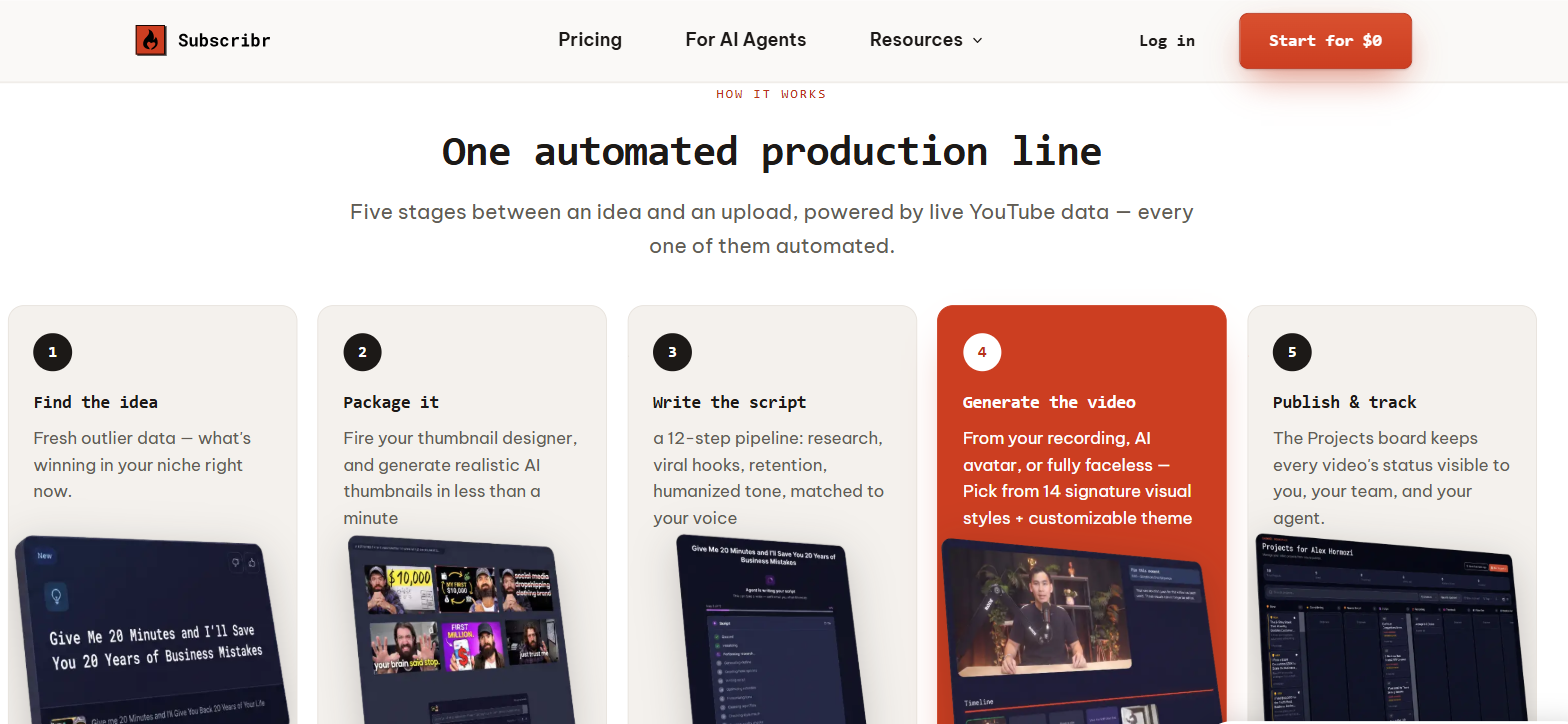
Subscribr's own home page, captured 7 September 2026, showing the five stages it runs between an idea and an upload.
It knows what is working before you pick a topic. The ideas come out of outlier data, meaning videos beating their own channel by several times over, pulled from a library of more than 35 million videos. You are choosing from what is landing in your niche this week rather than guessing.
What I found using Subscribr
It gets me about 80% of the way to the finish line. That is the honest number and it is the one worth planning around. It kills the blank page, it maps out the structure, and it pulls the research together. Then I go in and add my own stories, fix the pacing, and polish the last lines so they are actually camera-ready.
Pointing it at another video is the feature I use most. In the research step you can hand it a web search, a link, your own pasted notes, or another YouTube video to study before it drafts. Feeding it a video that already worked in your niche does more for the output than any amount of prompt writing.
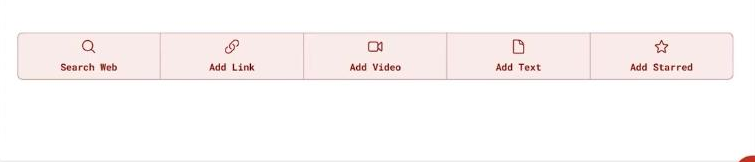
The research step, where a script can be built from a web search, a link, another YouTube video, pasted text or a starred source.
Choosing the payoffs is where the retention comes from. The hook stops someone leaving in the first 30 seconds. The payoffs are the small rewards you scatter through the rest so they keep watching. For a 10 minute video I would pick 2 or 3 and no more. Any more than that and the video starts to feel like a list.
The full walkthrough is in my own tutorial. If you want the click-by-click version, I wrote it up in how I set Subscribr up and write a script with it.
One thing to be straight about. My hands-on time is with the scripting. The thumbnail studio, the video rendering and the connection into Claude and ChatGPT have all arrived since I used it, and I have not tested any of them. Everything I say about those comes from Subscribr's own pages.
Where Subscribr falls short
The free plan will not write you a script. You get ideas and you get research, and then you stop. Scripting sits behind a paid plan, so there is no way to judge the actual output before you pay. That is the single biggest thing I would want to know before signing up.
Scripts and finished videos are two separate budgets. Subscribr meters them apart from each other, and a finished video costs more or less depending on how long it is and how much of it is generated. If you plan around the scripts and then start rendering video, the second number will surprise you.
The last 20% is real work. Anyone selling you a script tool as a way to stop writing is selling you something else. You still read every line, and on a faceless video, where the words are all you have, you should.
It only does YouTube. That is why it is good. It is also why it is no help if half your output is TikTok-native or ad scripts.
I cannot point you at a complaint pattern. People using it are not saying much in public that I can find, either way, so everything above comes from the product's own limits and from my own use rather than from other people's experience. Treat that as a gap in this page rather than as a clean bill of health.
What else I considered
Claude or ChatGPT will write you a script and it will be competent. What it will not do is know which of your videos overperformed, or how you sound. You end up re-explaining your channel at the start of every session. If you are writing one script a month, that is a fine trade and you should not buy anything.
Poppy AI is the other YouTube scripting tool I have written about, and I covered it in my walkthrough of the Poppy AI scripting workflow. I have not run the two against the same brief and I am not going to rank them on that basis.
Hiring a writer is the option nobody costs properly. A writer who learns your channel is genuinely better than any of this. A writer who has not is worse than the tool, and you pay either way.
What Subscribr costs
Subscribr meters two things separately. Script credits cover the writing. Video credits cover a finished render, and what one video costs depends on its length and how much of it is generated rather than filmed, with the exact number shown before anything renders. Thumbnails come with a monthly allowance of their own.
The useful thing to work out before you subscribe is not the monthly figure. It is how many scripts a month you actually publish, because that is the number the plans are sized around. Current figures are on Subscribr's own pricing page.
Getting started
- Connect the channel first, before you write anything. Everything downstream depends on it having read your uploads.
- Ask for one script on a topic you already know well. You need to be able to tell whether the research is right, and you cannot do that on a topic you are learning.
- Feed it a video that already worked in your niche at the research step. Compare that draft against one written from a web search. The difference is the whole argument for the tool.
- Time yourself finishing it. If the polish takes you longer than writing from scratch, stop. If it does not, you have your answer. You can start at Subscribr and get to that test in an afternoon.
Method and freshness
The first-hand parts of this page come from my own scripts, written when Subscribr was a scripting tool and nothing else, and linked above. I have not tested the thumbnail studio, the video rendering or the agent connection, and nothing above should be read as though I had. I have not run Subscribr and Poppy AI against the same brief.