AI YouTube Script Writer: How I Write Viral Videos in Seconds
Last updated: July 2026
Author: Greg Preece — I test AI video tools hands-on to help creators streamline their production workflow and grow their YouTube channels fast.
Growing a YouTube channel in 2026 is harder than ever. With professional creators and celebrities pouring millions into their content, the competition for viewers' attention is fierce. This hands-on guide details how I use a visual AI YouTube script writer to model successful channels, keep viewer retention high, and generate professional-grade scripts in seconds.
TL;DR: The Quick Verdict
- The Tool: Poppy AI is a visual, whiteboard-style canvas that integrates powerful AI models to organize research and build YouTube scripts.
- The Method: The S.I.G Method (Style, Information, Gurus) allows you to train the AI on specific channel styles, research data, and retention psychology.
- The Result: Professional, structured scripts that capture authentic human pacing and skip the robotic output of traditional AI chatbots.
Prefer to watch? Here's the video. Prefer to skim? The full breakdown is below.
Try it here: Try Poppy AI →
Table of Contents
- Why Generic AI Script Writers Fail
- What Is Poppy AI?
- Step-by-Step: How to Use Poppy AI’s Whiteboard Interface
- The S.I.G Method: How I Write Viral Scripts in Seconds
- The Results: Reviewing a Generated Script
- Is Poppy AI Worth the Price?
- Frequently Asked Questions
Why Generic AI Script Writers Fail
If you have tried using standard text-based AI tools like ChatGPT or DeepSeek to write your video outlines, you have likely run into the same major roadblock: the scripts sound generic, robotic, and completely artificial.
Writing a successful YouTube script is a highly specialized skill. It takes years to learn how to hook a viewer instantly and structure a video so that audience retention stays high. When you feed a basic prompt into a generic chatbot, it doesn’t understand your voice, your specific niche’s style, or the nuance of modern video pacing. Your videos struggle to maintain watch time, and the YouTube algorithm stops pushing them.
To get ahead of the competition, you need an AI writer that has professional [scriptwriting](/articles/best-ai-script-writer-for-faceless-youtube-channels) expertise built directly into its workflow.
What Is Poppy AI?
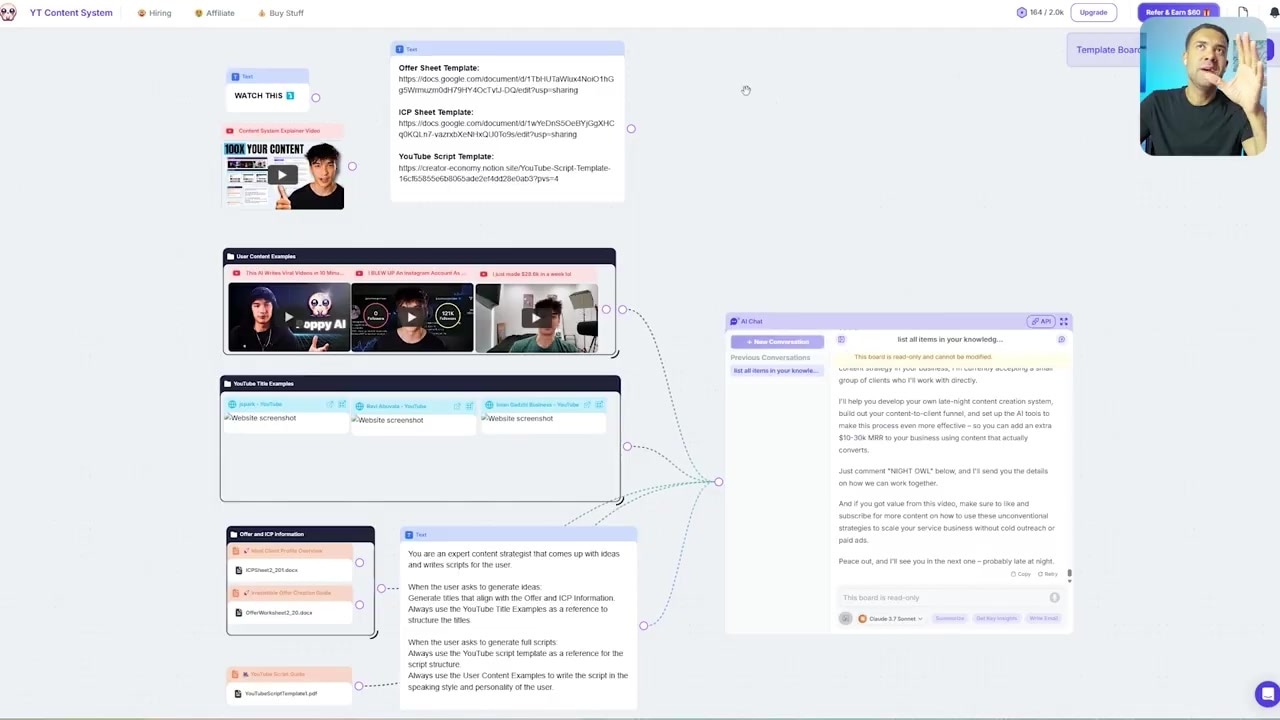
Caption: Poppy AI replaces traditional text-input chat threads with a highly collaborative, visual canvas environment.
Poppy AI is a visual AI workspace designed specifically for content creators, founders, and marketers. Unlike the standard linear chat interfaces of ChatGPT, Poppy AI functions like an interactive whiteboard.
Instead of typing long, complex prompts to explain your topic, you build custom "content boards." This allows you to drag, drop, and connect different information sources—such as competitor YouTube videos, TikToks, Instagram posts, images, documents, and web links—to create a unified context brain.
The AI then uses this tailored information pool to generate highly accurate, conversational scripts modeled after real-world data rather than AI-generalized knowledge.
Step-by-Step: How to Use Poppy AI’s Whiteboard Interface
When I first started using Poppy AI, the visual interface completely changed how I organized my pre-production research. Here is how simple it is to set up a visual board:
- Add a Title Text Box: Open your visual canvas, drag in a text box, and label your project (for example, "AI Video Editing Apps").
- Import Competitor Content: Go to YouTube, find popular videos covering your topic, copy their links, and hit
Ctrl+Von the whiteboard to paste them directly into your workspace. - Let the AI Analyze: Once imported, Poppy AI looks inside those videos and retrieves information instantly.
- Interact via the Canvas Chat: Open the built-in chat box and connect it directly to your visual elements. You can query your sources instantly with prompts like: "What are the AI apps mentioned in these five connected videos? Give me a bullet point list."
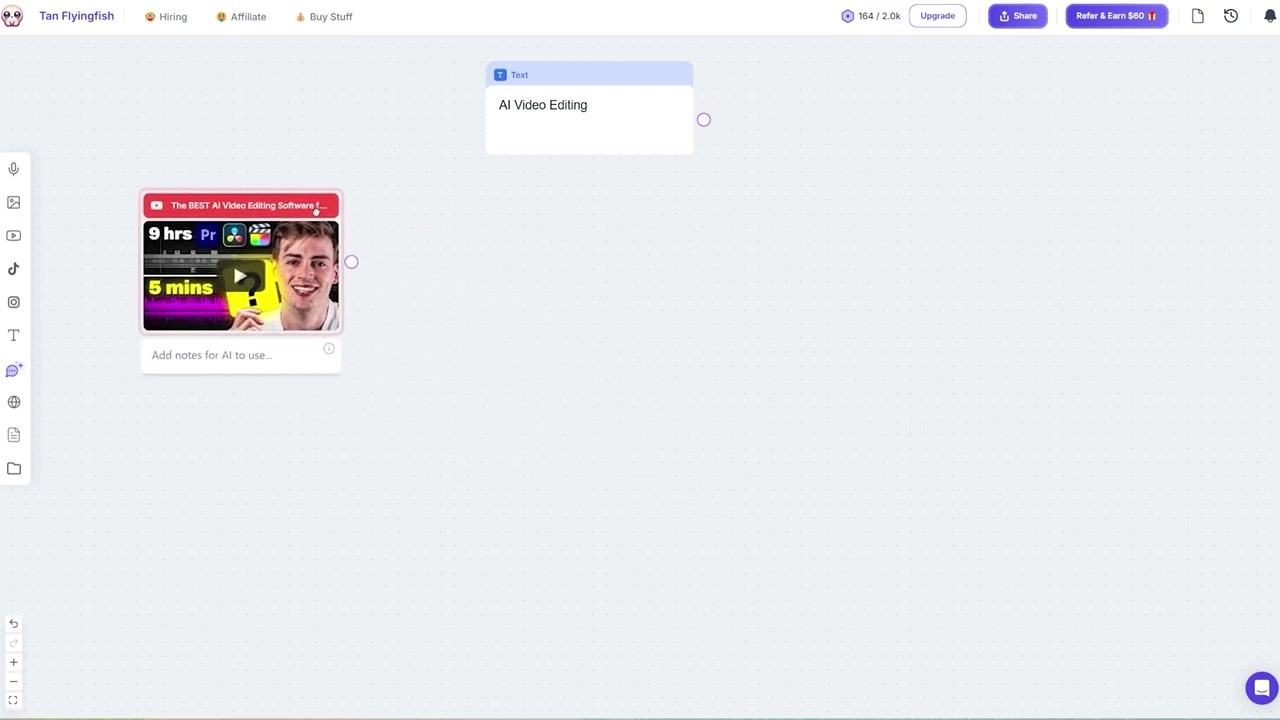
Caption: You can paste YouTube links directly onto the canvas to instantly pull video context into your scripting workspace.
Instead of spending hours manually taking notes and parsing through competitor uploads, you can extract the exact data you need in seconds.
The S.I.G Method: How I Write Viral Scripts in Seconds
To truly tap into professional scriptwriting expertise and make your videos perform better than 99% of your competitors, I developed a simple 3-step framework inside Poppy AI called the S.I.G Method.
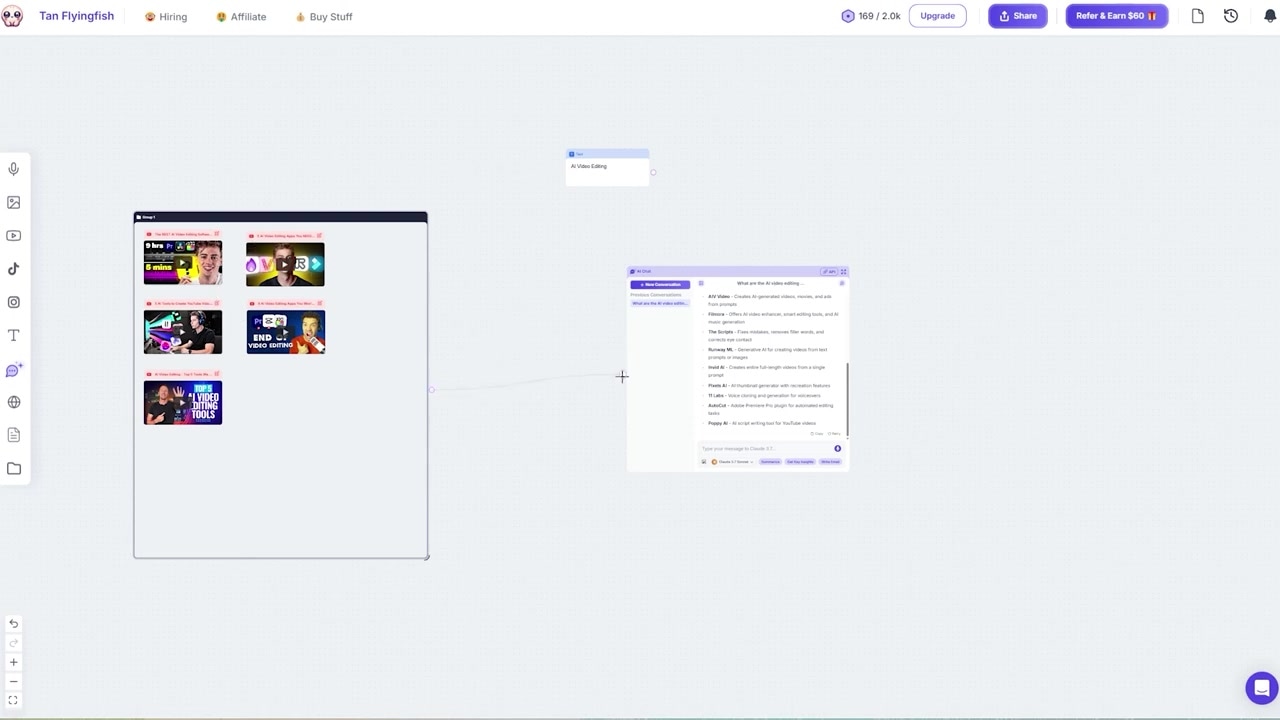
Caption: Connecting your grouped video resources directly to the canvas chat box feeds real-time context to the AI model.
The S.I.G Method stands for Style, Information, and Gurus. By setting up three separate visual groups on your whiteboard, you can synthesize high-performance scripts every single time.
Step 1: S — Style Group
Your script needs to sound like a successful creator, not a corporate robot.
- Create a group box on your canvas and name it "Style Group."
- Find a top-performing creator in your niche who knows how to keep viewers hooked. For my tech script, I used Marques Brownlee (MKBHD).
- Paste 5 to 6 of their most recent video links directly into this group. Poppy AI will analyze their exact pacing, hook structures, and vocabulary.
Step 2: I — Information Group
This group contains the exact factual research and topic ideas for your upcoming video.
- Create a second group box named "Information Group."
- Import the top 5 high-ranking competitor videos on your selected topic (e.g., AI video editing).
- This gives the AI the raw material, feature lists, and bullet points it needs to write an accurate script without "hallucinating" or inventing facts.
Step 3: G — Guru Group
Instead of paying a professional consultant thousands of dollars, you can feed proven scriptwriting theory directly into your workspace.
- Create a third group box named "Scriptwriting Gurus."
- Search YouTube for the absolute best tutorials on "YouTube script writing" and paste those links into this group.
- This forces the AI to construct your script around current retention psychology, high-converting calls-to-action (CTAs), and optimized hook frameworks.
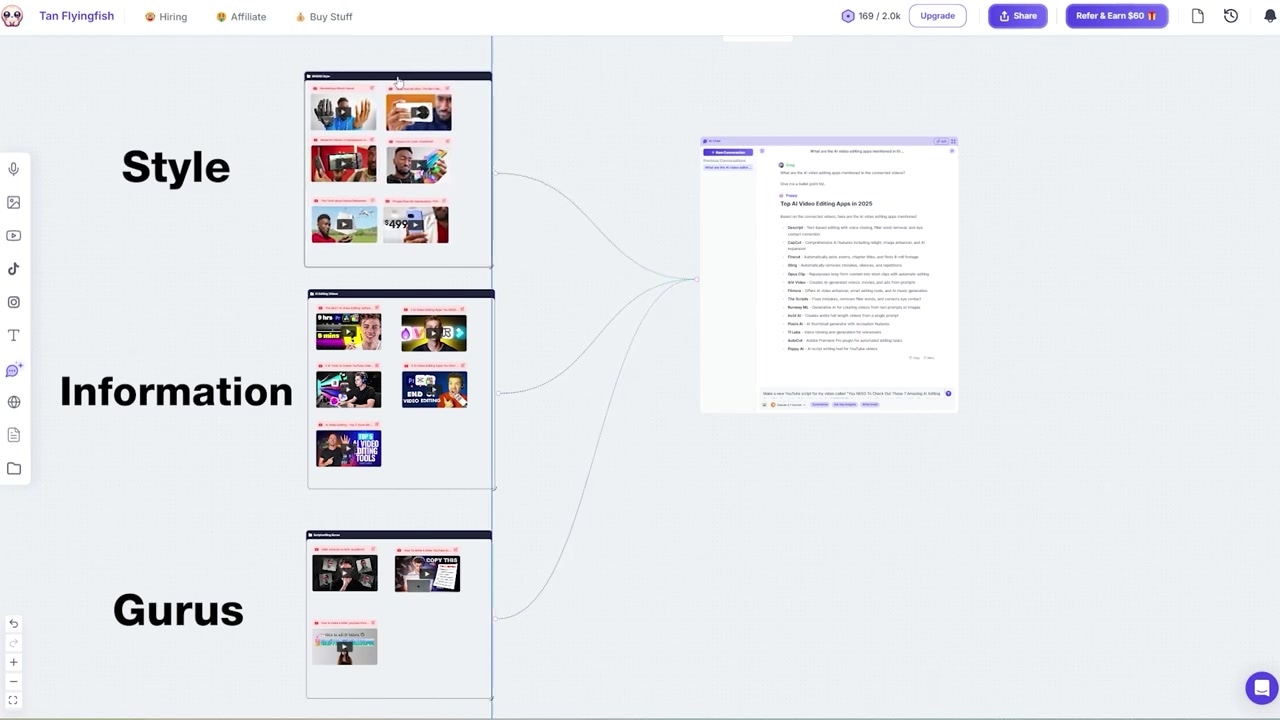
Caption: The completed S.I.G method layout features three distinct groups: Style, Information, and Gurus all connected to one chat interface.
The Results: Reviewing a Generated Script
Once your three visual groups are organized on the canvas, connect them all to the whiteboard chat box and input your master prompt.
The Master Prompt:
"Make a new YouTube script for my video called [INSERT YOUR TITLE] in the style of the videos in my Style group. Use the scriptwriting advice from the videos in the Scriptwriting Gurus group on the script that you write for me. For my video topic, use the information contained in the videos in the Information group."
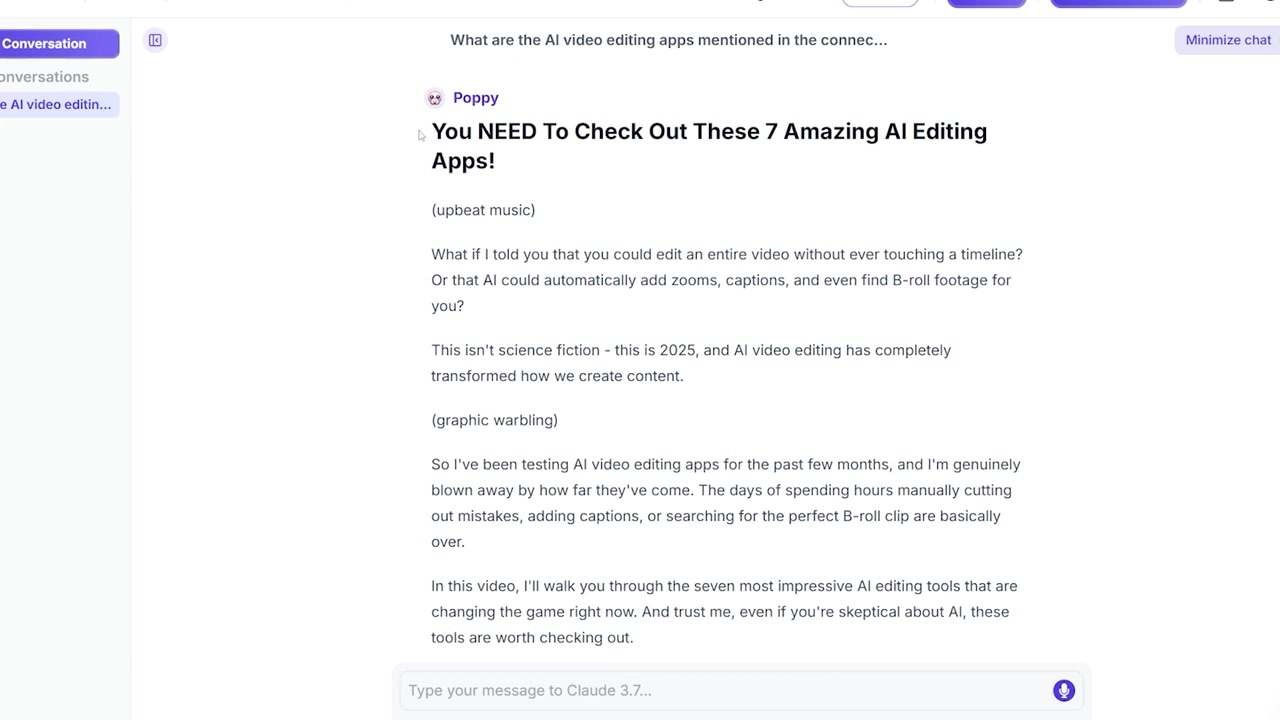
Caption: The full-screen chat interface outputs a professional script with customized hooks and modeled human expressions.
When I ran this prompt for a video about AI editing apps, the resulting output was impressively human:
- Tone Match: The script opened with phrases like "This isn’t science fiction - this is 2025," which perfectly modeled MKBHD's actual speaking style.
- Engagement Framework: The intro featured a structured hook and a natural curiosity builder ("But before we dive in, let me show you something crazy").
- Outro: The exit sequence included a smooth call-to-action asking viewers to hit the like button and subscribe, structured according to the professional advice in my Guru group.
Is Poppy AI Worth the Price?
Poppy AI bills annually, and also offers a one-off Lifetime Access plan. It no longer publishes prices publicly, so check the current cost, and any active discount code, on their site before you buy. The purchase also comes with a 30-day refund window if you decide the tool isn't the right fit for your workflow.
Try it here: Try Poppy AI → (Use coupon code GREGP for $25 off)
Cost Analysis for Content Creators:
- Hiring a Freelance Writer: Typically costs $50 to $200 per script. Over a year of consistent uploading, this easily totals thousands of dollars.
- Doing It Yourself: Takes years of practice to master retention frameworks, plus hours (or even days) of manual editing and outlining for every single upload.
- Using Poppy AI: For one annual payment, you get visual research synthesis, professional tone-modeling and high-retention script formatting, on a monthly credit allowance.
I’ve been testing Poppy AI for a month now—and I actually used it to draft the majority of this very script. If you are serious about growing your channel and scaling your content output, becoming an early adopter of visual AI workspaces is one of the easiest ways to establish a major competitive advantage.
Frequently Asked Questions
How does Poppy AI differ from ChatGPT?
While ChatGPT relies entirely on linear, text-based chat threads, Poppy AI uses a visual whiteboard canvas. This allows you to visually group and connect diverse research assets (like YouTube videos, PDFs, and web pages) and interact with them collectively, forcing the AI to generate highly customized scripts rather than generic outputs.
What files can I import into Poppy AI?
You can import YouTube videos, TikToks, Instagram posts, websites, image files, PDFs, voice notes, and local documents from your computer.
Is there a free trial for Poppy AI?
Poppy AI does not currently offer a traditional free trial, but they do provide a 30-day risk-free refund window, allowing you to receive 100% of your money back if you cancel within your first 30 days of purchase.