OpusClip Pricing: Current Plans and What They Actually Include
Last updated: 6 October 2026
Author: Greg Preece — I cover AI video tools and practical creator workflows.
Prices checked weekly on OpusClip’s own pricing page and help pages. I have used OpusClip on my own videos.
OpusClip takes a long video and cuts short vertical clips out of it. It charges 1 credit for every minute of video you feed in, which is the single most important thing to understand before picking a plan. You are not paying for clips. You are paying for source footage, whether you keep the clips or not.
That makes the plan comparison unusual, because the cheapest paid plan is not the cheapest way to buy. Starter costs $15 a month and only exists on monthly billing, which comes to $180 a year for 1,800 credits. Pro on annual billing is $174 a year for 3,600 credits, 2 seats and every Pro feature. It is cheaper in absolute terms and gives you double the footage.
Current [[OpusClip](/articles/agent-opus-pricing)](/articles/cost-to-turn-long-videos-into-shorts) plans
| Plan | Monthly | Annual, per month | Credits | Source video a month |
|---|---|---|---|---|
| Free | $0 | not offered | 60 a month | 1 hour |
| Starter | $15 | not offered | 150 a month | 2 hours 30 minutes |
| Pro | $29 | $14.50 | 300 a month per pack | 5 hours per pack |
| Business | custom | custom | custom | custom |
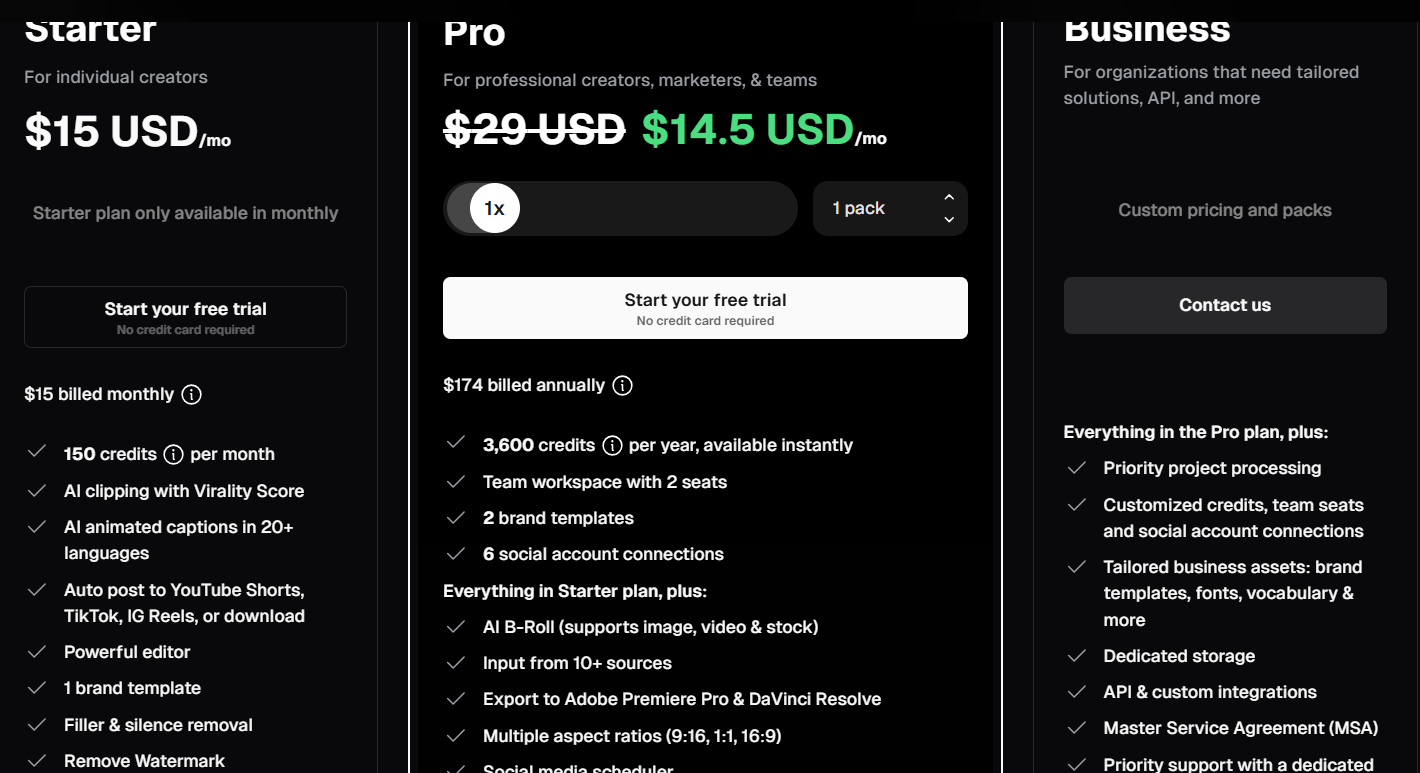
The current plan cards. Starter is marked as monthly only, Pro shows $29 struck through against $14.50 on annual billing, and Business is quote-only. OpusClip now lists the Free plan, 60 credits a month with a watermark, in a separate section below these cards. From opus.pro/pricing, captured 7 September 2026.
Pro sells in packs, and how many you are allowed to buy depends on how you pay. Annual billing goes up to 15 packs, which is 4,500 credits a month or 75 hours of source video. Monthly billing stops at 5, so 1,500 credits and 25 hours. Beyond that OpusClip asks you to get in touch.
Annual Pro credits do arrive monthly. The 3,600 on the card is 12 grants of 300 added together rather than a balance handed over on the day you buy, and unused credits roll forward 2 months.
What a credit actually buys
| Plan | Cost of one credit | Cost per hour of source video |
|---|---|---|
| Starter, $15 | $0.100 | $6.00 |
| Pro monthly, $29 | $0.097 | $5.80 |
| Pro annual, $14.50 | $0.048 | $2.90 |
On monthly billing Starter and Pro cost almost exactly the same per credit. The difference is the features and the volume, not the rate. Annual billing is where the rate actually halves.
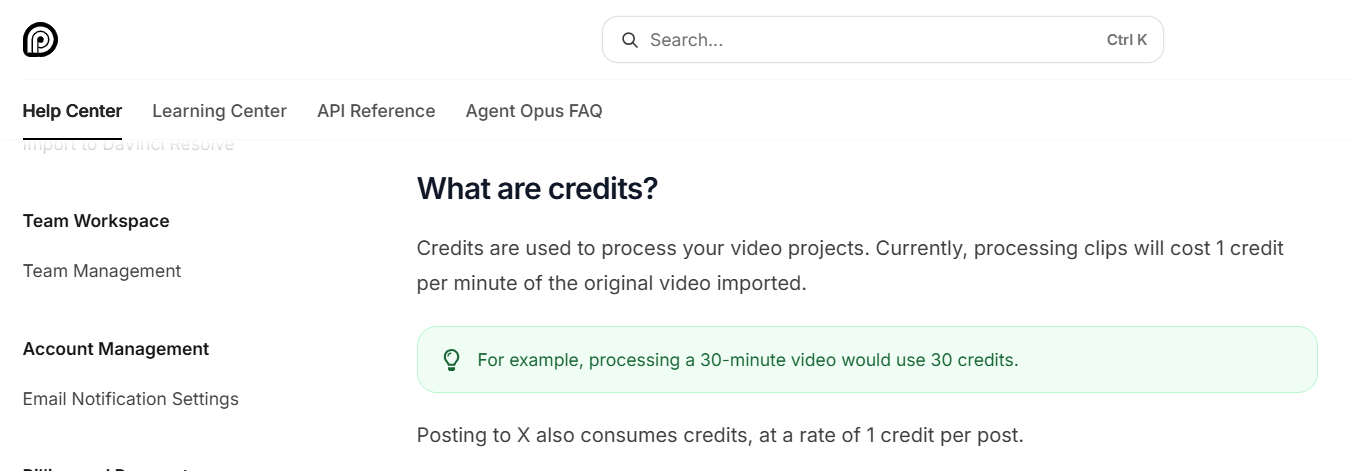
OpusClip’s own definition of a credit. One credit per minute of the original video imported, so a 30-minute video costs 30 credits. Posting to X costs a further credit per clip. From the OpusClip help centre, How Do Credits Work, captured 7 September 2026.
What each OpusClip tier delivers
Starter is beaten by Pro on annual billing at every measure except commitment. $180 a year against $174, 1,800 credits against 3,600, 1 seat against 2, and Pro adds AI B-roll, export to Premiere and DaVinci, the social scheduler, custom fonts, speech enhancement, dubbing and 3 aspect ratios. The only reason to choose Starter is that you will not sign up for a year.
You pay for what you put in, not what you take out. Import a 60-minute podcast and it costs 60 credits whether you publish 1 clip or 30. That is the number to plan around. Starter’s 150 credits is 2 and a half hours of source video a month, which is 2 or 3 podcast episodes.
There is a way to cut that bill and it is easy to miss. OpusClip lets you set a processing timeframe when you submit a video, so you can hand it only the section you want clipped rather than the whole file. On a 3-hour livestream where the good part is 20 minutes, that is the difference between 180 credits and 20.
The rounding runs both ways and it is not symmetrical. Anything under a minute rounds up to a full credit, so a 30-second clip costs 1. Anything with a part-minute on the end rounds down, so a 4 minute 30 second video costs 4. Short files are charged generously and long ones are not.
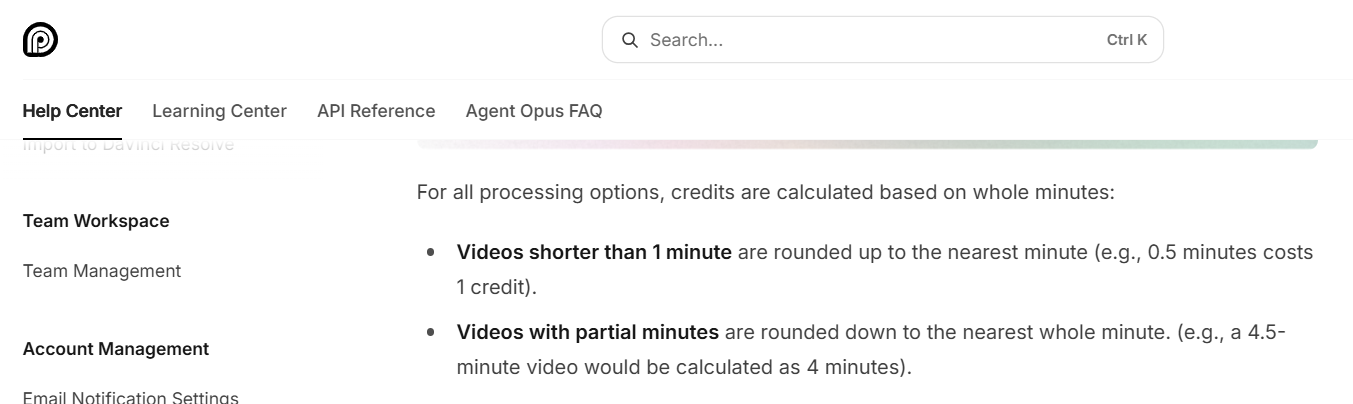
How OpusClip rounds part-minutes. Videos under a minute round up to a whole credit, and videos with partial minutes round down. From the OpusClip help centre, captured 7 September 2026.
Posting costs credits too. Publishing or scheduling a clip to X is charged at 1 credit per clip, on top of what you already paid to process the source. If the post fails, or you delete a scheduled one, the credit comes back automatically.
Credits roll over for 1 month on monthly billing and 2 on annual. The Pro card says which, and the line changes when you flip the billing toggle. Neither plan hands you a year in one go. If you cancel, whatever you are holding keeps its original expiry date rather than dying with the subscription, which is more generous than most of this category.
The free plan is a demo with a timer on it. 60 credits a month, a watermark, no editing, and clips stop being exportable after 3 days. Starter’s exports last 30 days and Pro’s have no limit.
Storage is a plan feature, not an add-on. Free media expires after 3 days, Starter after 29, and Pro gives you a fixed 100GB. There is no way to buy more without moving to Business.
Running out has 5 different fixes. You can add packs for more recurring credits, upgrade from Starter to Pro, switch from monthly to yearly, or press Add More Credits, which simply charges you for your current plan again and hands you another allowance immediately. The fifth is new. OpusClip now sells one-off top-ups at 12 cents a credit, in blocks from 100 up to 10,000, charged once with nothing recurring.
Hands-on with OpusClip
I put OpusClip against CapCut’s automatic long-to-shorts tool and the thing that decided it was the import. OpusClip takes a pasted link from YouTube, Vimeo, Zoom, Rumble, Twitch, Facebook or LinkedIn and pulls the file itself, so nothing has to sit on your machine first.
That convenience is also where the money goes. Pasting a link hands OpusClip the whole video, and the whole video is what you are charged for. The processing timeframe slider is the thing to reach for before you press go.
The rest held up well. Auto Censor found the swear word in a test clip, bleeped the audio and updated the on-screen transcript to match without breaking the pacing. AI B-roll read the transcript, worked out the speaker was talking about stories and pulled visuals of books, and rewriting the prompt to “a pile of books on fire” returned 4 new options in under a minute. There is a free trial if you want to test the clipping on one of your own videos before committing to a year.
Method
Figures come from OpusClip’s own pricing page and its help centre, both read live on 2 September 2026. Plan prices, credit allowances, the credit unit, the rounding rules, the expiry rules and the X posting charge were all confirmed on those pages that day. Every cost per hour is worked out from the published credit rate and the plan price, and is an estimate of what a plan works out at rather than a figure OpusClip advertises.
Two things are not published. OpusClip does not print a monthly credit figure for Pro anywhere on its pricing page, so the 300 a month above comes from its help centre instead. And Business is quote-only, so nothing about it can be costed here.