vidIQ Pricing: Current Plans and What They Actually Include
Last updated: 30 September 2026
Prices checked weekly on vidIQ's own pricing page.
vidIQ sells 3 plans and one pot of credits, and the pot is the only number that matters. Free gives you 150 credits a month, Boost 2,000 and Max 6,000. Everything vidIQ's AI does comes out of that pot, and the rate changes enormously depending on which thing you ask for. Cutting an hour of video into clips costs 540 credits. Generating one 30 second short from scratch costs 600.
On this page
- What vidIQ's plans cost
- What a credit actually buys
- What 11 hours means, and what it does not
- The plans that are not on the pricing page
- What each plan actually gives you
- Who each plan is for
- Jobs vidIQ competes in
- Hands-on
What vidIQ's plans cost
3 plans are on sale, plus coaching and an enterprise tier that both need a conversation. Yearly billing is the default the page loads with, and the monthly prices sit behind a switch at the top.
| Plan | Billed yearly | Billed monthly | Credits a month | Price per credit, yearly |
|---|---|---|---|---|
| Free | £0 | £0 | 150 | none |
| Boost | £16.58 a month | £19 a month | 2,000 | £0.0083 |
| Max | £31 a month | £39 a month | 6,000 | £0.0052 |
| Coaching | not published | not published | 6,000 | not published |
| Enterprise | quote only | quote only | not published | not published |
Paying yearly saves £29 a year on Boost and £96 on Max. Max costs 87% more than Boost and carries 3 times the credits, so every credit on Max is 38% cheaper. A gap that size is unusual. On most tools the bigger plan is better value by a few percent, and here Max is better value by more than a third.
Anyone using more than about 3 hours of clipping a month is already better off on Max, and the saving grows from there.
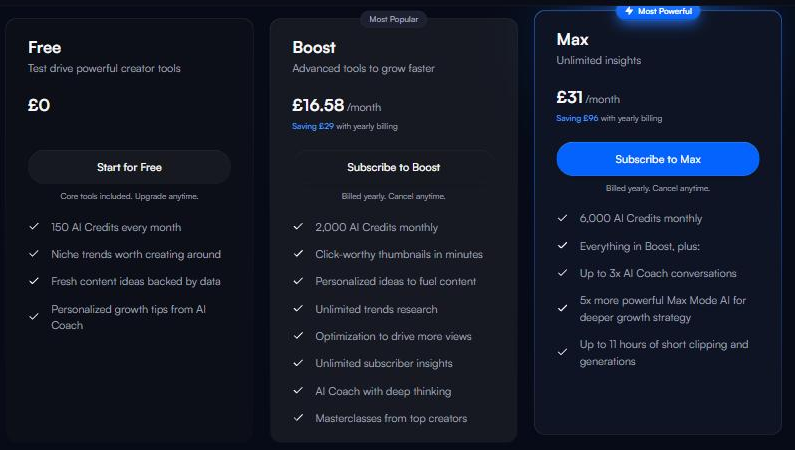
The 3 plans vidIQ publishes, on yearly billing. From vidiq.com/plans, captured 16 September 2026.
What a credit actually buys
vidIQ publishes a rate for every tool in its help centre, and the rates are not in the same units in each. Some charge by the minute of video you put in. One charges by the second of video it gives back.
| What you ask for | What it costs | What 2,000 credits buys | What 6,000 credits buys |
|---|---|---|---|
| Clipping | 9 credits a minute of video you upload | 3 hours 42 minutes of video | 11 hours 6 minutes of video |
| Shorts generator | 20 credits a second of video it makes | 100 seconds | 5 minutes |
| Thumbnails | 22 credits a picture, and again for every edit | 90 pictures | 272 pictures |
| Script writer | 1 credit a minute of script | 2,000 minutes | 6,000 minutes |
| AI Coach, normal | 10 credits a message | 200 messages | 600 messages |
| AI Coach, deep thinking | 25 credits a message | 80 messages | 240 messages |
| AI Coach, Max Mode | 35 credits a message | not available on Boost | 171 messages |
| Titles | 3 credits for up to 3 titles | 666 sets | 2,000 sets |
Clipping works out at £2.79 an hour of uploaded video on Max paid yearly, and £4.48 an hour on Boost.
Thumbnails are about 11p each on Max.
20 AI Coach questions in Max Mode cost 700 credits. That is more than an hour of clipping, spent on 20 messages.
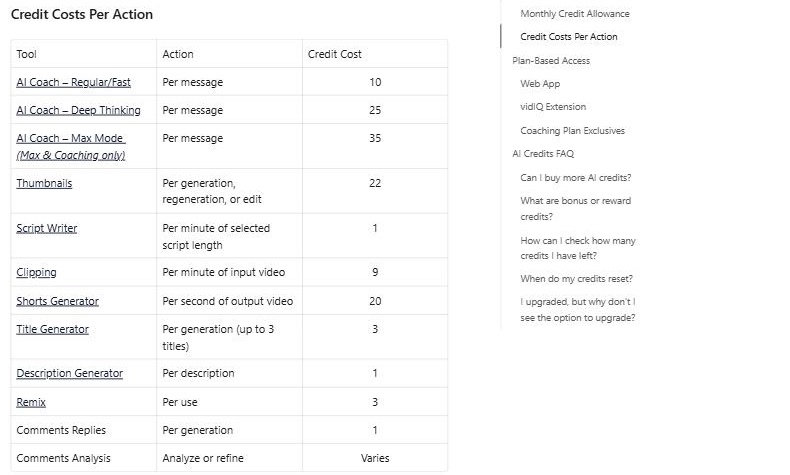
What each vidIQ tool costs in credits. Clipping charges by the minute of video you put in. The shorts generator charges by the second of video it puts out. From the vidIQ help centre, captured 16 September 2026.
What 11 hours means, and what it does not
The Max plan advertises "Up to 11 hours of short clipping and generations". The 11 hours is actually clipping only. 6,000 credits at 9 credits a minute is 11 hours and 6 minutes of video you can upload and have cut into clips.
Generating is the other rate. 20 credits a second works out at 1,200 credits for a minute of finished video. Spend the same 6,000 credits on the shorts generator and you get 5 minutes of output rather than 11 hours. One 30 second short costs 600 credits, so Max makes 10 of them in a month and Boost makes 3.
The good news is that vidIQ tells you the price before it starts. Paste a video in and the button carries the cost, so you find out what a job costs before you commit to it rather than after.
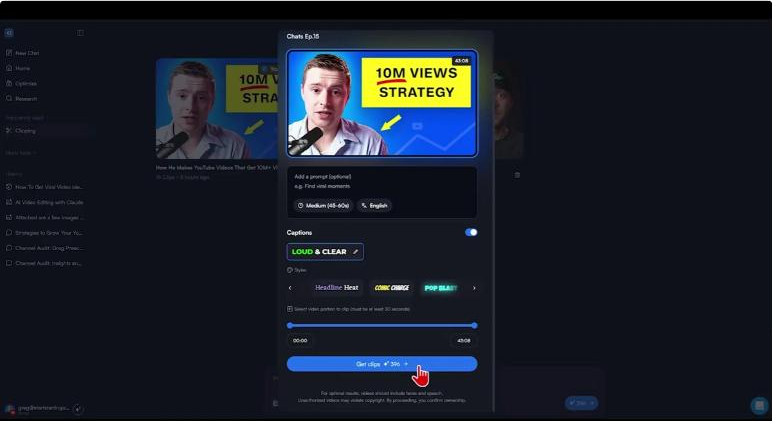
vidIQ quotes the credit cost before it starts. A 43 minute 8 second video comes back at 396 credits.
The plans that are not on the pricing page
The pricing page sells 3 plans. vidIQ's help centre lists 6 rows of credit allowances, and 3 of them are for plans you cannot buy from that page.
| Plan | Credits a month | On the pricing page |
|---|---|---|
| Free | 150 | yes |
| Pro, 1 channel | 1,000 | no |
| Boost, 1 or 2 or 3 channels | 2,000 or 2,500 or 3,000 | only the 1 channel version |
| Max, 1 or 2 or 3 channels | 6,000 or 8,000 or 10,000 | only the 1 channel version |
| Coaching | 6,000 | yes, without a price |
Pro sits between Free and Boost at 1,000 credits a month, and it has no price anywhere I could find. Neither do the 2 and 3 channel versions of Boost and Max, which carry bigger allowances than the plans on sale. If you run more than one channel, the plan you want is not the one being shown to you.
What each plan actually gives you
Credits do not roll over. Whatever is left at the end of your billing month is gone, and the month restarts on the anniversary of the day you signed up rather than the first of the month. Credits you buy as a top up behave differently and stay in the balance until you spend them.
Only Max and Coaching can buy top ups. Boost cannot, which is the wrong way round, because Boost is the plan with 3 hours 42 minutes of clipping in it and Max is the one with 11 hours. Run out on Boost and the only move is upgrading for the rest of the month.
Top ups also disappear if you pay through the App Store or Google Play, and vidIQ says they are not available in every country yet. What a top up costs is not published, and vidIQ shows the price at checkout instead. You can turn on an auto refill that tops you up when the balance runs low, and you pick both the trigger and the size.
The free plan is thinner than the credit number suggests. 150 credits is one 16 minute video through the clipper and nothing else, or 6 thumbnail attempts. Keyword searches return 3 results, the daily ideas stop at 3, and the channel audit shows 3 sections. 150 credits is enough to see what the tool does and not enough to do a week of work with. If you want to find out whether the clipper suits your footage, start on the free plan and spend all 150 credits on one real video rather than spreading them across several.
Who each plan is for
Clipping under 3 hours of video a month, and nothing else: Boost at £16.58 on yearly billing.
Clipping more than 3 hours a month, or doing thumbnails and clipping from the same pot: Max at £31 on yearly billing, which is cheaper per credit by more than a third.
Generating shorts from scratch rather than cutting them out of something: neither plan, unless 10 shorts a month is enough. At 20 credits a second the generator empties Max faster than any other tool vidIQ sells.
Running 2 or 3 channels: ask vidIQ what the multi channel plans cost, because the pricing page will not tell you.
Just looking: the free plan, and spend all 150 credits on one video.
Jobs vidIQ competes in
vidIQ turns up in one comparison on this site, against the tools that do the same job for the same money. If clipping is what you came for, the fuller answer is in [INTERNAL_LINK: https://gregpreece.com/articles/cost-to-turn-long-videos-into-shorts | what it costs to turn long videos into shorts], which prices vidIQ against OpusClip and Descript on the same hour of footage.
The tool vidIQ is most often weighed against is OpusClip, and [INTERNAL_LINK: https://gregpreece.com/articles/opusclip-pricing | OpusClip's own plans and credit rates] are on a page of their own.
Hands-on
I have run the same video through both clippers and compared what came back, in [INTERNAL_LINK: https://gregpreece.com/articles/opusclip-vs-vidiq | OpusClip against vidIQ on one 43 minute episode]. The short version is that vidIQ's clipper is an add on for people already paying for the rest of vidIQ, and OpusClip is the one built for the job.
The same split runs through this whole pricing page. vidIQ's credits are cheap while you are only cutting things up, and they stop being cheap the moment you ask vidIQ to make something.