What It Costs to Turn Long Videos Into Shorts

Last updated: 29 September 2026
Author: Greg Preece — I cover AI video tools and practical creator workflows.
Prices checked weekly on each vendor's own pricing page.
The short answer
Up to 5 hours of source video a month, OpusClip Pro is the cheapest way to do this at $14.50 a month on annual billing. Above 5 hours Descript is cheaper, at $16 a month up to 10 hours and $24 a month up to 30. vidIQ is never the cheapest at any volume I could price.
OpusClip Pro sells in packs worth 5 hours each and stacks up to 15 of them, so the published ceiling is 75 hours of source video a month at $217.50. Price and credits scale together at every pack count, which holds the cost at $2.90 an hour from 5 hours to 75. What changes at 5 hours is that Descript undercuts it, not that OpusClip stops.
OpusClip and vidIQ both charge for the video you put in. Descript charges for footage you bring into the app at all, which is a far larger allowance for the money and comes with a cost it does not publish.
On this page
- The short answer
- What these prices are measured in
- Cost at three volumes
- What I assumed
- Where the cheapest option changes
- OpusClip
- vidIQ
- Descript
- What each plan actually gives you
- Why Submagic is not in the table
- Who this is for
- Where this comparison breaks down
- Method and freshness
What these prices are measured in
Every figure here is the cost of putting 1 hour of finished recording through the tool and getting short clips out. Clipping 1 hour of recording is the job, and cost per hour is the only way to compare three products that count in three different units.
OpusClip charges 1 credit for each minute of the original video you import. vidIQ charges 9 credits for each minute of the video you put in. Descript does not use credits for this at all, and instead counts media hours, which is any footage you upload or record.
So 1 hour of a podcast costs 60 credits on OpusClip, 540 credits on vidIQ, and 1 media hour on Descript. Those three numbers are what the whole comparison rests on.
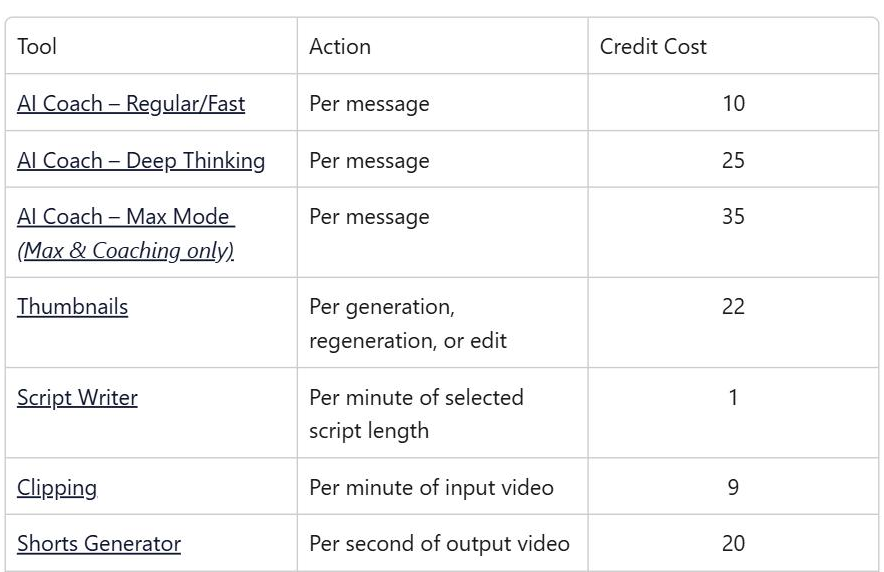
vidIQ's credit costs, read on its help centre on 9 September 2026. Clipping is charged per minute of the video you put in.
Cost at three volumes
Each cell is the cheapest plan that will cover that much video in a month, with annual billing where the vendor sells annually.
| Tool | 5 hours a month | 11 hours a month | 30 hours a month |
|---|---|---|---|
| OpusClip | Pro, 1 pack, $14.50 | Pro, 3 packs, $43.50 | Pro, 6 packs, $87.00 |
| vidIQ | Max, $31.00 | Max, $31.00 | No plan on the pricing page |
| Descript | Hobbyist, $16.00 | Creator, $24.00 | Creator, $24.00 |
| Submagic | Submagic charges for each finished video rather than for the length of the video you put in, and it will not accept a recording longer than 30 minutes on any plan. It cannot be placed on this axis. There is a section on it below. |
What I assumed
One unit is 1 hour of recorded source video, of any kind, put through the tool once.
Prices are in US dollars and are the annual figure divided by 12 where a vendor sells annually, because that is the cheaper way to buy on all three. Monthly figures are higher and are given in the plan sections below.
5 hours of source video is one pack of OpusClip Pro and the point where Descript becomes cheaper. 11 hours is where vidIQ Max runs out. 30 hours is where Descript Creator runs out for one person.
I have assumed that all of a vidIQ plan's credits go on clipping. They do not have to, and anything you spend on thumbnails or titles comes out of the same pot.
I have also assumed one person on Descript. Every extra editor seat is charged separately and adds a full allowance to a shared pool, so 3 people on Creator get 90 media hours for $72 a month.
Other tools do this job and are not covered here.
Where the cheapest option changes
Below 5 hours a month OpusClip Pro wins, and it wins by more than the table suggests. Buy Pro on annual billing and you pay $14.50 a month for 5 hours. Buy Starter instead and you pay $15 a month for 2.5 hours. The cheaper-sounding plan costs more and gives you half as much, which is worth knowing before you click the smaller number.
The switch happens at exactly 5 hours, and it is a pack boundary rather than a wall. Go over 5 hours on OpusClip and the second pack takes you to $29 a month. Descript Hobbyist covers 10 hours for $16, so the crossover lands the moment one pack is no longer enough.
Above 10 hours Descript Creator takes over as cheapest at $24 a month and holds all the way to 30 hours of source video. OpusClip is $87 a month for the same 30 hours, and vidIQ has no plan on its pricing page that reaches that far.
At the top end the two tools stop meaning the same thing. OpusClip's published ceiling is 75 hours a month at $217.50, and past that its Business tier is quoted as custom pricing. Descript has no ceiling of that kind. Creator and Business plans can buy extra media hours in bundles of 5, 20 or 50 hours. The prices are $25, $80 and $150, which puts the marginal hour at $3 on the largest bundle.
OpusClip
The one-click option, and the only one of the three that will take a link from almost anywhere. It pulls from YouTube, Zoom, Riverside and about ten other places. A recorded call never has to be downloaded first.
Pro is sold in packs rather than tiers. One pack is 300 credits a month, or 5 hours of source video, and the plan takes up to 15 packs. Both the price and the credits multiply by the pack count with nothing taken off for volume, which is why the cost per hour never moves. At 15 packs you are paying $217.50 a month for 75 hours and the plan also becomes a 4-seat team workspace.
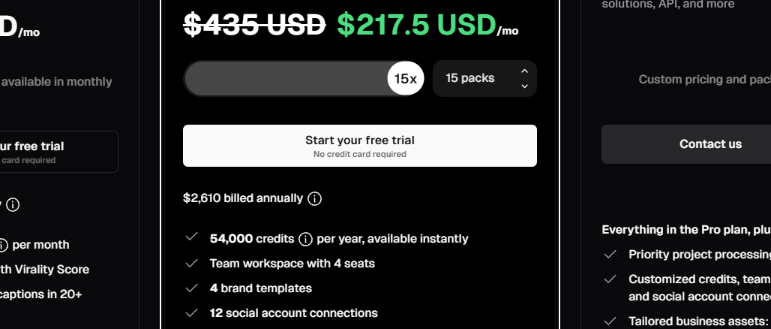
OpusClip's Pro plan at 15 packs, read on 9 September 2026. The pack control runs from 1 to 15 and the page loads at 1.
The pack control is the thing to watch, because the plan loads at 1 pack and the allowance you see is the smallest one it sells. Beyond 15 packs the dropdown stops offering numbers and asks you to get in touch.
The gotcha is that credits are not only spent on processing. Posting a clip to X costs 1 credit per post, so the allowance you budgeted for video quietly goes on distribution too. The Free plan also stops letting you export a clip after 3 days, which makes it a demonstration rather than a plan.
Rounding works in your favour on longer files and against you on short ones. Anything under a minute is charged a full credit, while a 4 minute 30 second file is charged 4.
You can see the current plans on my OpusClip pricing page, and if you want to try it, OpusClip's free plan will clip 1 hour a month.
vidIQ
The one with the most friction for this particular job. vidIQ will not take a YouTube link for clipping. You have to download the file and upload it, which for a YouTube-first creator is the one step the whole product should have removed.
Its credits are also shared with the rest of vidIQ. A thumbnail is 22 credits and a message to its AI coach is between 10 and 35, so every clip you make is money not spent on the tools people actually subscribe to vidIQ for. Unused credits do not roll over at the end of a month.
Max is the only plan that covers a serious volume, at 6,000 credits a month or 11 hours of source video for $31 on annual billing. Boost is 2,000 credits, which is 3 hours 42 minutes, and that is not enough for a weekly hour-long show plus anything else.
What vidIQ does well is accept long files. It will process a source video up to 10 hours, which is far beyond what the others advertise. If you already pay for vidIQ and clip occasionally, the marginal cost of clipping is nothing, and that is the honest case for it.
Descript
Much the cheapest at volume, and the least like a clipping tool. Descript is an editor first, and its clip feature pulls highlights out of a long recording rather than producing a finished vertical clip in one click.
Its media hours are generous because they are not a clipping allowance. They cover everything you bring into the app, so the 30 hours on Creator has to stretch across all your editing rather than just the clips.
There is a second meter, and this is the part that undercuts the headline. Descript's own documentation for the tools that turn a long video into clips says the feature uses AI credits. Creator includes 800 a month, Hobbyist 400 and Business 1,500, and Descript does not publish what a clip run costs against that allowance. It says the cost rises with the length of the media and the model you pick, and it publishes a ceiling for two unrelated tools only. So the Descript column above is a floor rather than a price.
Extra AI credits are sold on Creator and Business only. The bundles are 350, 1,000 and 4,000 credits at $35, $80 and $200. Top-ups expire 12 months after purchase and are spent only once the monthly allowance is gone.
The other thing to watch is that seats on Creator and Business are billed separately, so the headline price is per person rather than per team. Nothing rolls over, on either meter.
What each plan actually gives you
The headline allowance is not the whole plan on any of these.
OpusClip Free watermarks its output and expires clips after 3 days. Starter removes the watermark and is monthly only, so it cannot be bought at the annual discount. Pro adds a second seat and takes files up to 30GB, and reaches 4 seats at 5 packs.
vidIQ Free watermarks every clip it makes. Every paid plan exports at 1080p and vertical only, so there is no landscape or 4K option whatever you pay. The pricing page sells 1 channel, and the plan data behind the same page carries 2 and 3 channel versions of Boost and Max that no control on the page will select.
Descript Free caps export at 720p. Hobbyist reaches 1080p, and 4K starts at Creator. Upload size runs from 1GB on Free to 50GB on Business. Hobbyist cannot buy top-ups at all.
Why Submagic is not in the table
Submagic is the obvious fourth tool for this job, and it does not belong in the table. The reason is worth spelling out.
It charges for each finished video rather than for the length of what you put in. Its plans read 45 credits for 15 videos, 120 for 40 and 300 for 100, which works out at 3 credits per video regardless of length. That alone would make a rough comparison possible.
What makes it impossible is the length limit. Submagic caps every video at 2 minutes on Starter, 5 minutes on Pro and 30 minutes on Business, and that limit applies to the file you upload as well as the one you export. No plan it sells will accept an hour-long recording.
Submagic does sell the feature that turns a long video into shorts. Magic Clips has a marketing page of its own and no price anywhere on the site. The pricing page names it once in the custom tier, as a limit to be agreed with sales. So the one product that would put Submagic on this axis is the one product it will not quote.
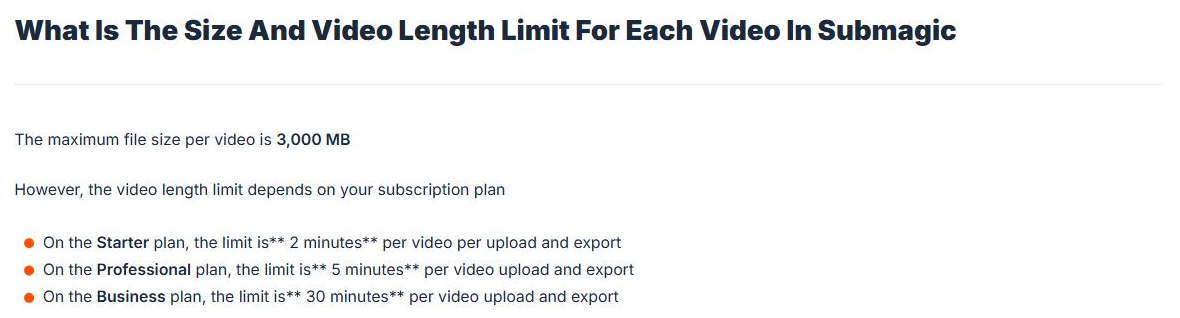
Submagic's help centre on 9 September 2026, setting out the length limit on each plan.
Who this is for
Clipping a weekly hour-long show and nothing else is OpusClip Pro on annual, at $14.50 a month for the one pack you need.
Clipping more than 5 hours a month is Descript, as long as you are willing to work in an editor rather than a one-click tool, and as long as you check what a clip run costs you in AI credits before you commit to a year.
Wanting the one-click tool at a serious volume is still OpusClip. Six packs is $87 a month for 30 hours and fifteen is $217.50 for 75, at the same $2.90 an hour throughout.
If you already pay for vidIQ, clip there and spend nothing extra, but download and re-upload the file first.
If you only need captions on clips you have already cut, Submagic does that job, which is not the one priced here.
If you want the editor rather than the clipper, Descript has a free plan that covers 1 hour a month at 720p.
Where this comparison breaks down
Cost per hour of source video is the right measure for a podcast or an interview, where you have a long recording and want clips out of it. It is the wrong measure if you are cutting short pieces you already own, which is where a per-video charge like Submagic's becomes cheaper.
The Descript figures carry a second meter that Descript will not price, so treat that column as the least certain thing on this page.
The comparison also cannot capture how many usable clips you get from an hour. All three will return clips from the same recording and the number you would actually publish is not something a pricing page can tell you.
Descript is not really competing with the other two on convenience, and OpusClip is not competing with Descript on editing. The prices are comparable, the products are not, and picking on price alone will get some people the wrong tool.
Other tools do this job and are not covered here. There is more on how these compare in practice in my write-up on clipping a weekly show.
Method and freshness
Prices are checked weekly on each vendor's own pricing page. Credit conversions come from each vendor's own help documentation. Everything here was last verified on 9 September 2026.