Descript Pricing: Current Plans and What They Actually Include
Last updated: 26 August 2026
Author: Greg Preece — I cover AI video tools and practical creator workflows.
Prices checked weekly against Descript's own pricing and help pages. The plan figures below are analysis rather than a review, but I have edited my own videos in Descript and there is a section on that at the end.
Current Descript plans
Descript is a video and podcast editor where you edit the video by editing its transcript. Every plan price below is per person, per month.
| Plan | Billed annually | Billed monthly | Media hours a month | AI credits a month | Video export |
|---|---|---|---|---|---|
| Free | $0 | $0 | 1 hour | 100, one time only | 720p with a watermark |
| --- | --- | --- | --- | --- | --- |
| Hobbyist | $16 | $24 | 10 hours | 400 | 1080p, no watermark |
| --- | --- | --- | --- | --- | --- |
| Creator | $24 | $35 | 30 hours | 800 | 4K, no watermark |
| --- | --- | --- | --- | --- | --- |
| Business | $50 | $65 | 40 hours | 1,500 | 4K, no watermark |
| --- | --- | --- | --- | --- | --- |
| Enterprise | custom | custom | sized to your team | sized to your team | not published |
| --- | --- | --- | --- | --- | --- |
Annual billing saves 33% on Hobbyist, 31% on Creator and 23% on Business.
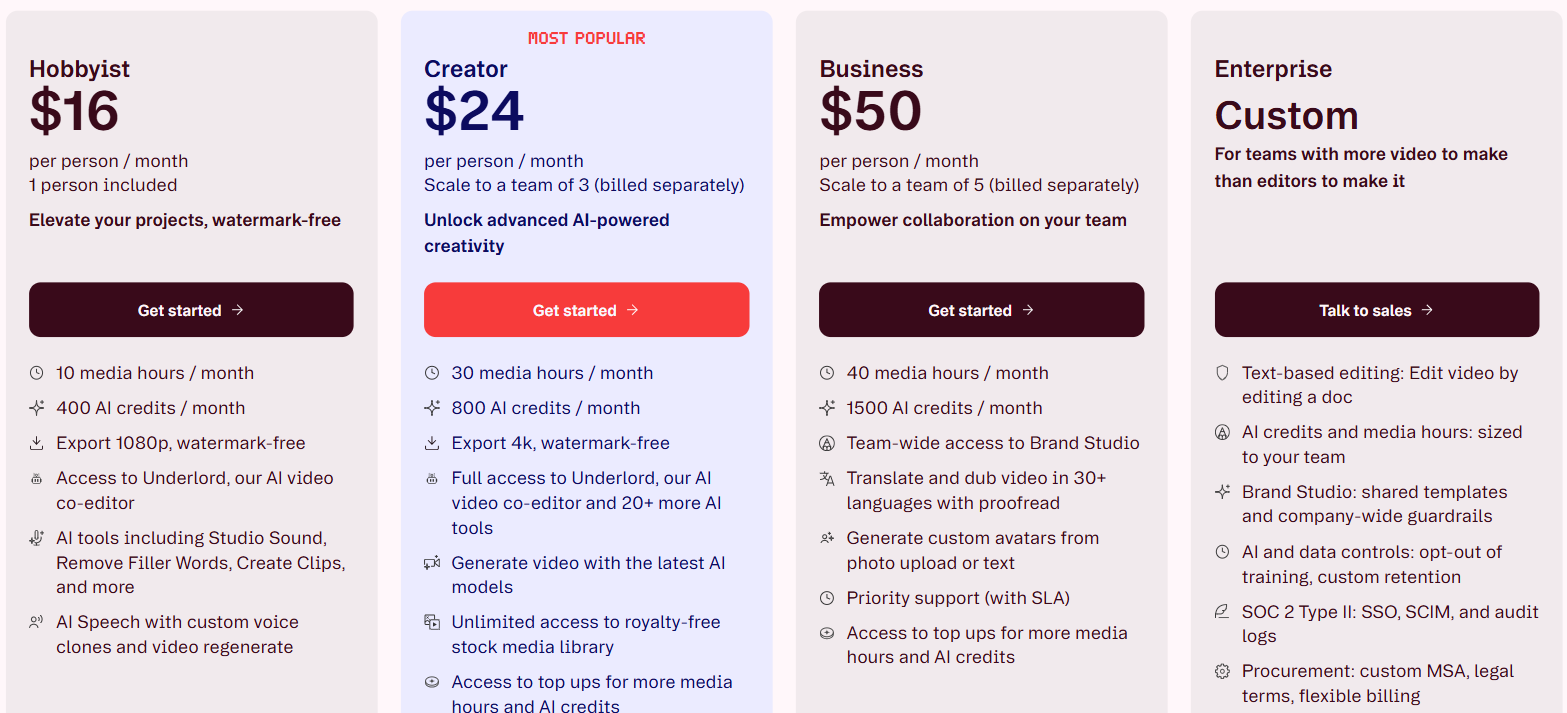
Descript plan cards on annual billing, showing 10, 30 and 40 media hours and 400, 800 and 1,500 AI credits a month. Access to top ups is listed on Creator and Business and not on Hobbyist. From descript.com/pricing, captured 7 September 2026.
What Descript actually charges you for
There are two meters and they run separately.
Media hours count everything you upload or record, whether or not you transcribe it. AI credits count the AI tools you run on top of that footage. Run out of one and the other keeps working, which is easy to miss until half the app stops.
Both are counted per editor seat, and they pool across the drive. A viewer or a project-level editor cannot spend either, so adding someone to review your work costs you nothing.
The gotcha is Hobbyist. It is the cheapest paid plan at $16 a month on annual billing, and it is the only paid plan that cannot buy top-ups. Hit 10 media hours on the 20th of the month and your two options are to wait for the reset or upgrade to Creator. Creator at $24 buys 3 times the media hours and the right to buy more when you run out. If you record more than about 2 hours a week, Hobbyist will strand you.
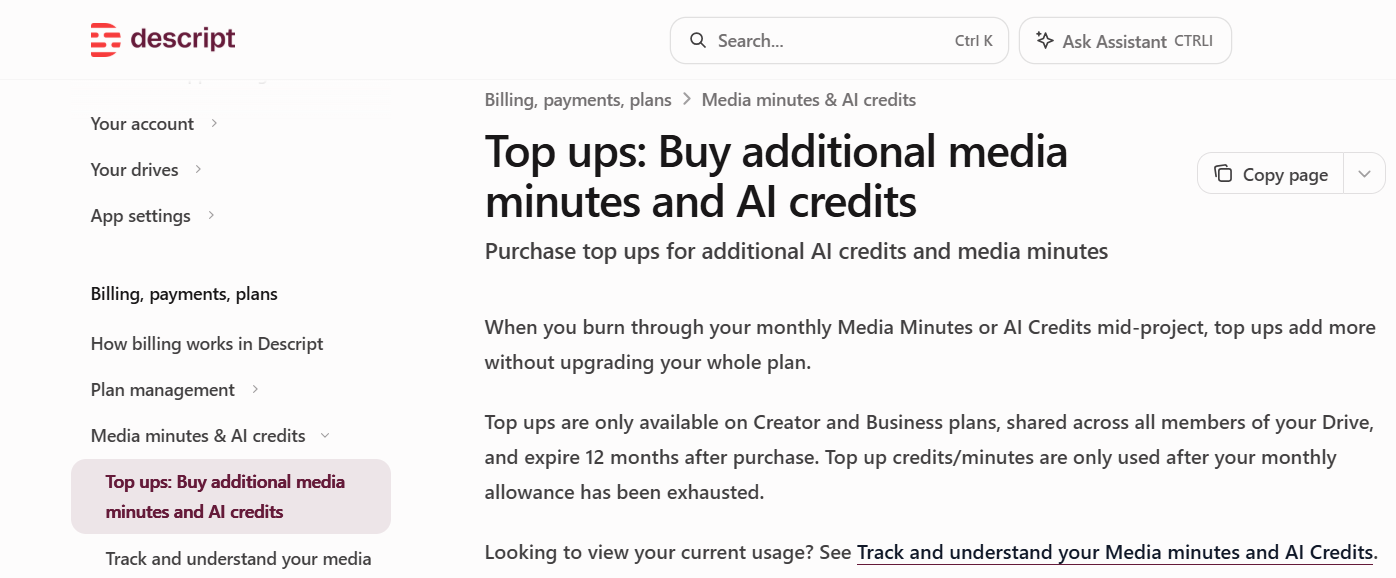
Descript states that top ups are only available on Creator and Business plans, expire 12 months after purchase, and are only used once the monthly allowance is gone. From the Descript help centre, Top ups: Buy additional media minutes and AI credits, captured 7 September 2026.
The second gotcha is how media time gets counted. A still image counts as 1 second. A 1-hour remote recording with 5 people costs you 60 minutes, not 300. The first one is generous, the second one catches people out when they price up an interview series.
What each Descript tier delivers
Free is a trial, not a tier. The 100 AI credits arrive once and never refresh, and every export carries a watermark at 720p.
Hobbyist gets the AI tools and not the exports. Studio Sound, Eye Contact, Remove Filler Words, Underlord and the rest all work. What is missing is everything that gets footage out of Descript and into something else. No timeline export to Premiere, Final Cut, Pro Tools or Audition. No batch export. No custom fonts. If Descript is one step in a longer edit rather than the whole edit, Hobbyist does not fit.
Creator is the real entry point for video work. 4K export, top-ups, batch export, timeline export, unlimited stock search and custom fonts all start here.
Business is where dubbing gets usable. Translation proofread and native-sounding AI speakers are Business only. Creator will translate and dub into 30 languages, but nobody checks the translation and the voices are not native. For client work in another language that difference decides it.
Underlord charges twice. Descript's AI co-editor bills for the agent thinking and again for each tool it runs, and the cost is not fixed per action. Studio Sound and Remove Filler Words are capped at 30 credits per file each time you apply them, so those two are predictable and Underlord is not.
The nonprofit and education discount is for one person. Descript offers a discounted subscription to nonprofits and educators through an application form. It carries the Hobbyist feature set, Descript describes it as the only plan available at a discounted rate, and says it suits individual creators. A 4-person charity team gets one discounted seat and pays list price for the rest.
What has changed recently
Plan prices have not moved since I started checking these in mid-August. The top-up bundles have.
Descript used to sell AI credits in 4 sizes. 350 for $35, 1,000 for $80, 3,000 for $180 and 8,000 for $400. It now sells 3. 350 for $35, 1,000 for $80 and 4,000 for $200.
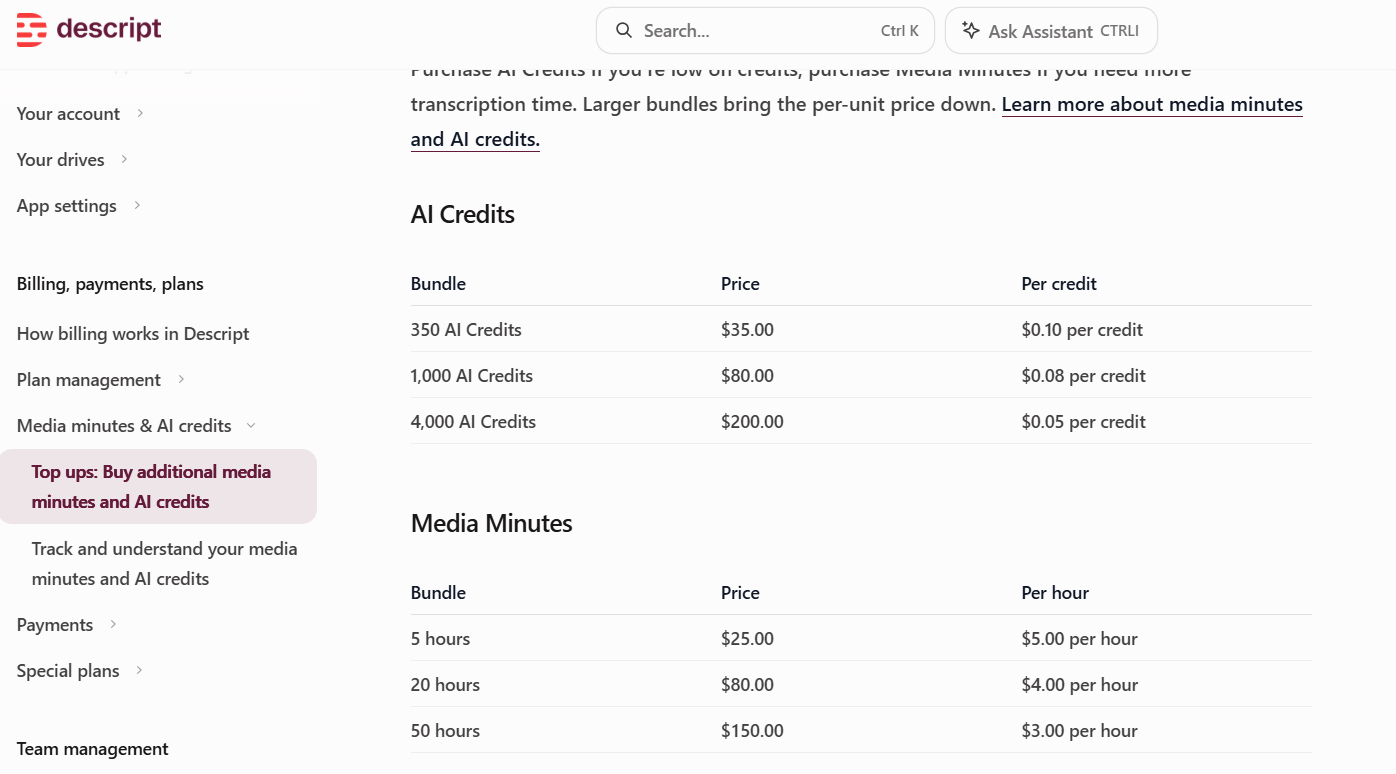
The current top up bundles: 350 AI credits for $35.00, 1,000 for $80.00 and 4,000 for $200.00, and media minutes at 5 hours for $25.00, 20 hours for $80.00 and 50 hours for $150.00. From the Descript help centre, Top ups page, captured 7 September 2026.
Two things moved at once, in opposite directions. The cheapest rate per credit, 5 cents, used to need a $400 purchase and now needs $200, so heavy users reach the best rate for half the spend. But the largest single purchase halved, from 8,000 credits to 4,000. Anyone who was buying the big pack now buys two.
Media minute top-ups did not change. 5 hours costs $25, 20 hours costs $80, 50 hours costs $150.
Top-ups on both meters only work on Creator and Business, only get spent once the monthly allowance is gone, and expire 12 months after purchase.
Hands-on with Descript
Descript, eye contact and edit for clarity test fixed my eye line across a whole video in a few seconds, after I had read the script off camera for the entire take. Edit for Clarity took a 10-minute recording down to 4 minutes 9 seconds.
On a podcast project it worked out who was speaking at each moment on its own. When I corrected a mis-heard word by typing it, the audio came back in my own cloned voice, which is the thing Descript, podcast editing and voice regenerate does that a normal editor cannot.
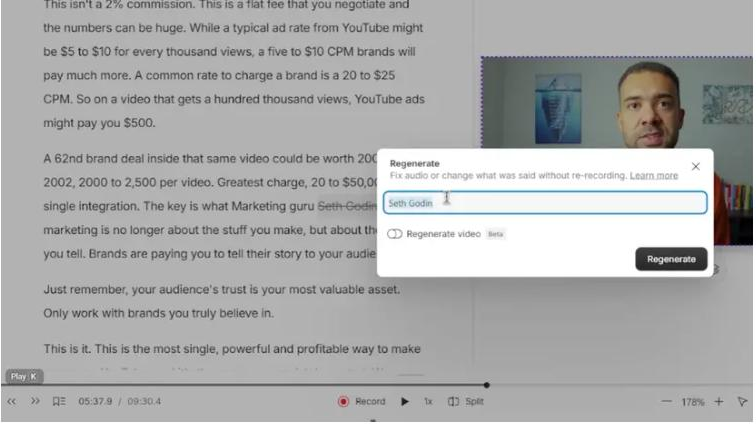
Correcting a mis-heard word by typing the replacement over it. Descript rebuilds that word alone in the cloned voice instead of asking for a re-record.
Worth knowing before you buy on the strength of that: Eye Contact wants a single clear face in frame, so it will not save a two-person interview shot in one wide. Filler word removal only works on English transcripts.
If you want to try it, Try Descript → has a free tier that will show you the transcript editing without spending anything.
Method
Figures come from Descript's pricing page and its own help pages, checked weekly. Last verified 26 August 2026. Nothing here is an estimate, and where Descript does not publish a figure I have said so rather than working one out.