The Best AI Clipping Tool for Podcast Shows
Last updated: 24 September 2026
Author: Greg Preece — I cover AI video tools and practical creator workflows.
I have made video for a living for 10 years and I run a YouTube channel with over 130,000 subscribers. I record a podcast, I have clipped it with OpusClip, and this is why I would give it to anyone who owes a set number of reels every episode.
If you publish a podcast and every episode has to produce a fixed set of clips on a deadline, OpusClip is the right choice. When I put one episode through it and through vidIQ at the same time, OpusClip finished in 10 to 15 minutes and gave me 35 clips. vidIQ took 50 to 55 minutes on the same file and gave me 16.
Speed is the reason, but not the way it sounds. If you have to publish 5 clips an episode every week, OpusClip is not competing with your taste. It is costing you an hour of your week. An hour of waiting per episode is an hour you spend not choosing clips.
In short
- Best for shows that owe a fixed number of clips per episode, week in and week out.
- One episode of mine came back in 10 to 15 minutes with 35 clips to choose from.
- It pulls straight from Zoom, Riverside, StreamYard, Google Drive and YouTube, so the file does not have to move.
- Filler words, dead pauses, weak audio and missing b-roll are all one toggle each.
- It bills you for the video you put in, not the clips you keep.
- The score on each clip is its own model marking its own work.
On this page
- Who this is for
- [The problem with clipping a weekly show](#the-problem-with-clipping-a-weekly-show)
- Why OpusClip solves it
- What I found running my own episode through it
- Where OpusClip falls short
- What else I considered
- What OpusClip costs
- Getting started
- Method and freshness
Who this is for
This is for you if:
- You publish a podcast or interview show on a schedule and clips are part of what you deliver.
- Somebody, a client or your own calendar, expects a set number of reels per episode.
- Your recordings come out of Zoom, Riverside or StreamYard rather than a camera card.
- Two speakers on screen is your normal case, not an edge case.
This is not for you if:
- You publish one episode and then decide whether to clip it. You want a one-off editor, not a subscription.
- Your show is in a language outside the 25 or so it handles. Check before you pay.
- A client reviews your clips frame by frame. You will end up exporting into a proper editor anyway.
- You want the tool to choose for you. The good version of this still has you picking from the shortlist.
The problem with clipping a weekly show
Look at what the clipping costs when you buy it in.
In the two weeks to 28 August 2026, a health podcast advertised on Upwork for an editor to cut 5 hour-long episodes plus 5 captioned reels per episode, paying 240 euro an episode. A property channel wanted 4 long-form videos and about 12 Shorts a month for 1,000 dollars a month. A crypto project posted 50,000 dollars for a 60-day campaign turning interviews, podcasts and live Spaces into short form at volume and seeding it across pages.
So the money is there and it is priced per episode, not per hour. That is the part that decides everything. The clips are not a bonus you get to if there is time. They are a deliverable with a date on them, and the same date comes round again next week.
The work itself is unglamorous and identical every time. Find the moments worth pulling. Crop two speakers into a vertical frame without cutting anyone's head off. Strip the ums. Caption it. Do that 5 times. Then do it again on Tuesday.
Why OpusClip solves it
The file does not have to move. OpusClip takes a link from where your show already lives. Zoom, Riverside, StreamYard, Google Drive, YouTube, Vimeo, Loom, Twitch and more, with the longer list attached to the paid tier. If you record on Riverside and clip on Riverside links, you have deleted the download-and-re-upload step from every single episode.
It knows it is looking at a conversation. You set the genre before it runs, so it tracks who is speaking rather than guessing. That is the difference between a two-hander clip that cuts between faces and one that sits on a wide shot of two people while only one of them talks.
Reframing follows the person, not the middle of the frame. Its reframe model keeps a moving subject centred as the crop travels, and you can take manual control and tell it exactly what to follow when it picks the wrong thing.
The cleanup is a row of switches. Filler words, dead pauses, speech enhancement for a guest whose microphone was wrong, automatic b-roll, stock b-roll, a generated hook, keyword highlighting in the captions. Each of those is a job you would otherwise do by hand on every clip.
The enhance panel, where filler words, pauses, audio quality and b-roll are each a single toggle.
It publishes. Connect your TikTok, YouTube, Instagram or Facebook accounts and clips can be posted or scheduled from inside the tool. I have not wired mine up, so I am telling you it exists rather than telling you it works.
What I found running my own episode through it
I ran one episode through both tools at once. I have accounts with OpusClip and with vidIQ, so I took a single long-form podcast episode and processed it in both at the same time. Same file, same day.
OpusClip took 10 to 15 minutes. vidIQ took 50 to 55. Three to four times faster on identical input. On a weekly show that is the difference between clipping in the gap after recording and clipping the next morning.
35 clips against 16. More than double, from the same episode. That matters less than the speed does, because you are not publishing 35 of them. What it buys you is a shortlist wide enough that you are choosing rather than settling.
The two-speaker layout is where the difference showed. In the vidIQ editor my episode came in stacked, with me on top and my guest Oliver underneath. I picked the Split layout, which is meant to put the host on the left and the guest on the right, and it bugged out and put both of us on screen twice. I have written the whole head-to-head up in my OpusClip and vidIQ test on a real podcast episode.
Where OpusClip falls short
You pay for what you feed it, not for what you use. A 90 minute episode costs the same whether you keep 3 clips or 30. That is true of every tool in this category rather than a mark against this one, but it does change how you work. Trim the episode before you upload it, and use the timeframe setting to skip the intro chat, or you are paying for 12 minutes of hellos every week.
The scores are its own opinion. Every clip comes back with a rating. I have not run anything to check whether a higher-rated clip actually gets more views, and neither has anyone else I can point you at. Use it to sort the list, not to decide.
It is not a timeline. The editor is good and it will get most clips finished. It will not do frame-level work, so if a client sends notes about a specific cut you will export and finish elsewhere.
Its own marketing has moved on from podcasts. OpusClip now leads on the idea that other clippers only handle podcasts and that theirs handles any genre. Nothing wrong with that, but it is worth knowing that the case this page is about is no longer the case they are selling hardest.
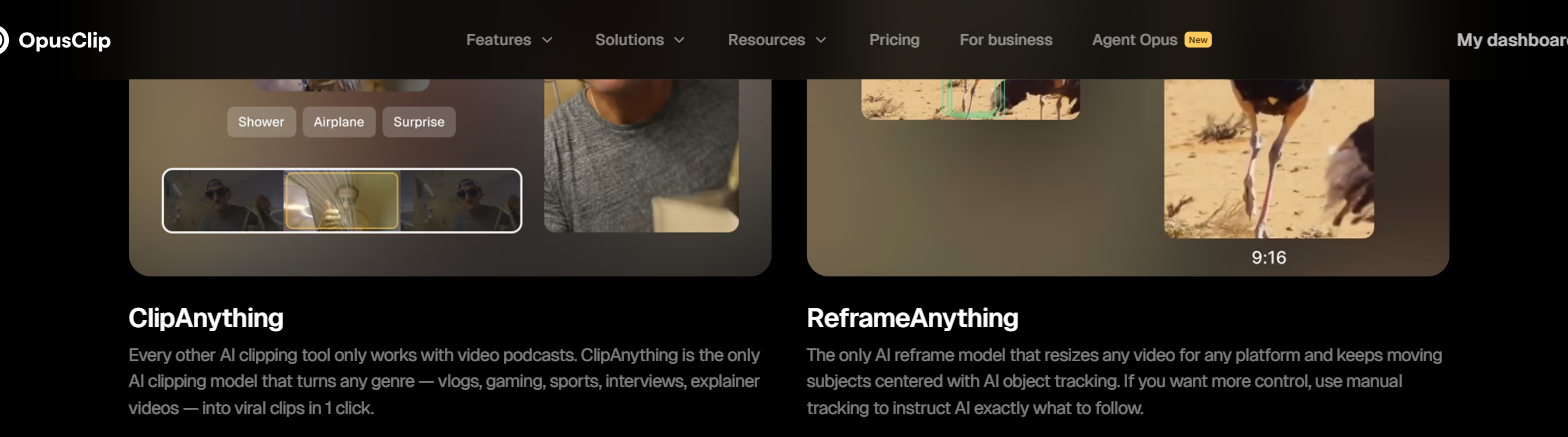
OpusClip's own home page, captured 7 September 2026, where it describes every other clipping tool as working only on video podcasts.
I cannot show you a complaint pattern. I looked at what people said publicly about OpusClip across three separate dates in August 2026 and nothing came up often enough from enough different people to be worth reporting. The most recent batch was 20 reactions to a newsletter integration. So the limits above come from the product and from my own use, not from anyone else's.
What else I considered
vidIQ is the one I have actually tested against it, on the episode described above. It is the right answer if you already pay for vidIQ for its research and keyword tools and clips are an occasional extra. It is the wrong answer for a weekly show, because of the hour it takes and the layout bug I hit.
CapCut will do the editing and it will do it well, and it is where a lot of people finish clips. What it will not do is find the moments for you. I have written about why I reach for OpusClip first in my piece on OpusClip and CapCut for shorts, and I have not tested CapCut on this job.
Klap is the other clipper I have written about, in my OpusClip and Klap comparison. I have not run it on a podcast episode since, so I am not going to tell you how it does on one.
If your channel is not monetised yet the argument changes, because the thing you are chasing is a threshold rather than a delivery date. I wrote that one up separately in the best AI clipping tool for channels that are not monetised yet.
What OpusClip costs
OpusClip meters on the length of the video you import, not on the clips it gives back. One minute of source is one unit, so a 60 minute episode costs the same whether you publish 1 clip or 30. Which import sources you get, and how much you can process, both move with the plan.
That unit is the thing to plan around. Work out the total runtime you publish in a month, not the number of clips you want, because the runtime is what you are buying. Current figures are on OpusClip's own pricing page.
Getting started
- Take one episode you have already published and run it. You know which moments were good, so you can judge the shortlist honestly.
- Set the genre before you run it, so it tracks speakers instead of guessing at a wide shot.
- Trim the pre-roll chat off the file first, or set the timeframe to skip it. You are paying for those minutes.
- Turn the cleanup switches on one at a time on a single clip rather than all at once. Speech enhancement in particular changes the sound of a guest, and you want to hear what it did before it is on 5 clips. You can run that first episode at OpusClip and have your answer in an afternoon.
Method and freshness
The first-hand parts of this page come from a test I published, where I put one long-form podcast episode through OpusClip and vidIQ at the same time, and it is linked above. OpusClip's own pages were read on 3 September 2026 to confirm the import sources, the reframing and clipping models, the language list and the cleanup features. I have not connected my own social accounts for publishing, I have not tested CapCut or Klap on a podcast episode, and I have not checked whether a higher clip score leads to more views.