Agent Opus MCP: How I Set Up Hands-Free Video Automation
Last updated: September 2026
Author: Greg Preece — I test AI video tools hands-on to help creators and marketers build highly efficient, automated video production workflows.
The newly released Agent Opus MCP (Model Context Protocol) lets you completely automate your long-form animated video production directly inside your favorite AI assistant. In this guide, I will show you how to connect Agent Opus to ChatGPT or Claude so you can trigger, bulk-produce, and schedule videos on autopilot.
TL;DR Summary
The Agent Opus MCP allows you to use Agent Opus directly inside LLMs like Claude or ChatGPT via the Model Context Protocol. Instead of manually navigating the Agent Opus web interface, you can generate complete voiceovered animated videos, schedule posts, and bulk-create ad variants using pure text prompts. Setup takes under two minutes: copy the connector code, add a custom connector inside Claude's settings, and log in to authenticate.
Table of Contents
- What is the Agent Opus MCP?
- Why Generate Videos Inside Claude or ChatGPT?
- Step-by-Step: How to Set Up the Agent Opus MCP in Claude
- 5 Advanced Automations You Can Run with MCP
- FAQ
Prefer to watch? Here's the video. Prefer to skim? The full breakdown is below.
Quick Link
Try it here: Try Agent Opus MCP →
What is the Agent Opus MCP?
MCP stands for Model Context Protocol. Developed as an open standard, MCP acts as a bridge or "universal translator" that lets AI models securely connect to external tools, databases, and SaaS platforms.
With the Agent Opus MCP, you no longer have to jump back and forth between your AI writer and the video generation platform. Instead, you connect Agent Opus directly into your AI of choice (such as Claude or ChatGPT). Once connected, your AI assistant can build, edit, and schedule videos using the Agent Opus engine on your behalf.
Caption: A high-quality animated short or commercial generated directly through the Agent Opus interface.
Why Generate Videos Inside Claude or ChatGPT?
You might wonder why you should connect Agent Opus to your AI assistant instead of simply using the official web interface. While the web interface is great for manual editing, bringing the tool into Claude or ChatGPT unlocks massive automation potential.
1. Bulk Creative Production
If you have a high-performing product ad format that you want to scale, doing it manually is tedious.
With the Agent Opus Claude connector, you can hand your AI a list of 20 different products and instruct it to run through them in bulk. The AI will swap out the product details, generate a tailored script, clone your brand's voice, and command Agent Opus to output 20 finished ads—all in a single automated step.
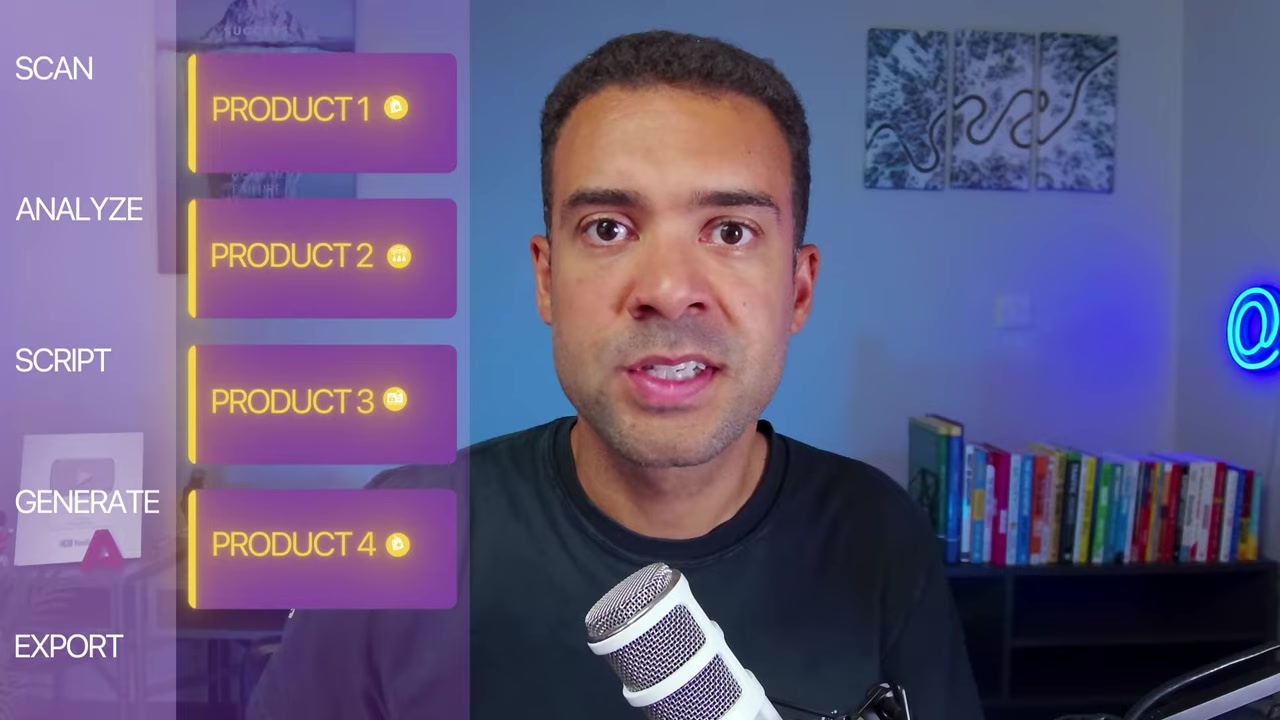
Caption: Example of custom marketing creatives running on screen, demonstrating how one template is duplicated across multiple products.
2. Trend-to-Video Pipelines
Instead of wasting hours looking for content ideas, you can set up Claude to perform daily web research to find trending news or viral topics.
Once your AI identifies a trend, it can immediately write a script, generate matching voiceovers, and trigger Agent Opus to produce and queue up a video addressing that exact topic. This makes faceless channel management truly hands-free.
Caption: The Claude connectors dashboard showing Agent Opus listed as an active, enabled plugin next to OpusClip.
Step-by-Step: How to Set Up the Agent Opus MCP in Claude
Setting up your Model Context Protocol connection is incredibly simple. Below is the exact step-by-step process I used to get Agent Opus running inside my personal Claude account:
Step 1: Copy the Connector Code
First, head to the official Agent Opus MCP webpage (which we have linked in the resources section). Locate the remote server configuration code and click the Copy button.
Caption: The official Agent Opus MCP webpage, highlighting the remote connection URL and the copy button.
Step 2: Add a Custom Connector in Claude
Next, log in to your Claude account and open your settings panel.
- Navigate to the Connectors tab on the left-hand menu.
- Click the Add button in the top-right corner and select Add custom connector.
- Paste the remote MCP code you copied in Step 1 into the connection field.
- Give your connector a clear name (e.g.,
Agent Opus MCP). - Click the Add button.
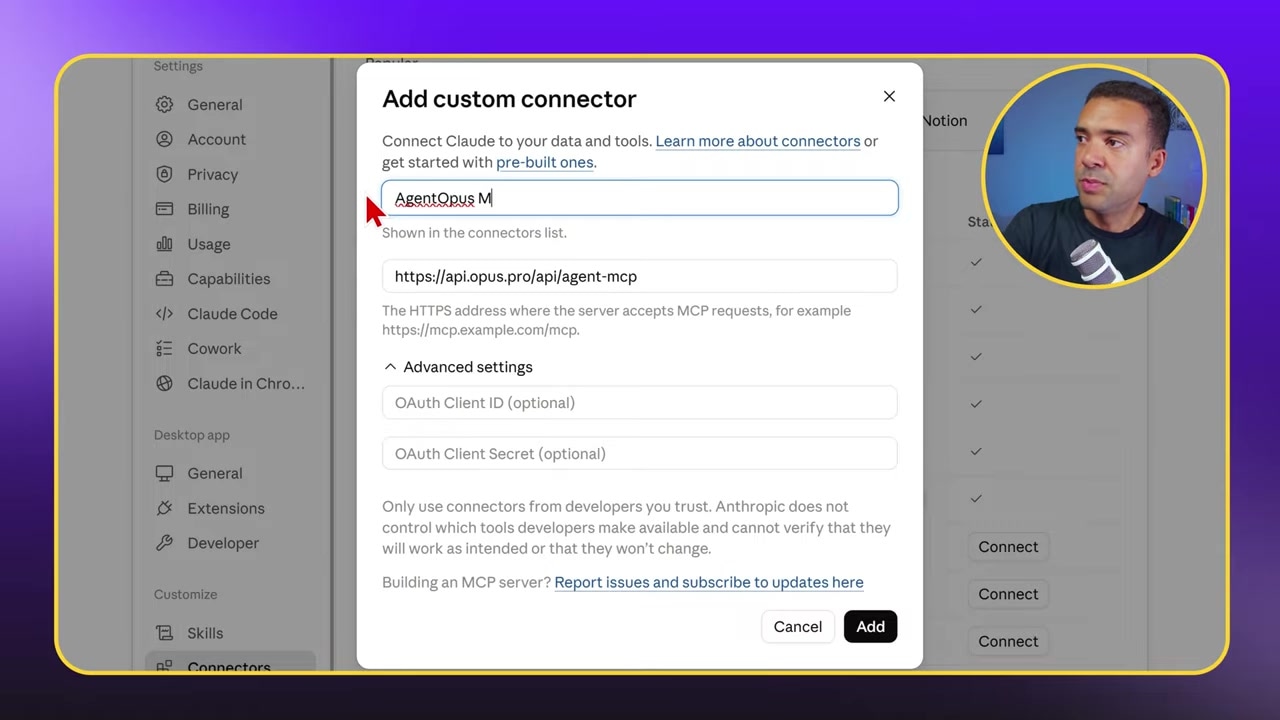
Caption: Claude’s Developer settings window, demonstrating how to paste the MCP code block and name the connector.
Step 3: Authenticate Your Account
Once you click add, Claude will open a secure OAuth sign-in popup. Log in using your existing Agent Opus credentials to authorize the connection.
Caption: The OAuth authorization screen that appears inside Claude, prompting you to log in to your Agent Opus account.
Step 4: Toggle the Connector On
With authentication complete, the plugin is fully installed. You can now toggle the Agent Opus connector on or off directly inside your chat window whenever you want to generate videos during a session.
5 Advanced Automations You Can Run with MCP
Now that your setup is complete, you can command your AI assistant to generate and manage your videos. Here are five of the best automation use cases featured on the Agent Opus dashboard:
- Product Demo Videos: Provide a raw list of product specs to Claude and ask it to output a visually engaging product demo video.
- Script-to-Voiceover Generation: Ask your AI to draft a detailed video script, apply a cloned voice or preset voiceover, and output the animated video.
- Creative Ad Variations: Automatically draft and generate 10+ visual variations of an advertisement to A/B test across your social media channels.
- Custom Voice Cloning: Use your own cloned voice inside your AI assistant's workflow to narrate generated videos.
- Song-to-Music Videos: Have Claude analyze a song track file and instruct Agent Opus to generate a fully synchronized music video.
Caption: The Agent Opus directory of automated features, including options for voice cloning, motion graphics, and scheduling.
If you want to take your output quality to the next level, mastering prompt structure is key. Be sure to check out our complete guide on writing effective prompts for Agent Opus to get the cleanest visual results.
Try it here: Try Agent Opus MCP →
FAQ
What is an MCP?
An MCP (Model Context Protocol) is an open-source standard created to let AI models securely connect to external data sources and API tools. It removes the need for custom integrations, acting as a universal port for AI assistants.
Do I need coding experience to set up the Agent Opus MCP?
No coding is required. The setup relies entirely on copying a pre-generated code block from the Agent Opus website, pasting it into your Claude settings, and logging in via an OAuth popup.
Can I schedule videos directly through Claude with this setup?
Yes. The Agent Opus MCP includes scheduling capabilities. You can ask Claude to create a video and instruct it to schedule the post to your connected social channels automatically.