I Tested an AI Voice Generator with Emotions (No Manual Editing)

Last updated: July 2026
Author: Greg Preece — I test AI audio and video tools hands-on to help creators, marketers, and voiceover artists find the most realistic, natural-sounding workflows.
Traditional text-to-speech (TTS) engines are great at reading words, but they struggle to understand feeling. If you want a voiceover that sounds scared, sarcastic, or excited, you usually have to waste hours typing manual phonetic prompts, adjusting sliders, or using tags to get the AI to act.
I recently tested a new AI voice generator with emotions that automatically changes its tone based on the script you write. It’s created by a company called Hume AI, and their voice model is called Octave.
In this hands-on guide, I'll walk you through how Hume Octave works, show you how it performs in emotional stress tests, and help you decide if it’s time to move on from platforms like ElevenLabs.
Prefer to watch? Here's the video. Prefer to skim? The full breakdown is below.
Quick Link
Try it here: Try Hume Octave →
Table of Contents
- What is Hume Octave (And Why is it Different?)
- Hands-on with Hume's Featured Voices
- How to Create a Custom Voice in Hume Octave
- The Ultimate Emotion Test: Joy, Anger, and Sarcasm
- Pricing and Character Limits
- Frequently Asked Questions
- The Verdict: Should You Use Hume Octave?
What is Hume Octave (And Why is it Different?)
Rather than being a traditional, phonetic-based text-to-speech generator, Hume Octave is actually a voice-based Large Language Model (LLM).
This distinction is crucial for how it handles emotional delivery. To understand the difference, imagine two distinct robots reading a storybook:
- Robot 1 (Traditional TTS): Pronounces every word perfectly and has excellent spelling. However, it does not understand the story. When the plot gets scary, triumphant, or funny, the robot maintains the exact same flat, robotic cadence.
- Robot 2 (Hume Octave LLM): This robot actually understands the story. It evaluates the words in context. When it reads a scary plot twist, it sounds genuinely frightened; when it encounters a joke, it automatically shifts to a humorous, lighthearted tone.
Because Octave operates as an LLM, it evaluates the underlying sentiment of your script to predict the correct rhythm, timbre, and tune. According to Hume AI's data, blind comparison studies show that 71% of people prefer Octave's audio quality and 51% find it more natural than ElevenLabs.
Hands-on with Hume's Featured Voices
When you first log into the Hume AI interface, the best place to experiment is the Playground area, which you can access via the top-left navigation panel.
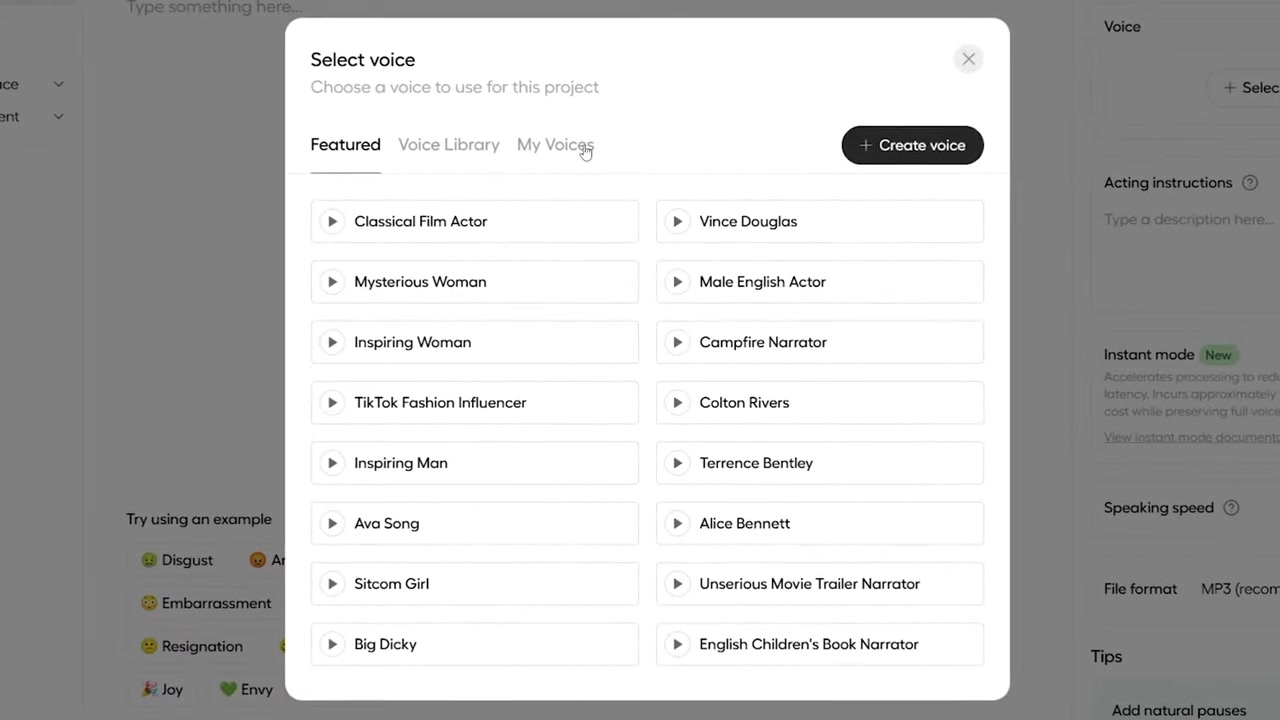
Caption: The Hume playground interface allows you to browse featured profiles or tap into the extensive voice library to find preset characters.
Inside the Playground, you can browse Hume's Featured Voices and the broader Voice Library. I tested several pre-made options:
- TikTok Influencer: Perfect for summer-themed, fast-paced talking.
- Inspiring Man: A warm, resonant voice suited for motivational content.
- Campfire Narrator: A rich, comforting, and slightly gravelly voice that is perfect for storytelling.
Testing the "Enhance Text" Feature
A major issue when using preset voices is that our own writing doesn't always match the natural cadence of the selected character. To solve this, Hume features an Enhance Text button.
I tested this by selecting the TikTok Fashion Influencer voice and typing a very formal, dry sentence:
"Hello, everybody. I have some of the latest clothes here from all of the local stores in the area. I am going to try them all on in this video so that you can see which ones you like."
When generated, the voice sounded alright, but the phrasing felt stiff and completely unnatural for a social media creator.
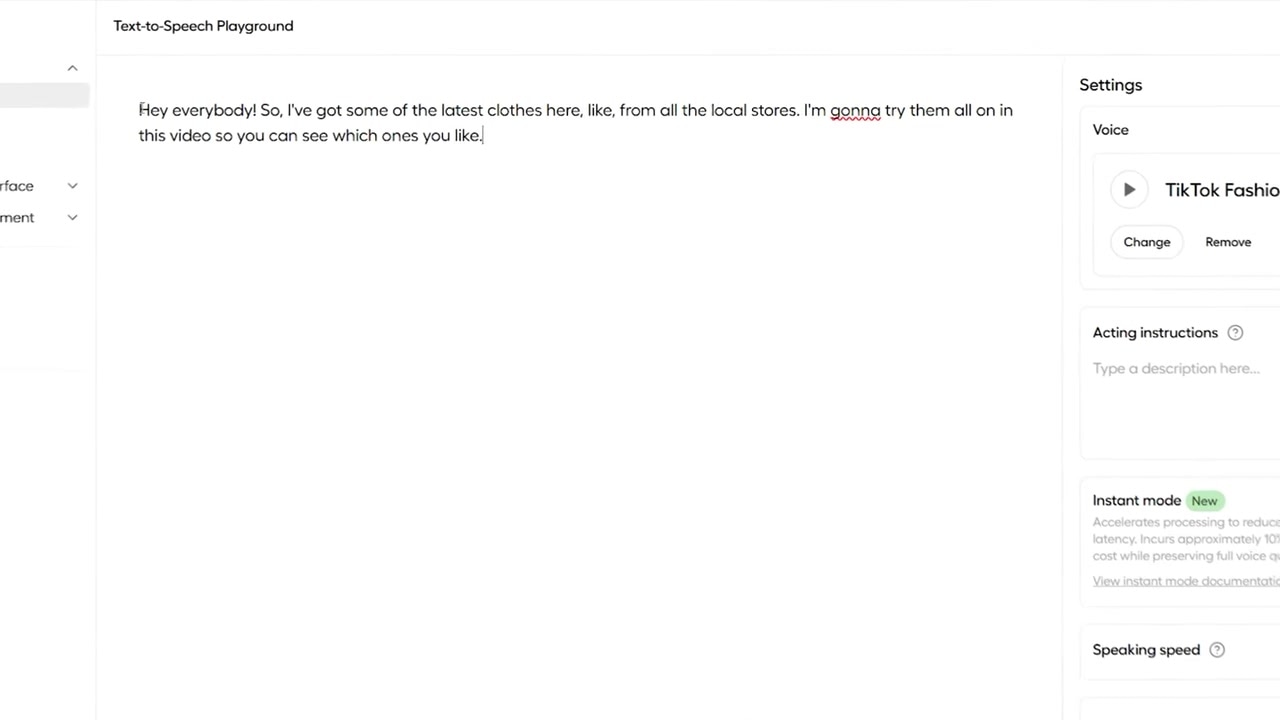
Caption: Clicking the 'Enhance Text' tool automatically adapts formal script language to match the tone and slang of the chosen character profile.
With a single click of the Enhance Text button, the AI recognized that this script belonged to an influencer character. It automatically rewrote the sentence to match her persona:
"Hey, everybody. So, I've got some of the latest clothes here, like, from all the local stores. I'm gonna try them all on in this video so you can see which ones you like."
When I played the revised version, the voice instantly became expressive, inserting perfect conversational pauses, casual slang, and natural inflections.
How to Create a Custom Voice in Hume Octave
If you want to generate a unique custom voice rather than using a pre-made preset, the process is incredibly straightforward and takes less than 10 seconds.
Step 1: Write Your Script
In the voice creation menu, type the exact text you want your generated voice to read. For this test, I used a radio weather update:
"Today's weather will be partly cloudy with temperatures around 70 degrees."
Step 2: Use the "Auto-Generate" Prompt Tool
Rather than spending several minutes manually writing a word-by-word description of what the voice should sound like, you can simply click the Auto-Generate button next to the prompt area.
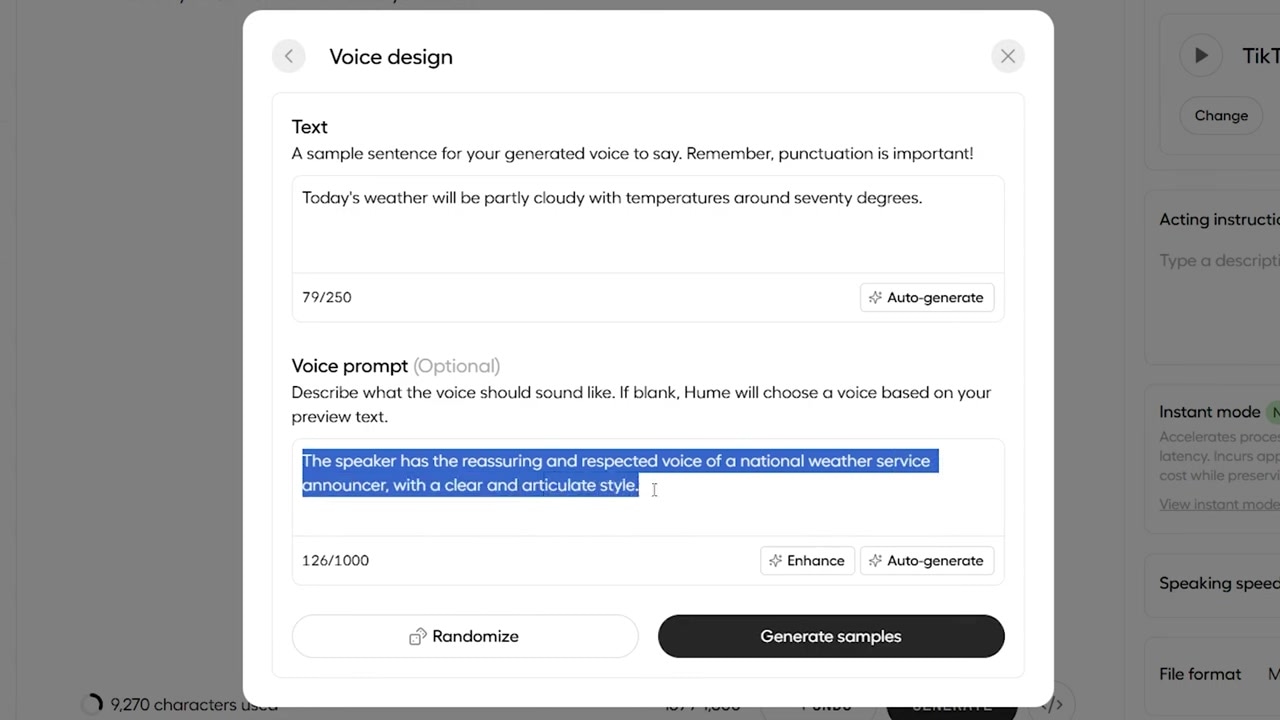
Caption: By inputting a basic script and clicking 'auto-generate', the LLM interprets the text to build a highly detailed descriptive voice prompt.
The AI analyzed my weather script, realized it was designed for a broadcast format, and instantly wrote this highly descriptive prompt:
"The speaker has the reassuring and respected voice of a national weather service announcer, with a clear and articulate style."
Step 3: Customize the Description (Optional)
If you want to tweak the style, you can manually type changes directly into the prompt box. For example, I typed a news broadcast script and added: "with a British accent" to the end of the auto-generated description.
Step 4: Generate and Save
Click Generate Samples. Within 10 seconds, the engine yields three distinct, high-quality audio variations to choose from. Once you select your favorite sample, name the voice and hit Save Voice to store it in your library for future projects.
The Ultimate Emotion Test: Joy, Anger, and Sarcasm
To truly put Hume Octave through its paces, I wanted to see if the LLM could read a completely flat, neutral script, understand the emotional weight of rewritten text, and apply those emotions accurately without any manual tuning on my end.
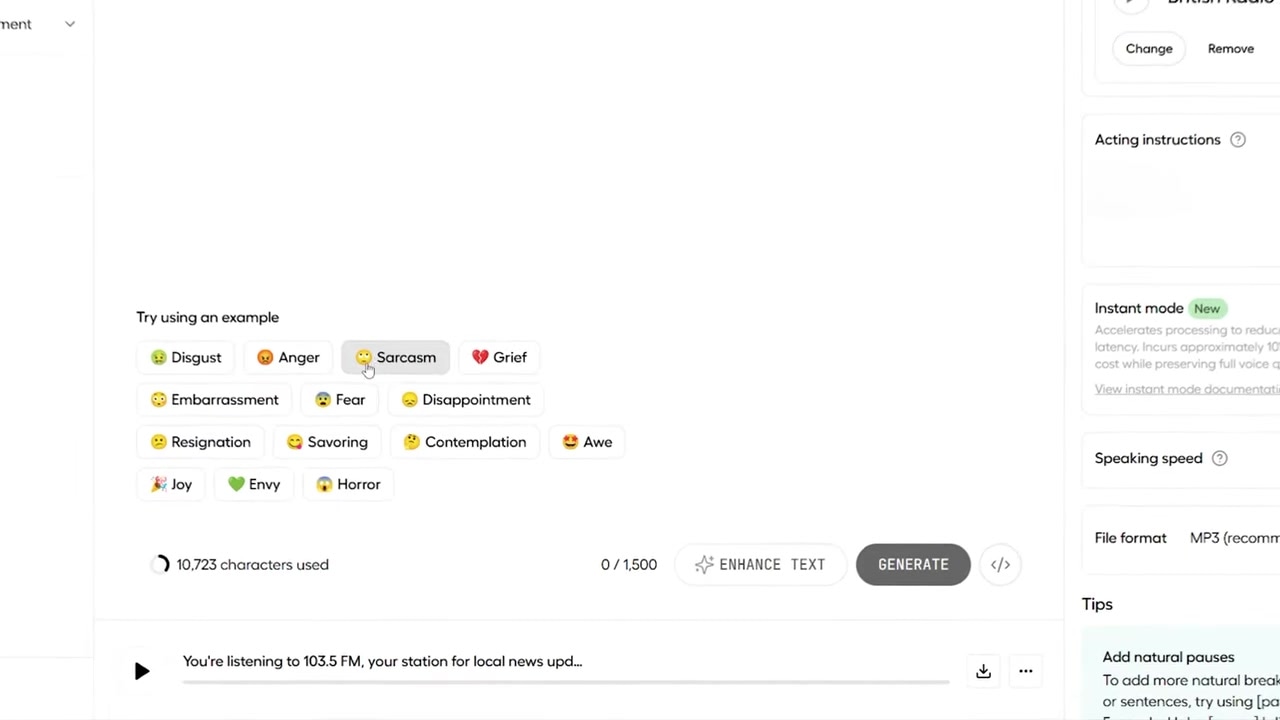
Caption: Selecting pre-defined emotion prompts like joy, anger, or sarcasm forces the speech-language engine to instantly shift its contextual delivery.
Using a saved custom presenter voice, I used Hume's emotional prompt buttons to test three completely different scripts:
1. The "Joy" Test
- The Script: "Life is beautiful, amazing. One just wants to hug everyone. Every single moment feels magical..."
- The Result: The voice became bright, breathy, and highly enthusiastic, perfectly matching the uplifting tone of the text.
2. The "Anger" Test
- The Script: "Oh, coming from you, that's rich! I can't believe the nerve, lecturing me about responsibility..."
- The Result: The generated audio was genuinely aggressive. The pace quickened, the tone dropped, and it sounded exactly like an angry speaker confronting someone in real life.
3. The "Sarcasm" Test
- The Script: "Oh, yes. Because clearly, I've nothing better to do than fix your mistakes, again..."
- The Result: This was incredibly impressive. The AI delivered a slow, snarky, dripping-wet sarcastic performance that usually requires hours of painful manual speech-editing to achieve in other apps.
Other Contextual Stress Tests I Ran
I also tested how the model handled other complex emotional cues across different scenarios:
- Grief/Sadness: "The house feels so empty now. I keep expecting to hear his footsteps..." (The AI delivered a quiet, slow, and somber performance with realistic pauses).
- High-Stakes Panic: "Attention all passengers. Due to engine issues, prepare for emergency landing..." (The engine matched the urgency with a tense, authoritative, yet highly alarmed cadence).
- Excitement: "I just booked a one-way ticket to Paris!" (The voice spiked with authentic high energy and nervous laughter).
Pricing and Character Limits
Hume Octave is incredibly accessible, whether you want to test the waters for free or require a budget-friendly paid tier for high-volume content creation.
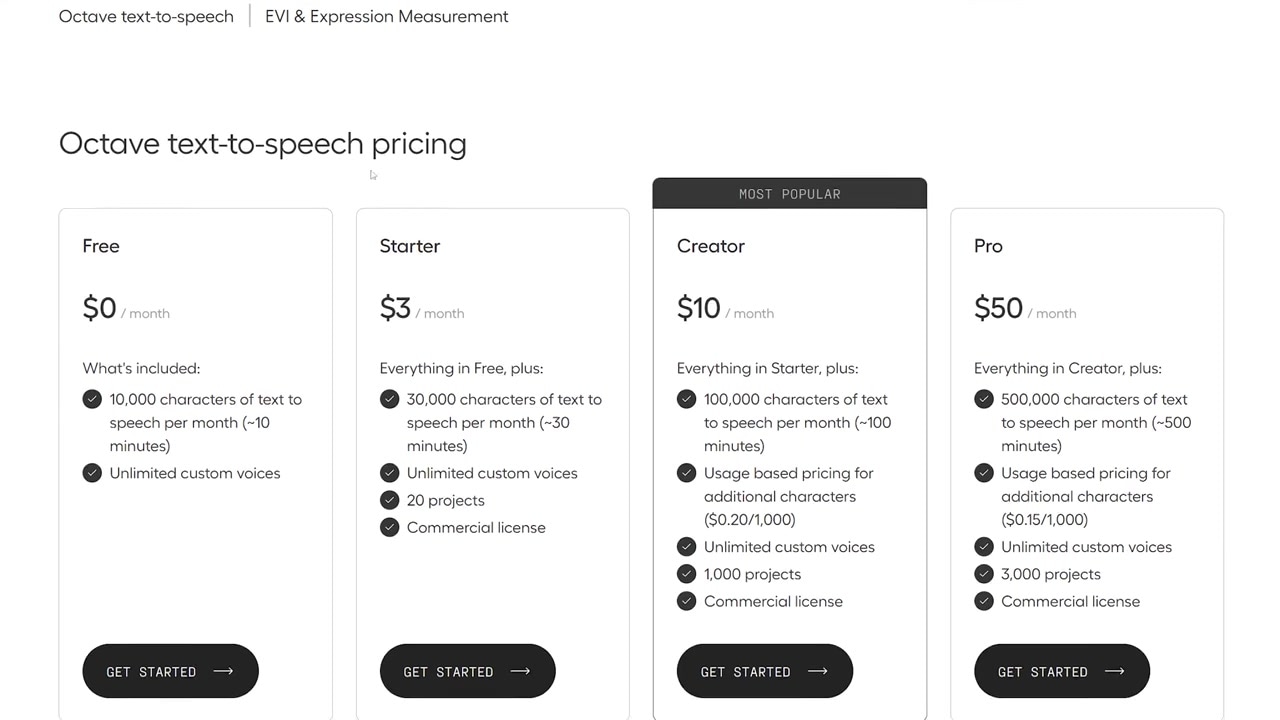
Caption: Hume's pricing dashboard details the free allocation of 10,000 characters and the starter tier pricing starting at just $3 per month.
- Free Tier: Get started with 10,000 free characters per month (approximately 10 minutes of audio) and enjoy unlimited custom voice creations.
- Starter Plan: Starts at just $3 per month, which unlocks 30 minutes of text-to-speech generation, with pricing scaling up affordably from there depending on your needs.
(Note: Pricing and limits are subject to change; make sure to verify current plans directly on the official Hume AI website).
Frequently Asked Questions
Is Hume Octave completely free to use?
Yes, Hume AI provides a generous free tier that gives you 10,000 characters of text-to-speech per month along with unlimited custom voice generations.
How does Hume Octave compare to ElevenLabs?
Traditional tools like ElevenLabs require you to manually direct the emotion or accept a flat delivery. Because Hume Octave is an LLM, it reads the emotional context of your script and applies the exact tone (anger, sarcasm, panic, joy) automatically, saving you massive amounts of manual editing time.
Can I generate custom voices with accents?
Absolutely. You can use the text-to-speech prompt area to type in specific vocal attributes, such as "with a British accent," and the model will generate highly realistic samples matching your request.
The Verdict: Should You Use Hume Octave?
If you are tired of stiff, robotic AI voices or wasting hours manually styling phonetics, Hume Octave is a game-changer. By treating voice generation like a large language model rather than a standard text-to-speech tool, Hume has unlocked incredibly lifelike delivery that is contextually aware of emotional plot twists.
For creators, storytellers, and developers looking to produce high-emotion audio quickly, Octave is highly recommended.
Try it here: Try Hume Octave →