The Best AI Character Consistency Tool for Indie Filmmakers

Last updated: 8 October 2026
Author: Greg Preece — I cover AI video tools and practical creator workflows.
I've made video for a living for ten years and I run a YouTube channel past 130,000 subscribers. Here's the tool I'd point a solo filmmaker at when the same character has to survive every shot of a short.
For a solo filmmaker holding one character across every shot, Seedance 2.5 is the right pick, because you can hand it up to 30 reference images in a single generation and it builds the shot from those rather than from your description alone.
Most tools let you describe a character. Seedance 2.5 lets you show it instead, and show it 30 times over. Build an image character sheet of your character first, then feed that sheet in every time you generate a scene.
In short
Seedance 2.5 takes up to 30 reference images, 10 video clips and 10 audio clips in one pass. Build a character sheet first and feed it into every scene generation. The model holds a subject steadily inside a single generation. Across separate generations the character sheet is what does the holding, not the model.
What's on this page
- Who this is for, and who it isn't
- The problem with shot 2
- Why Seedance 2.5 solves it
- The character sheet method
- What I found using Seedance
- Where Seedance 2.5 falls short
- What it costs
- Getting started
- How I put this together
Who this is for, and who it isn't
This is for you if you're making a narrative short on your own, your character appears in more than a handful of shots, and you've already watched a face drift into somebody else's between generations.
It isn't for you if you only need one hero shot, because almost anything will hold a character for a single generation and you don't need a method for that. And it isn't for you if you need 4K out of the box, for reasons you'll read below.
The problem with shot 2
The difficulty isn't making a good shot. It's making a second one that belongs in the same film.
One filmmaker on Xput it exactly right while talking about what he looks for in a tool. "for editing I still care more about whether shot 2 looks like shot 1".

The reference capacity is the argument. From ByteDance's own Seedance 2.5 announcement, captured 8 October 2026.
Why Seedance 2.5 solves it
Seedance 2.5 takes references rather than adjectives. ByteDance says you can put up to 30 images, 10 video clips and 10 audio clips into a single generation. The model reads what sits in all of that material, from composition to costume, and applies it as instructed.
On its own that's a claim about one generation. ByteDance also says that in multi-character shots the model can preserve the appearances of several characters while keeping each subject stable. That's the part that matters for a scene with two people in it.
The routes into the model are what make the method work. There are four of them.
- text to video
- first frame to video
- first and last frame to video
- omni reference, which takes images and video and audio together
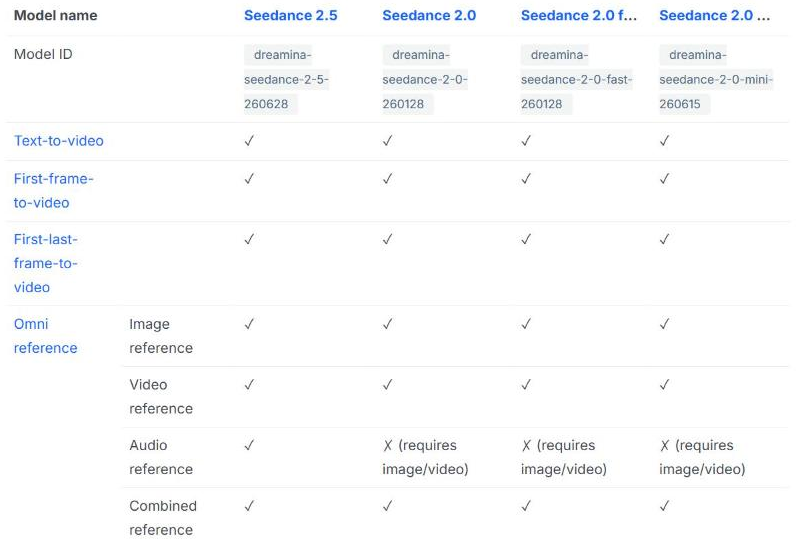
The routes into Seedance 2.5, and how they compare with the 2.0 models. From ByteDance's own developer documentation, captured 8 October 2026.
The character sheet method
This is the half of the recommendation that isn't the model.
Generate an image character sheet of your character before you generate any video. Show the face from the front and the side, show the whole body, and show the costume you'll actually shoot in. Treat the sheet the way a production designer treats a reference board.
Then feed that sheet into Seedance when you generate each scene. Every shot starts from the same pictures, so every shot is anchored to the same face rather than to your memory of how you described it last time.
Without the sheet you're relying on the model to remember something it was never given. With it, you're giving the same evidence to every generation. That's why the method is part of the recommendation and not a tip at the bottom. Seedance 2.5 is where that sheet goes to work.
What I found using Seedance
I've run Seedance inside Higgsfield rather than directly from ByteDance. During a 30-day ad campaign test I ran a full generation run to evaluate the output quality of Higgsfield's video engines, Seedance 2.0 among them, with Claude Fable 5 managing the run. My write-up of that campaign covers what came out of it.
My view from that run is that Seedance 2.0 produces strong cinematic physics and camera motion. Seedance 2.5 landed on Higgsfield after that.
Where Seedance 2.5 falls short
It doesn't do 4K, and Seedance 2.0 does. ByteDance's own capability table lists 480p, 720p and 1080p for 2.5, and lists 4K for 2.0. For a filmmaker planning a finish that's a real step backwards on the newer model, and it's the first thing I'd check against your delivery spec.
ByteDance names its own weak spot. It says there's still room for improvement on the physical plausibility of complex motions, and on the stability of scenes where several subjects interact. A two-hander where people touch is the hardest thing you'll ask of it.
What it costs
Seedance reaches most people through a platform that resells it rather than directly, so what you pay depends on where you run it. Pricing is per generation, and it moves with clip length and resolution, which means a 30-second 1080p shot and a 5-second 480p test are not remotely the same purchase.
Higgsfield is where I run it, and my page on what Higgsfield charges carries the current figures.
Getting started
- Build the character sheet first, in an image tool, before you open any video model. Cover the face from the front and the side, the whole body, and the costume.
- Run one scene as a test at low resolution, with the sheet attached. You're checking whether the face survives, not whether the shot is beautiful.
- Generate your real scenes with the same sheet attached every time. Never describe the character in words and leave the sheet out, because that's the generation that drifts.
- Check your delivery spec against the resolution ceiling before you commit to the model for a whole film.
You can run Seedance through Higgsfield and feed a sheet in on the very first generation.
How I put this together
The capability and consistency claims here come from ByteDance's own Seedance 2.5 announcement and developer documentation, read on 8 October 2026.