The Best AI Music Generator for YouTube Creators
Last updated: 24 September 2026
Author: Greg Preece — I cover AI video tools and practical creator workflows.
I have made video for a living for 10 years and run a YouTube channel of over 130,000 subscribers, and I have built and edited tracks in ElevenLabs Music. Here is why it is the one I would point a monetising creator at.
If you make YouTube videos for a living, ElevenLabs Music is the right tool. It is an AI music generator that writes full tracks with vocals and instruments from a description. The reason it beats the rest for this job is that you can go back into a finished track and rebuild one section, so a chorus that is nearly right stops being a reason to generate the whole thing again.
There is one thing to check before you commit, and it has nothing to do with quality. ElevenLabs splits the right to use a track commercially from the right to release it to streaming platforms, and those two rights sit on different tiers.
In short
- Best for a creator making a lot of videos who wants control over a track rather than another roll of the dice.
- You can edit one block of the timeline and regenerate only that part.
- Drag the edges of a section and the vocal stretches to fit, which almost nothing else does.
- Upload footage and it will score it for you.
- Commercial use and release to Spotify and Apple are different permissions on different tiers. Check yours before you push a video anywhere but YouTube.
- Changing an instrument is a two-step job and the obvious way does not work.
On this page
- Who ElevenLabs Music is for
- The problem music causes a monetising channel
- Why ElevenLabs Music solves it
- What I found using ElevenLabs Music
- Where ElevenLabs Music falls short
- What else I considered
- What ElevenLabs Music costs
- Getting started
- Method and freshness
Who ElevenLabs Music is for
This is for you if any of these fit.
- You publish often and need a track per video rather than one a quarter.
- You want a specific thing, and generating until something lands is wasting your afternoon.
- You have been paying a library subscription and resent it.
- Your videos get cut down and reposted, so the same track ends up in several places.
This is not for you if any of these fit.
- You need one piece of music, once. A library track is cheaper and faster.
- You are releasing the music itself as your product. That is a different job and a different tier, and you should read the rights line below before you start.
- You want a specific real artist's sound. It will not do that, and you would not want the letter that follows.
- You work entirely in a video editor and will not open a second tool.
The problem music causes a monetising channel
Music is the part of a video that can cost you the video. Everything else you get wrong is a quality problem. Music is a rights problem, and it arrives after you publish, as a claim against something already earning.
So most creators end up paying a monthly library subscription for the right not to think about it. That works until the video moves. You cut the same piece into a short, it goes out as a podcast, a client reposts it. Each of those is a different use, and the licence you were relying on was written for one of them.
That is the real cost, and it is not the subscription. It is that you stop repurposing, because checking is more effort than the repost is worth.
I should be straight about the evidence here. I am describing this from my own position as someone who publishes on YouTube for a living, not from a stack of job postings. There was one posting on Upwork in the week to 14 August for an AI song producer at 20 to 50 dollars an hour, and one posting is not a trend. The problem is real because it is structural, not because a lot of people advertised for it.
Why ElevenLabs Music solves it
You edit a section instead of regenerating the track. This is the whole argument. Pick a block on the timeline, change what it should be, and rebuild just that part. The rest of the track stays exactly as it was. Every other generator I have used treats a track as one object, so a good song with a bad bridge is a good song you throw away.
The vocal bends to fit the edit. Drag the edge of a section to make it longer and the delivery stretches and slows to fill it. That means you can cut music to picture rather than cutting picture to music, which is the right way round when the video already exists.
It will score your footage. Upload the video and it generates a track built against what is on screen. For a weekly publishing schedule that is the difference between 40 minutes and 4.
The training data is licensed. ElevenLabs says on its own page that Music v2 is trained on licensed data only and that every track you generate is cleared for commercial use. For anyone monetising, that sentence is the reason to be here at all.
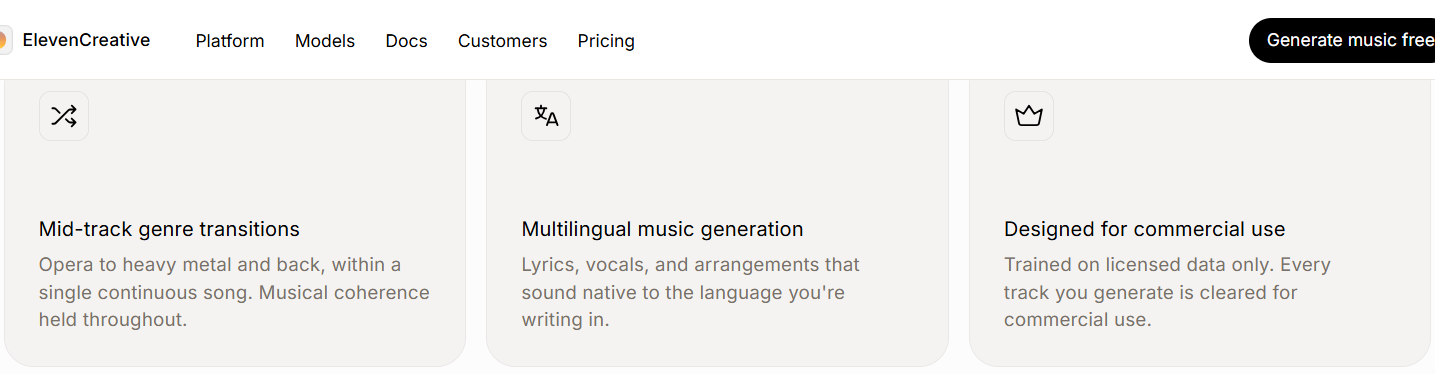
ElevenLabs' claim about licensed training data and commercial clearance, on its Music page. Captured 7 September 2026.
What I found using ElevenLabs Music
Changing an instrument takes two edits, not one. I typed heavy drums into the overall style box and expected the track to change. It did not. You have to set the style at the project level and again inside each block on the timeline. Nothing tells you this and it cost me a while to work out.
Rewriting a lyric works better than rewriting a prompt. Editing the words inside one highlighted block and regenerating that block gave me what I wanted far more reliably than describing the change and hoping.
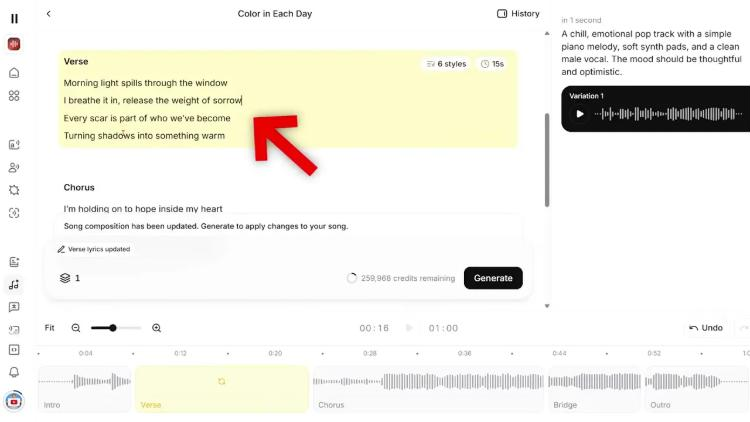
One verse highlighted and its lyrics rewritten, with only that block set to regenerate on the timeline underneath.
Stretching a section is the feature to learn first. Dragging the timeline edges and letting the vocal slow to fit is the thing that made it usable for cutting to video rather than a novelty.
The full walkthrough is in ElevenLabs Music — generator tutorial and section editing.
Where ElevenLabs Music falls short
Commercial use and streaming release are not the same permission. ElevenLabs' own page says every track is cleared for commercial use. Its tier table says something more precise. The entry paid tier is marked commercial, no streaming, and release to Spotify and Apple is switched off. That right starts at the Creator tier.
Plenty of tools gate rights by plan and that on its own is not a finding. What is worth knowing is where this particular line falls, because commercial and streaming sound like the same thing and are not. Putting a track under a YouTube video is fine on the entry paid tier. Pushing that same video out as a podcast episode, or releasing the track itself, is not.
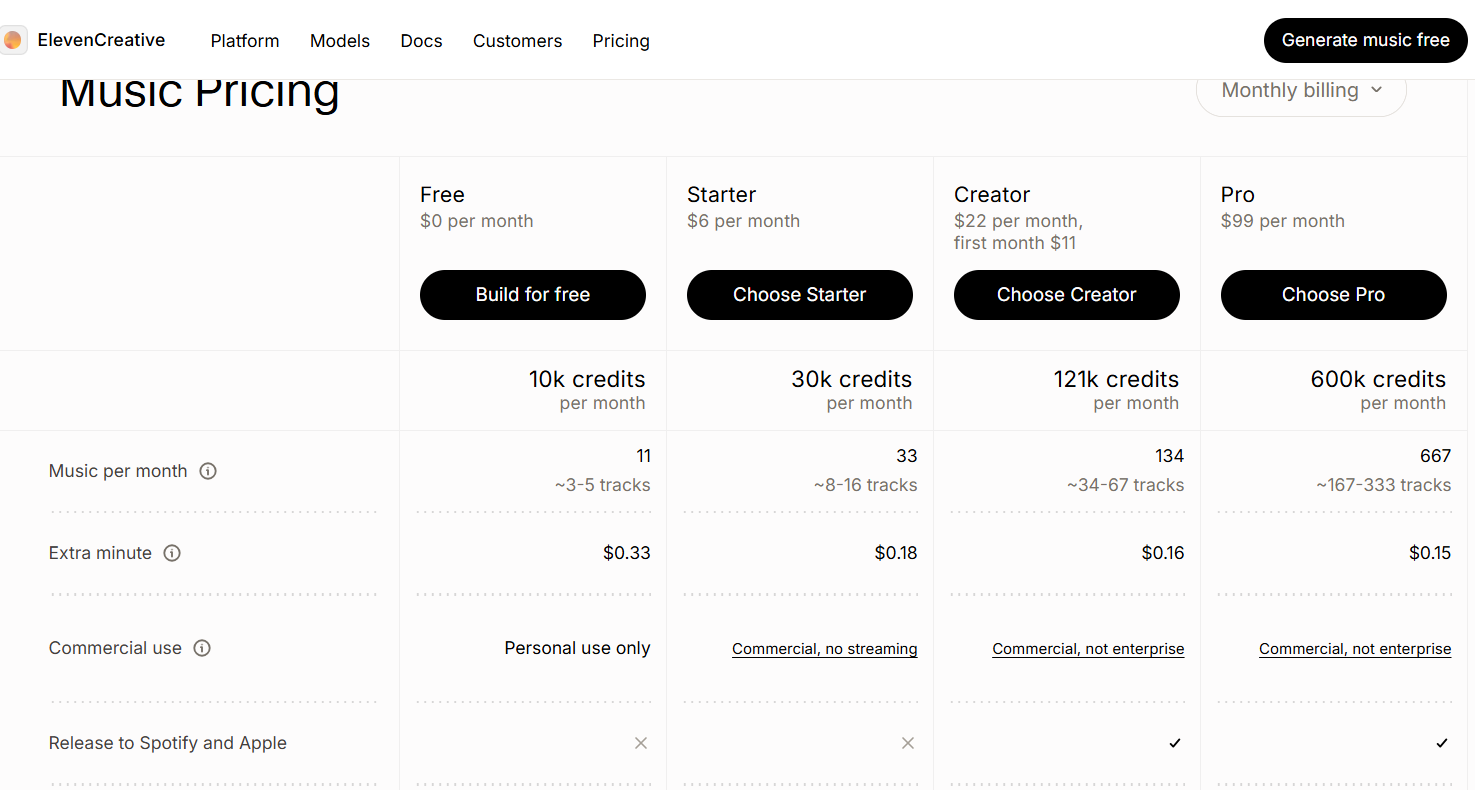
The commercial use row and the release row on ElevenLabs' own Music tier table. Captured 7 September 2026.
The free tier is personal use only. Worth saying because people evaluate on free and then publish. Anything you make there cannot go on a monetised channel.
Style changes are unintuitive. The two-step business above is the single thing most likely to make you give up in the first hour.
Support came up twice and neither was answered publicly. Two mentions is not a pattern and I am not going to pretend it is. It is worth knowing before you depend on it for a weekly schedule.
What else I considered
Suno is the stronger pick if you want a finished song fast and are not going to edit it. Check how many finished tracks each Suno plan lets you download in a month before you commit. That download limit is what decides whether Suno works for a channel. It is built around generating rather than revising, which is the opposite trade to the one above.
Udio sits in similar territory and is worth a look if vocals are the thing you care most about, though the rights position is the first thing to read rather than the last.
A library subscription is still the right answer for a channel that publishes monthly. Generating music has a learning cost, and below a certain volume you will not earn it back.
There are other music generators I do not cover. This is the pick for a creator publishing often and editing what they get, not a survey.
What ElevenLabs Music costs
ElevenLabs sells monthly plans with a free tier and a credit balance, and the tiers differ in rights as well as volume, which is unusual and matters more than the volume does. Current figures are on ElevenLabs.
Getting started
- Work out where the finished video ends up before you choose a tier. If it only ever goes on YouTube, the entry paid tier covers you. If it becomes a podcast, it does not.
- Generate one track the ordinary way, from a description, so you have something to work on.
- Rebuild one section of it. Change the lyric in a single block and regenerate that block only. This is the thing you are buying.
- Drag that section longer and listen to the vocal stretch. If that lands for you, it will change how you cut.
The free tier is enough for steps 2 to 4, as long as nothing you make there gets published. You can start at Try ElevenLabs →.
Method and freshness
The first-hand parts of this page come from my own work in ElevenLabs Music, linked above. ElevenLabs' own Music page was read on 27 August 2026 to confirm the licensed training data claim and the tier rights, and both screenshots are from that reading.