The Best AI Voice Generator for Freelance Voiceover Work
Last updated: 28 August 2026
Author: Greg Preece — I cover AI video tools and practical creator workflows.
I have run my own scripts through ElevenLabs v3, including the sound effect tags that took me 3 goes to get right. I have been making video for 10 years and my channel is past 130,000 subscribers. This page is for people who deliver voiceover to clients for money.
If you take voiceover jobs where the client sends a script and expects a round or two of notes, ElevenLabs is the right choice, mainly because a note like warmer on the second line becomes a tag edit rather than another hour at the mic.
Eleven v3 is their most expressive model and it takes direction inside the text itself. You write the delivery into the script, generate, and send. When the note comes back you change the tag and render again.
The thing that decides whether you can use it at all is not the voice. It is the licence, and I have put that near the top of this page rather than the bottom.
ElevenLabs in short
ElevenLabs turns a written script into spoken audio, and Eleven v3 lets you direct the delivery with tags you type into the script. For a freelancer that matters because revisions stop costing you a recording session. The catch is the licence. The free tier carries no commercial rights at all, so the moment you invoice for the work you need a paid plan.
What is on this page
- Who ElevenLabs is for
- The problem freelance voiceover work has right now
- Why ElevenLabs solves it
- What I found using ElevenLabs
- Where ElevenLabs falls short
- What else I considered
- What ElevenLabs costs
- Getting started with ElevenLabs
- How I put this together
Who ElevenLabs is for
Use ElevenLabs if you recognise yourself in this list.
- You are paid per project to deliver finished voiceover from somebody else's script.
- Revision rounds are part of the deal and they eat the profit on a fixed fee.
- You want the delivery notes written into the script so the next version is a render rather than a session.
- You are on a paid plan, or you are willing to move to one before you invoice anybody.
Look elsewhere if any of these is true.
- You are selling your own voice as the thing the client is buying. That is a different product and this will not replace it.
- You want to stay on the free tier. It carries no commercial licence, so you cannot sell what it makes.
- You need the read to be word-perfect first time with no iteration. Tags are direction, not a guarantee, and I say below how many goes some of mine took.
The problem freelance voiceover work has right now
The work is funded and it is priced per job. It is a fixed fee, which means every round of notes comes out of your margin rather than the client's budget. That is the actual problem. Not recording the first version, which is the easy part. It is the note that says can we hear the third line a bit warmer, arriving 2 days later, when the mic is packed away and the room sounds different anyway.
Why ElevenLabs solves it
Eleven v3 takes direction as tags you type into the script. ElevenLabs groups them into emotions, delivery direction and human reactions. You write curious, whispers or sighs straight into the line, and the model performs it rather than reading the word out.
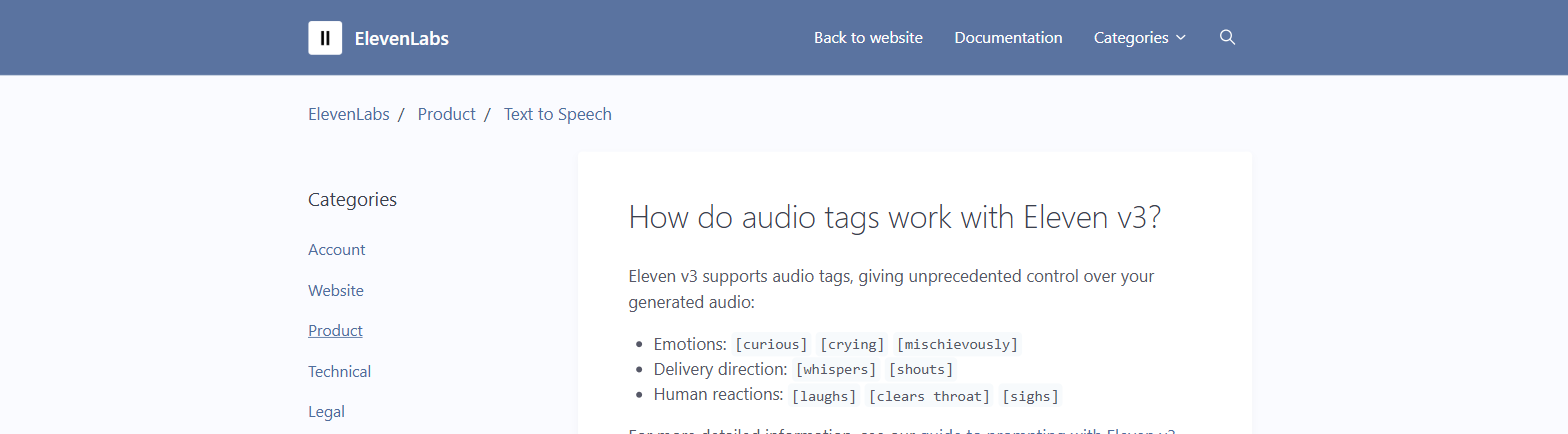
ElevenLabs' own help page listing the audio tag categories for Eleven v3. From help.elevenlabs.io, captured 7 September 2026.
That is what turns a revision from a session into an edit. The delivery lives in the script, so the script is the thing you keep. Change the tag, render, send.
It also means the note itself becomes easy to act on. A client who says warmer is asking for something you can put in brackets and try 3 ways in a minute, which is not true when warmer means driving back to a room with a mic in it.
ElevenLabs also publishes separate dialogue endpoints for scripts with more than one speaker, so a two-hander does not have to be assembled from separate takes.
What I found using ElevenLabs
I pasted a test script into the editor and worked with the tags directly rather than reading about them.
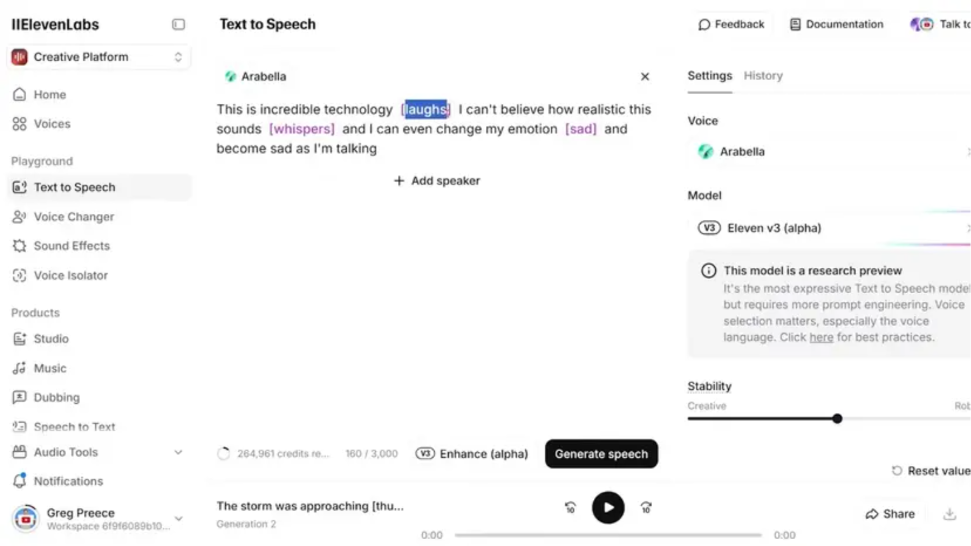
The tags sitting inside the script itself, which is what turns a revision into a text edit.
The thing that surprised me was how much the voice choice does. When I moved from V2 to V3 I found there is a science to picking the voice, and a tag will not rescue a bad pick. If the voice is calm, a shout tag does not make it shout.
Sound effect tags were the fiddly part. It took me 3 separate generations and a slight tag tweak to get the blend right. I have had that workflow come out well with applause, door creak and crowd sounds, but not on the first attempt.
Worth knowing before you quote a job on it. ElevenLabs - my v3 audio tags walkthrough
Where ElevenLabs falls short
Start with the licence, because it is the one that can cost you a job rather than an afternoon. ElevenLabs says the free plan does not include a commercial licence and cannot be used for any commercial purpose. It also says anything published from a free plan, or without being signed in, has to credit ElevenLabs in the title.
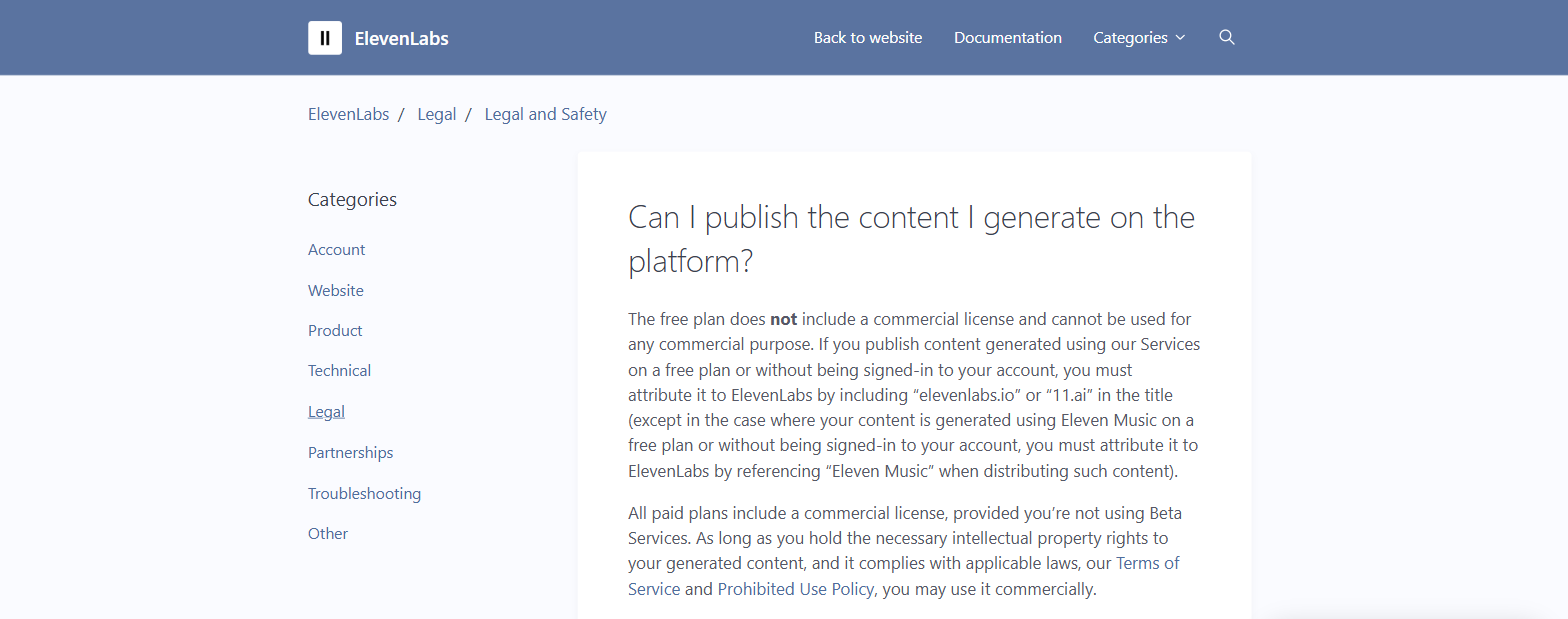
ElevenLabs' own help page on publishing generated content, setting out the free plan restriction and the condition attached to paid plans. From help.elevenlabs.io, captured 7 September 2026.
Read the second paragraph in that image twice. Paid plans include a commercial licence, provided you are not using Beta Services. That page does not say which features count as Beta Services. So if you are about to deliver client work made with something newly shipped, settle that question before you invoice, not after.
The tags are direction rather than a switch. 3 generations for one sound effect blend is fine when you are experimenting and annoying when you have quoted a fixed fee and the clock is the thing you are selling.
Pause control is fiddlier than it looks. Eleven v3 does not support the break tags that older models took, so pauses are done with punctuation and tags instead.
And if you have already made a professional clone of your own voice, check it before you build a job around v3. ElevenLabs' own guidance says professional voice clones are not fully optimised for v3 and points you at an instant clone or a designed voice instead.
What else I considered
Descript. I put both platforms' voice cloning through a side-by-side comparison and published it. The short version is that Descript earns its place when you are already editing in Descript and want to fix a line without re-recording it. ElevenLabs is the pick when generating the whole read is the job. ElevenLabs - versus Descript on voice cloning
Hume Octave. I have written about it and it is built around emotional delivery, which is the same problem v3 is aimed at. I have not run it against v3 on the same script though, so I am not going to tell you which one takes a note better.
What ElevenLabs costs
ElevenLabs has a free tier and paid monthly plans, and the usage is metered in credits. Current figures are on ElevenLabs.
Getting started with ElevenLabs
- Settle the licence before you quote. Free output cannot be sold, and if you publish it at all it has to carry ElevenLabs in the title.
- Pick the voice before you write a single tag. Choose one whose natural delivery is already close to the read the client asked for.
- Run one real script through before you take a paid job on it, and count how many generations each effect takes you. That number is your true rate.
- Keep the tagged script, not just the audio file. It is the thing that makes the next round of notes cheap, and it is the reason this beats a microphone for this kind of work.
You can try it on the free tier first at Try ElevenLabs →, as long as nothing you make there goes to a client.
How I put this together
The hands-on parts come from running my own scripts through Eleven v3 and writing up what happened. Everything about tags, models and licensing was checked against ElevenLabs' own help pages and documentation on 28 August 2026. I have not tested Hume Octave against v3 on the same script. The market rates come from 2 jobs posted on Upwork in August 2026.