Gling Pricing: Current Plans and What They Actually Include

Last updated: 3 October 2026
Author: Greg Preece — I cover AI video tools and practical creator workflows.
Prices checked weekly on each vendor's own pricing page.
What Gling costs
Gling costs $20 a month on Plus, $40 on Pro and $100 on Elite, and there's a free plan that edits 1 hour of footage a month. Pay for a year up front and every one of those prices halves. Plus becomes $10 a month, Pro $20 and Elite $50.
The allowance doesn't move when you do that, so the yearly plan is the same product for half the money.
Gling is a video editor that strips the silences, bad takes and filler words out of a recording and hands you back the cut. The free plan runs that same edit. It just won't let you take the result into Premiere, Final Cut or Resolve.
What's on this page
- Every current plan
- What each plan actually gives you
- Who each plan suits
- What I found using Gling
- How these figures are kept current
Every current plan
| Plan | Monthly | Annual, per month | Cost for the year | AI edited media a month | Export |
|---|---|---|---|---|---|
| Free | $0 | $0 | $0 | 1 hour | MP4 or MP3, with a watermark |
| Plus | $20 | $10 | $120 | 10 hours | No watermark, and XML to Premiere, Final Cut or Resolve |
| Pro | $40 | $20 | $240 | 30 hours | Same as Plus |
| Elite | $100 | $50 | $600 | 100 hours | Same as Plus |
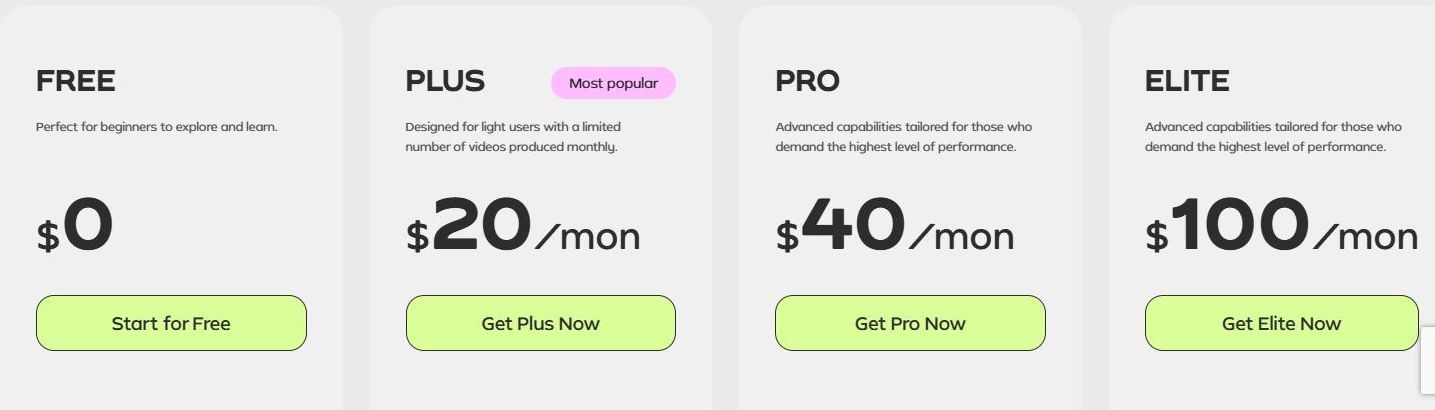
Gling's four plans on the monthly setting, read on gling.ai on 3 October 2026.
Every paid plan carries the same feature list. What you buy as you go up is hours, and on Pro and Elite you also get priority support.
What each plan actually gives you
Each paid plan states its allowance as hours of edited media OR number of words in videos you generate, or some combination of the two.
The free plan is where the real limit sits. It edits your footage and exports MP4 or MP3 with a watermark burned in. Gling's own help section says the free version can't export to Premiere, Final Cut or Resolve. For most people that export is the entire reason to use Gling, so the free plan does the work and then keeps the result.
Premium support starts at Pro. Plus doesn't include it, which is worth knowing if you're on a deadline and something won't render.
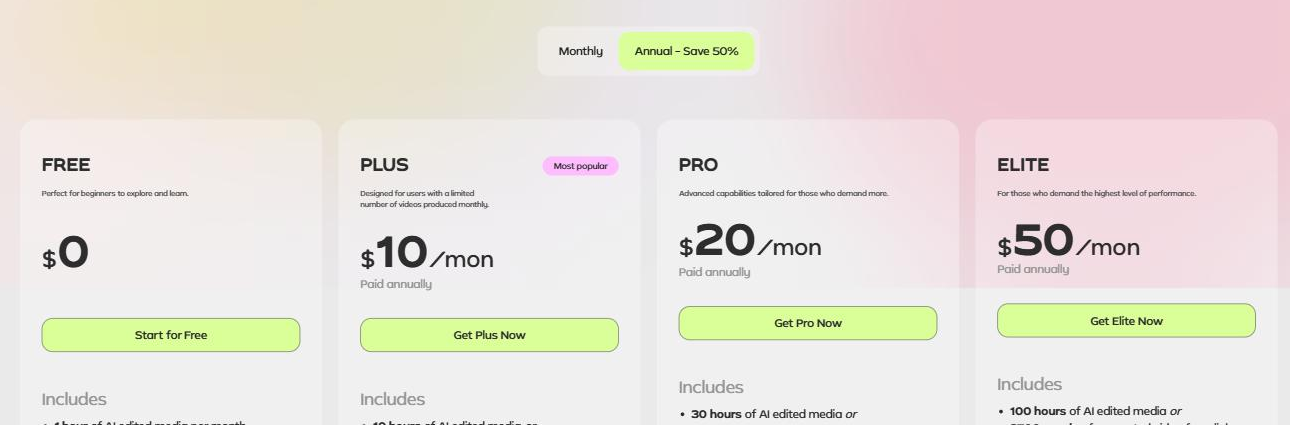
The same four plans with annual billing selected, read on gling.ai on 3 October 2026.
Switching to annual changes the price and nothing else. The hours, the exports and the features are identical on both billing terms.
Who each plan suits
On annual billing Plus works out at $1 for each hour of footage you put through it, Pro at 67 cents and Elite at 50 cents. Pay monthly and all three double. If you already know you'll still be using Gling in six months, the yearly plan is the obvious choice, because nothing else about it is different.
Plus at 10 hours a month covers roughly 2 hours of recording a week, which fits one weekly video with the takes left in. Pro at 30 hours suits you if you shoot long and cut hard, or if you're running more than one channel. Elite at 100 hours suits a team putting several recordings a week through Gling, and at 50 cents an hour that tier is the cheapest footage on the page.
The thing to watch is that shared allowance. Two unrelated jobs draw on the same monthly figure, and only hours are measured in something you can plan against. The moment you start generating video from a link, the hours you have left stop being a number you can predict. If you only ever use Gling to cut recordings, which is what most people buy it for, the problem never arises. You can see where it fits alongside a Premiere workflow in my piece on the best AI rough cut tool for Premiere Pro, and you can start on the free plan from Gling's own site.
What I found using Gling
I used Gling to do the bulk of the editing on a video that went on to pass 200,000 views. The setting that changed the result most was speech enhancement. I ran the same clip with it switched off and then on, and the room echo and background noise that were obvious in the first pass had gone in the second.
The export is the part that matters for anyone already working in an editor. It writes an XML for Premiere, Final Cut or Resolve with the cuts preserved, so the rough cut lands in your timeline rather than as a flat file you have to cut again. The full walkthrough is in how I use Gling to cut hours out of a YouTube edit.
How these figures are kept current
Every figure here was read on gling.ai on 3 October 2026 and covers both monthly and annual billing. Prices are checked weekly on the vendor's own pricing page, and this page is rebuilt when one of them moves.