I Tested Leonardo AI vs Higgsfield: The Better Tool for Brands
Update, 25 August 2026: This comparison originally named DALL-E 3 and Google Imagen 3. Both have since been retired - DALL-E 3 on 12 May 2026, Imagen 3 on 10 November 2025 - and the models named below are the current replacements on each platform.
I Tested Leonardo AI vs Higgsfield: The Better Tool for Brands
Last updated: July 2026
Author: Greg Preece — I test AI video tools hands-on to help creators and brands build attention-grabbing content without wasting budget.
Creating attention-grabbing marketing videos is essential for scaling a business, but choosing the wrong AI platform can easily drain your budget. In this comparison, I break down my hands-on experience using Leonardo AI and Higgsfield so you can see which one actually drives conversions and saves you time.
TL;DR: While both platforms offer access to industry-leading visual models, Higgsfield wins the battle for brand content hands down. Leonardo AI’s Blueprints offer decent static image options, but Higgsfield's Marketing Studio, automated Supercomputer, brand memory, and native app integrations (like HubSpot and Claude MCP) make it a complete powerhouse for automated, high-converting video campaigns.
Table of Contents
- Quick Comparison: Leonardo AI vs Higgsfield
- The Baseline: Industry-Standard AI Models
- Tool 1: Leonardo AI (Blueprints)
- Tool 2: Higgsfield (Marketing Studio)
- Next-Level Automation: Higgsfield Supercomputer & Connectors
- Feature-by-Feature Comparison Table
- The Verdict: Which One Should You Buy?
- Frequently Asked Questions
Prefer to watch? Here's the video. Prefer to skim? The full breakdown is below.
Quick Links
- Higgsfield: Try it here: Try Higgsfield →
- Leonardo AI: Try it here: Try Leonardo AI →
The Baseline: Industry-Standard AI Models
Before diving into proprietary features, let’s clear up a common misconception about underlying tech models.
You do not need to worry about which website features which raw model. Both Leonardo AI and Higgsfield provide access to the best image and video generators on the market. Whether you need a current image model such as GPT Image 2 or Nano Banana Pro, or Kling or Runway for video, both platforms have them.
Since the base visual quality is virtually identical, the real battle is about utility: which features actually help you grow your brand, market your products, and make sales faster?
Tool 1: Leonardo AI (Blueprints)
Leonardo AI approach to business content centers around Blueprints. These are pre-configured workflows designed to simplify creation so you don't have to fiddle with complex prompt engineering.
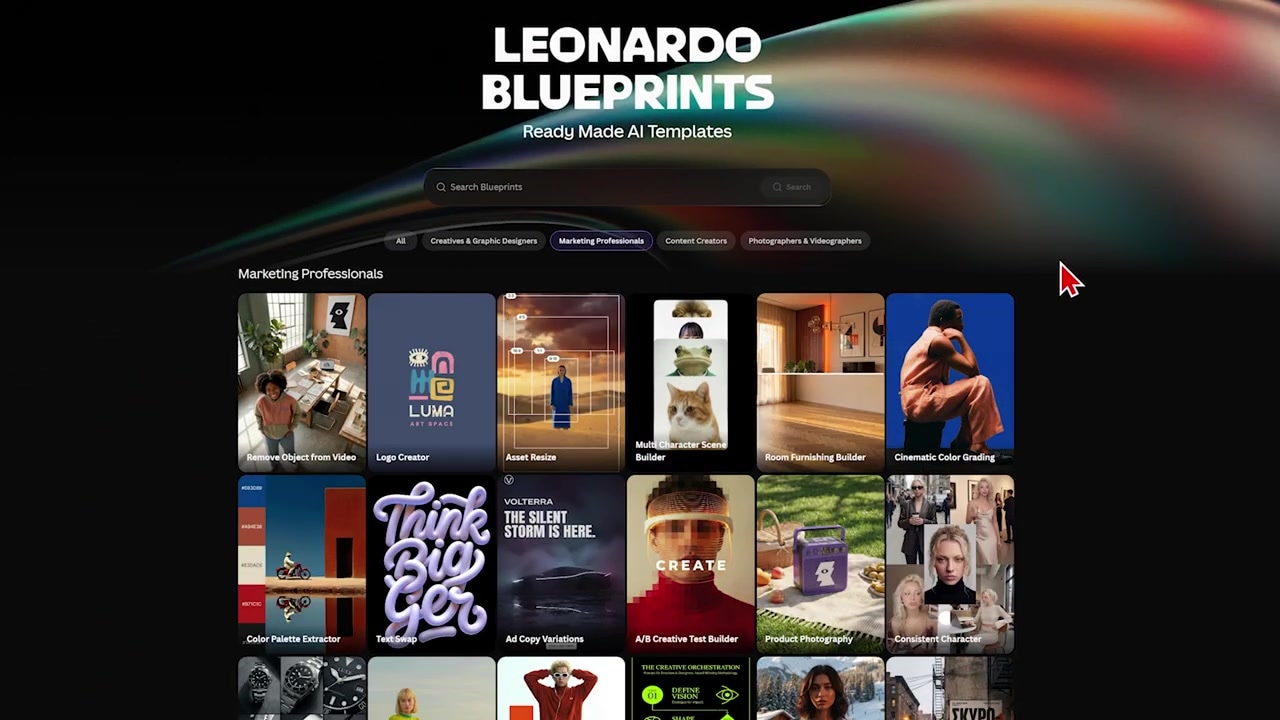
Caption: The Blueprints panel inside Leonardo AI, featuring guided templates like the Logo Creator and Product Photography presets.
Inside the Marketing Professionals section of the Blueprints library, Leonardo AI offers 24 presets aimed at business use. These include:
- Logo Creator for generating branding marks.
- Product Photography to drop your product into cinematic background scenes.
- Product Spin which creates a 360-degree rotating visual effect from a static product image.
- Model Holding Product to composite your product into a model's hands.
Who It's For
Leonardo AI is best suited for solo creators or businesses that primarily need static, cinematic product photography mockups or very simple rotating product animations.
Try it here: Try Leonardo AI →
Step-by-Step: Testing the "Model Holding Product" Blueprint
To see how these work in practice, I tested the Model Holding Product blueprint using an image of a custom drinks can from one of my previous workflows:
- Open the Blueprint: Navigate to the Blueprints tab on Leonardo AI and select "Model Holding Product."
- Upload Your Product: Upload your static product image (in my case, the drinks can).
- Upload the Model’s Reference: Upload an image of yourself or a model to represent the person in the final scene.
- Generate: Press generate. Within 10 to 20 seconds, Leonardo AI produces three customized variations.
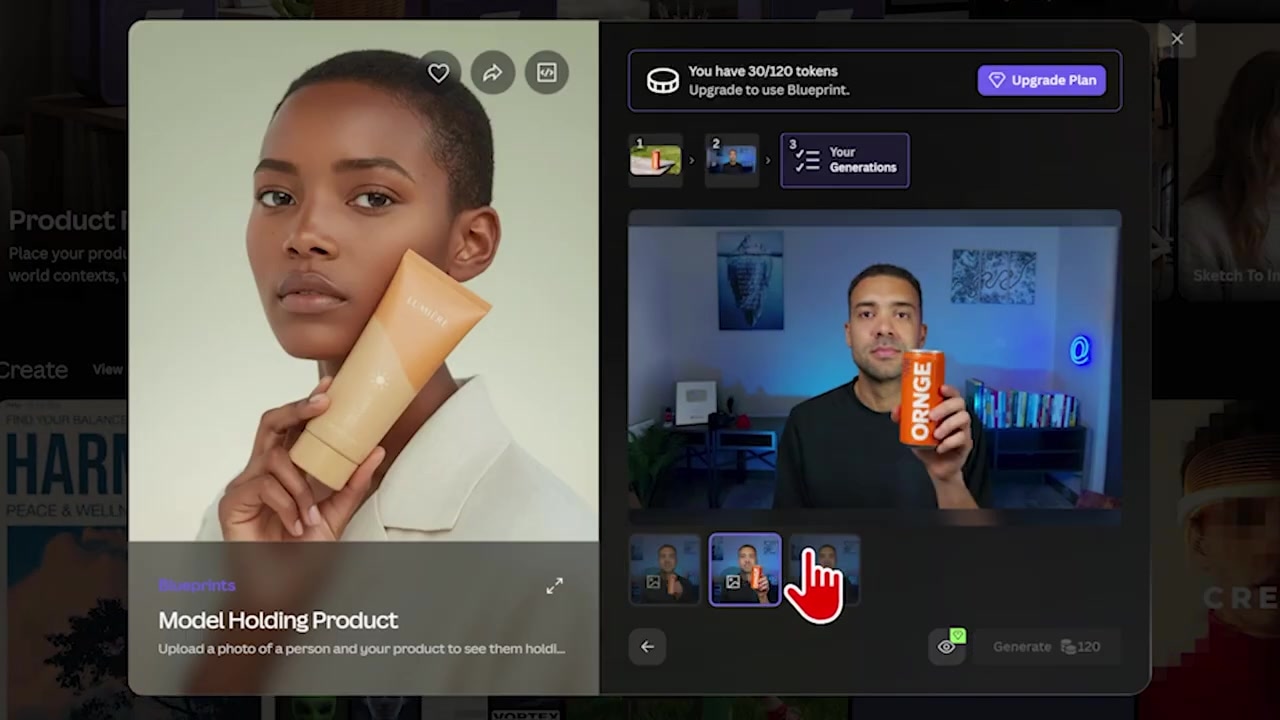
Caption: Three generated variations showing the uploaded model successfully holding the drink can product using Leonardo's template.
The Catch: While these templates work well for static imagery, Leonardo AI’s brand features mostly stop there. Aside from standard product photos and basic spinning effects, there isn’t much depth to help you scale video campaigns or automate marketing outreach.
Tool 2: Higgsfield (Marketing Studio)
While Leonardo AI leans heavily on static design, Higgsfield is built from the ground up for high-impact visual marketing. Right from the homepage, the positioning is laser-focused on ads and business campaigns.
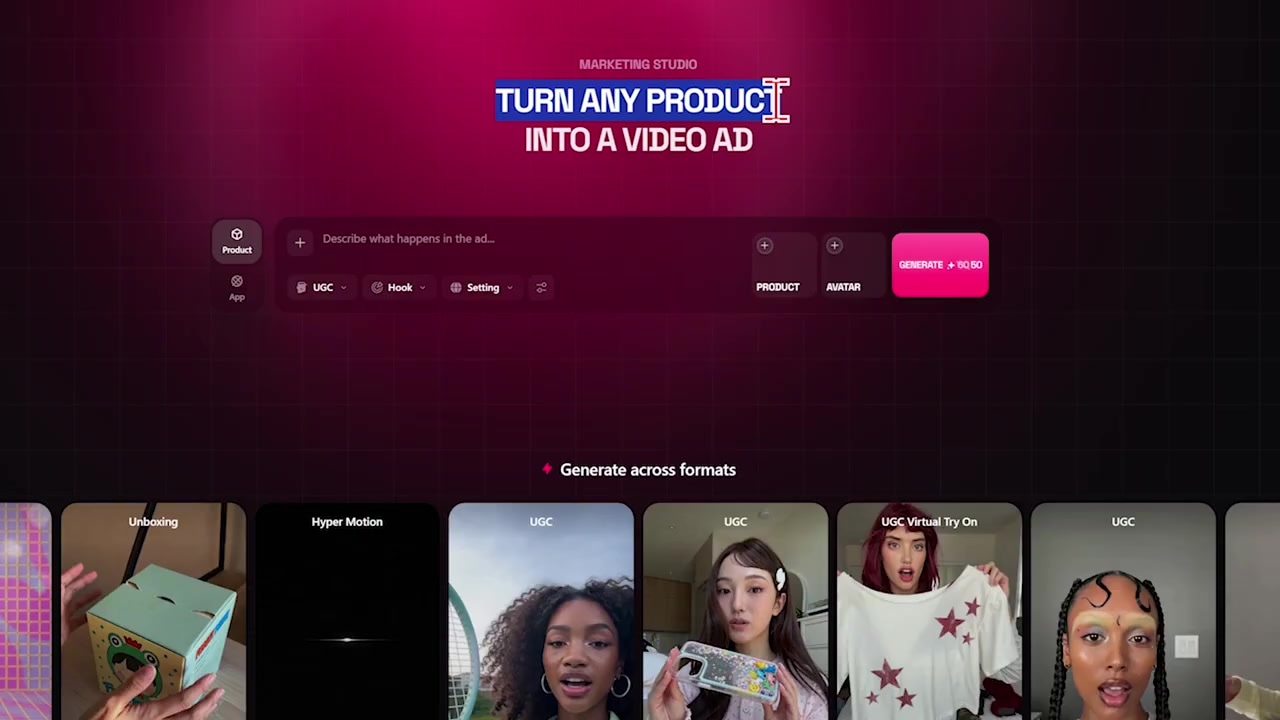
Caption: The central hub of Higgsfield's Marketing Studio, where you can configure visual ads for both physical products and software apps.
Inside Higgsfield’s Marketing Studio, you are given an entirely different class of video ad tools. The system is designed to turn any product into a high-converting video ad, whether you sell physical items or software applications.
Instead of manually editing and placing your products in scenes, Higgsfield uses an automated scraper. You can paste a direct product webpage link—like an Amazon URL—and Higgsfield will automatically extract the product images, features, and descriptions to build the visual assets.
Who It's For
Higgsfield is built for e-commerce brands, marketing agencies, and scaling businesses that need to push out dozens of high-performing video ads, user-generated content (UGC) styles, and social video variations without spending thousands on real production crews.
Try it here: Try Higgsfield →
Step-by-Step: Generating Video Ads From a Product URL
- Import the Product: Go to Marketing Studio, select "Physical Product," and paste your Amazon product listing URL into the box. Press Enter.
- Auto-Fill: Higgsfield automatically scrapes the listing to construct your product slot.
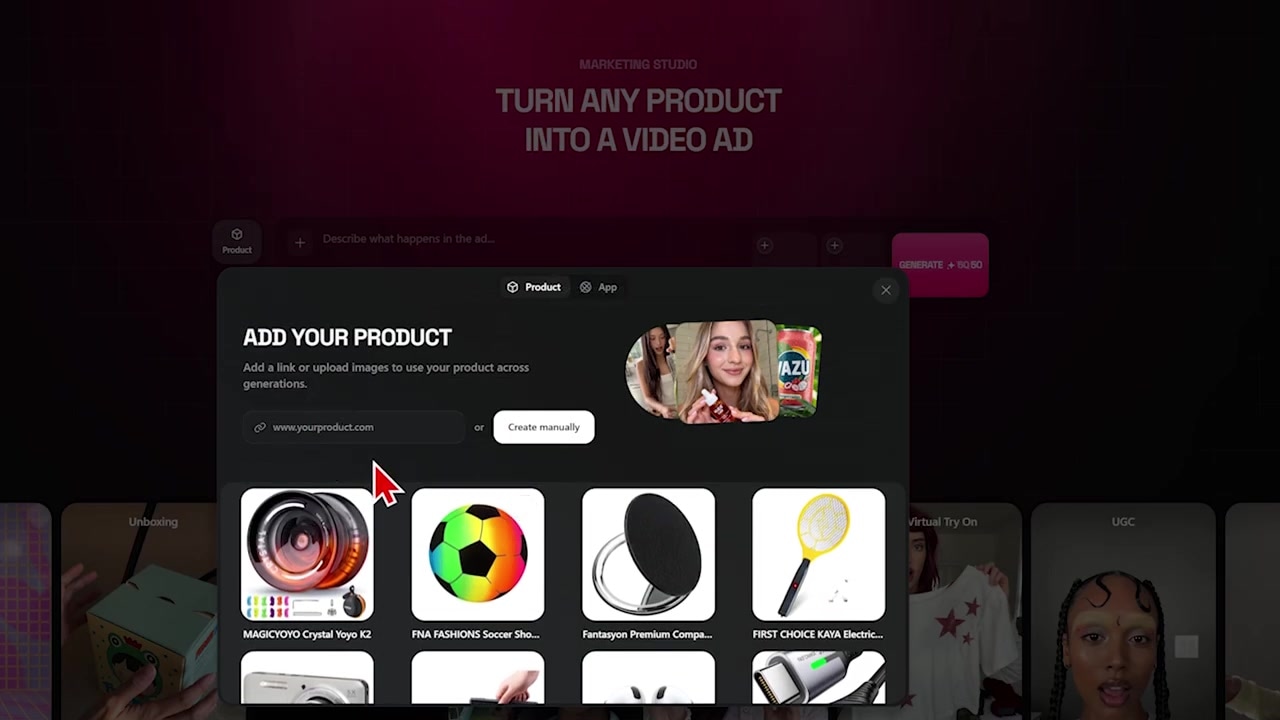
Caption: Pasting a product page URL (like an Amazon listing) allows Higgsfield to scrape images and product details automatically.
- Define Your Actor: Upload an image of the person you want featured in your ads (you can save your own face as a custom avatar for consistent reuse).
- Choose a Video Preset: Select from a massive library of pre-built marketing tracks:
- UGC Style: Highly authentic video formats where AI models present or test the product in realistic settings.
- TV Spot: Highly cinematic, big-budget commercial aesthetics.
- Virtual Try-On: Ideal for apparel brands, allowing AI avatars to realistically wear your clothing.
- Cinematography/Spin: Attention-grabbing motion shots highlighting the product design.
- Generate: Click generate to render complete, high-quality video ads ready for social media.
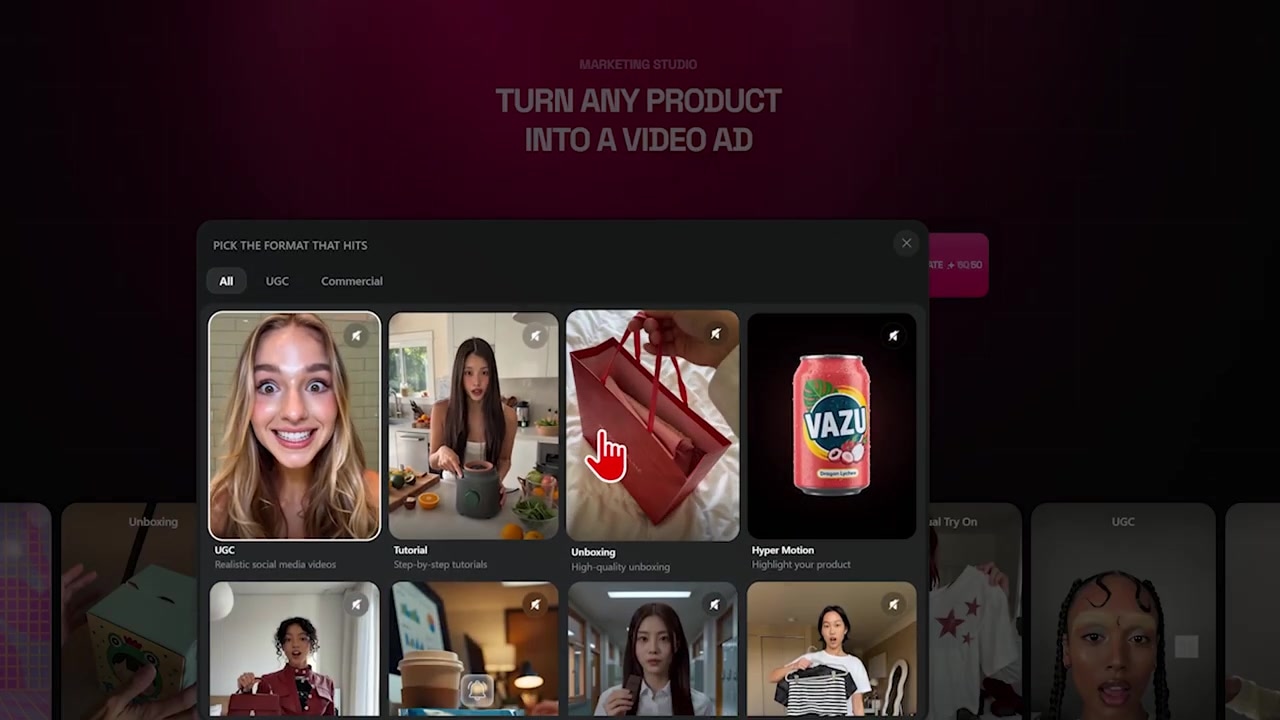
Caption: Selecting from Higgsfield's wide range of pre-built marketing tracks, including UGC styles, TV Spots, and custom virtual try-ons.
Next-Level Automation: Higgsfield Supercomputer & Connectors
Beyond simply rendering videos faster, the biggest point of differentiation is how both platforms handle business automation.
Higgsfield Supercomputer & Brand Memory
If you want to automate campaign generation at scale, Higgsfield’s Supercomputer is a massive leap forward. Powered by an advanced agentic orchestration layer, Supercomputer manages the entire creation process without requiring expert prompting.
- Multi-Language Scale: I tested this by feeding Supercomputer one of my English YouTube thumbnails and asking it to translate it. It automatically translated the text and reformatted it into German, French, and Italian versions without any manual editing.
- Deep Brand Memory: You can upload your company logo, PDF brand guidelines, and custom mascots or avatars into a permanent "Memory" area. Supercomputer remembers these assets and automatically applies your brand rules to every piece of content it generates.
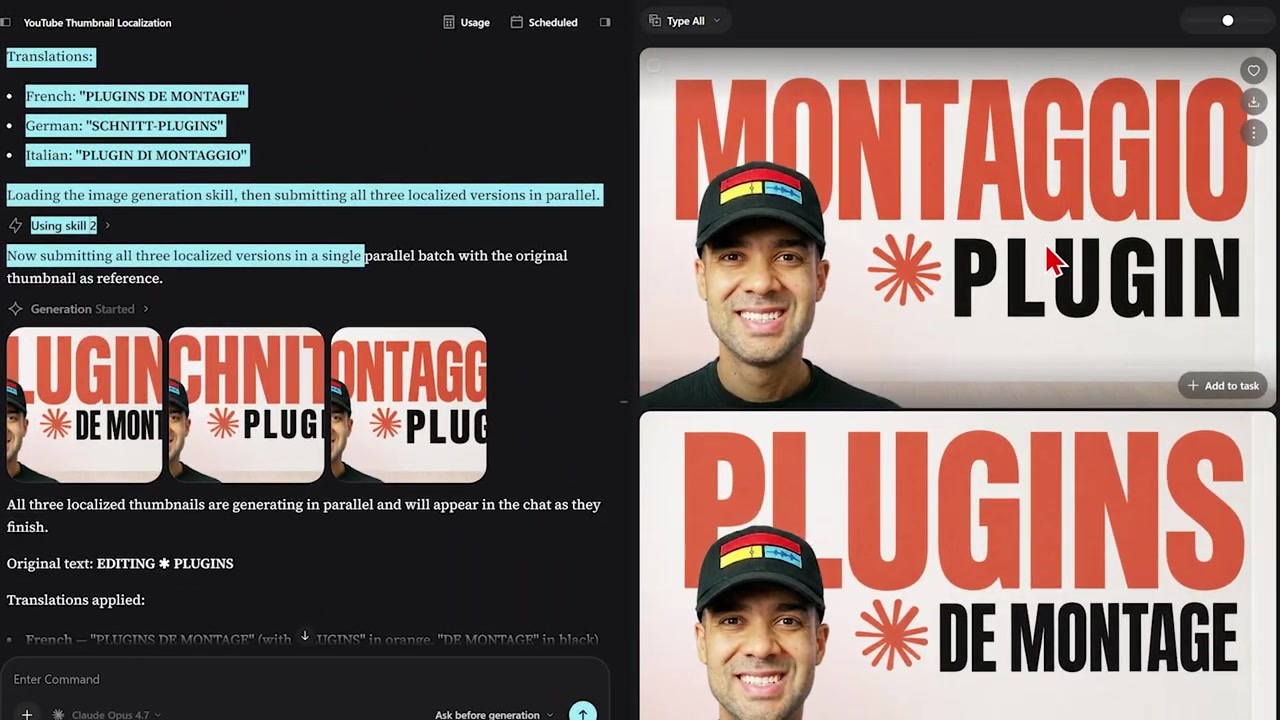
Caption: The Supercomputer agent automatically translated a YouTube thumbnail into German, French, and Italian, managing layout and text changes flawlessly.
Connectors & Integrations
Leonardo AI is isolated. It does not natively connect with external tools, meaning you have to perform all tasks manually inside their web interface.
Higgsfield, on the other hand, features a dedicated Connectors ecosystem that lets you embed video generation directly into your business stack:
- HubSpot & WhatsApp Workflows: You can connect your HubSpot CRM to Higgsfield so that when a new lead enters your database, a personalized marketing video is automatically created and sent directly to them via WhatsApp.
- Claude MCP Integration: Higgsfield features a Model Context Protocol (MCP) connector. This means you can link Higgsfield directly to your Claude app, allowing you to generate professional images and videos using natural chat prompts within your custom Claude automation routines.
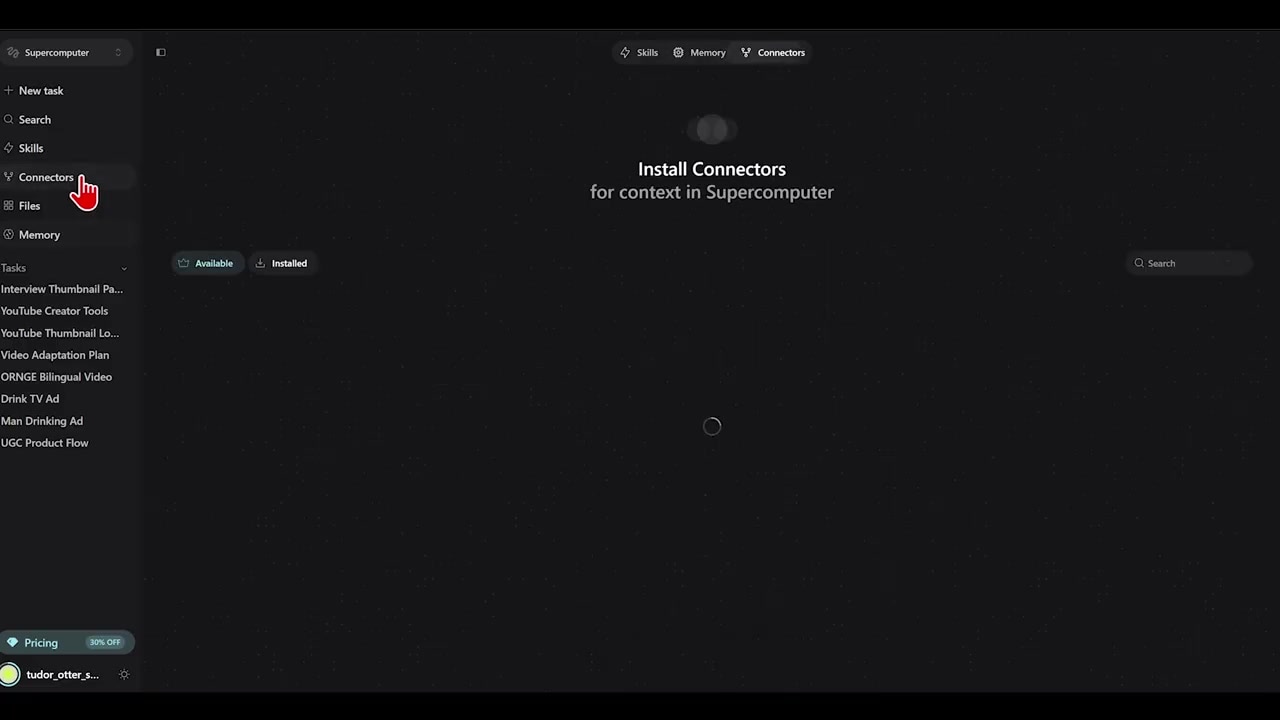
Caption: The Connectors panel inside Higgsfield, letting you sync video workflows to CRMs like HubSpot, WhatsApp, and the Claude MCP.
Feature-by-Feature Comparison Table
| Feature | Leonardo AI | Higgsfield |
|---|---|---|
| Primary Focus | General AI art, design assets, & simple product mockups | High-converting video ads, UGC, & marketing automation |
| Templates & Presets | 24 general "Blueprints" (mostly static photography styles) | Marketing Studio with dedicated UGC, TV Spot, and try-on video tracks |
| Product Importing | Manual image uploading | Automated scrape via product webpage/Amazon URL |
| Brand Assets Memory | No built-in brand guidelines memory | Permanent Memory area for logos, brand kits, and consistent characters |
| Automated Workflows | None | Higgsfield Supercomputer (auto-prompts, multi-language translation) |
| API & Integrations | Web API only | Web API, Connectors (HubSpot, WhatsApp), and Claude MCP |
The Verdict: Which One Should You Buy?
Your choice boils down to what your business needs to produce:
- Choose Leonardo AI if you are a solo creator, photographer, or hobbyist who needs beautiful, high-quality static product photos or basic graphic design mockups, and you don't mind handling everything manually inside a web browser.
- Choose Higgsfield if you run a scaling business, agency, or e-commerce brand. If you want to create automated video ads, authentic UGC-style sequences, and integrate your visual creation directly into HubSpot, WhatsApp, or Claude workflows, Higgsfield is the clear, undisputed winner.
Frequently Asked Questions
What are Leonardo AI Blueprints?
Leonardo AI Blueprints are guided template workflows designed to generate specific visual outputs (such as logos, product mockups, and editorial portraits) without requiring advanced prompting skills.
What is Higgsfield Supercomputer?
Higgsfield Supercomputer is an agentic AI tool that orchestrates multiple creative and reasoning models. It automates campaign generation, translates visual assets into multiple languages, and uses a built-in memory system to keep all outputs on-brand.
Can I connect Higgsfield to other marketing software?
Yes. Unlike Leonardo AI, Higgsfield features native Connectors that integrate with HubSpot and WhatsApp. It also has a Claude MCP (Model Context Protocol) connector to run automated visual generation straight from your Claude chat workspace.