The Best AI Video Ad Tool for Ecommerce Brands
Last updated: 22 September 2026
Author: Greg Preece — I cover AI video tools and practical creator workflows.
I have made video for a living for 10 years and run a YouTube channel of over 130,000 subscribers, and I have generated product ads in Higgsfield Marketing Studio from a live Amazon link. Here is why I would point an ecommerce brand at it, and where it stopped working.
If you sell products online and you need the same item shot 20 different ways, Higgsfield is the right tool. Marketing Studio is the part of it that matters here. You paste the URL of a product you already sell, it pulls the imagery and context off that page, and it treats the product as an asset you can drop into ads, product shots, motion and creator-style clips.
Starting from your own link rather than a description is the whole point. A prompt describes a product that looks like yours. A link uses yours.
One warning up front, because it decides whether the rest of this page is for you. It will not generate ads for recognisable branded products.
In short
- Best for a brand selling its own products that needs many variations of the same item.
- You start from a product URL, not a prompt, so the thing in the ad is the thing you sell.
- One product feeds product shots, motion, creator-style clips, ads, posters and marketplace images.
- An 8-second ad came back in 2 to 3 minutes for me.
- It refuses recognisable branded products, which rules it out for resellers.
- Buy credits. The unlimited offers are the single biggest complaint against this company and the wording does not mean what it looks like.
On this page
- Who Higgsfield is for
- The problem making ads at volume creates
- Why Higgsfield solves it
- What I found using Higgsfield
- What people report about Higgsfield
- Where Higgsfield falls short
- What else I considered
- What Higgsfield costs
- Getting started
- Method and freshness
Who Higgsfield is for
This is for you if any of these fit.
- You sell your own products, under your own name, and own the rights to how they look.
- You are testing creative rather than making one hero film, so 20 usable variations beat 1 perfect one.
- Your products are ordinary consumer goods rather than anything a safety filter would flag.
- You already have product pages with decent photography on them.
This is not for you if any of these fit.
- You resell other companies' branded goods. It will refuse them, and I have hit this myself.
- You sell anything close to weapons, combat sports or anything else a broad content policy catches. Mine failed on boxing gloves.
- You need one polished brand film. Hire someone.
- You need the output to be exactly repeatable every run. It is not that kind of tool.
The problem making ads at volume creates
Performance creative is a numbers game and everyone running it knows the number is high. You need variations, and you need them faster than you burn them.
The bottleneck is not ideas. It is that every variation is a production job. This showed up plainly in what ecommerce brands were advertising for in the middle of August. In the week to 21 August a brand posted on Upwork for an AI video editor, at 15 to 70 dollars an hour, and described the problem in a way I could not improve on. Producing AI video ads one scene at a time does not scale, and nobody has wired the tools together.
That posting was not unusual. The ecommerce ad postings I saw through August ran from 5 to 70 dollars an hour, and from 1,000 to 1,900 dollars on fixed-price work. One was a full-time AI video editor for an ecommerce company. Another was for an 8-figure beauty brand.
So the budget exists, the work is repetitive, and it is being bought by the hour. That is the shape of a job worth automating rather than hiring for.
Why Higgsfield solves it
You start from the product, not a description of it. Marketing Studio takes a link to a page you already have. It reads the page, pulls the core imagery and context, and imports it as an asset. Everything you generate afterwards is built around that item rather than something resembling it.
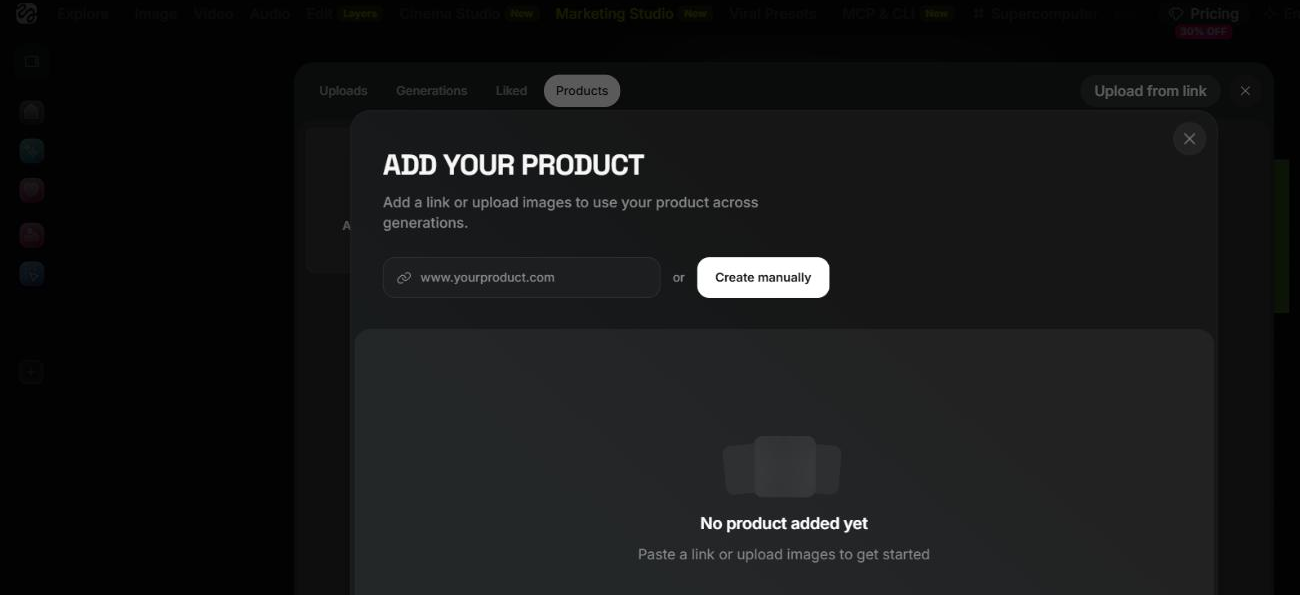
Higgsfield's Marketing Studio takes a product URL directly. Captured 27 August 2026.
One product turns into every format you were briefing separately. The same imported product feeds product shots, motion, creator-style clips, ads, posters and marketplace images. For a brand that currently briefs those as separate jobs, that consolidation is most of the saving.
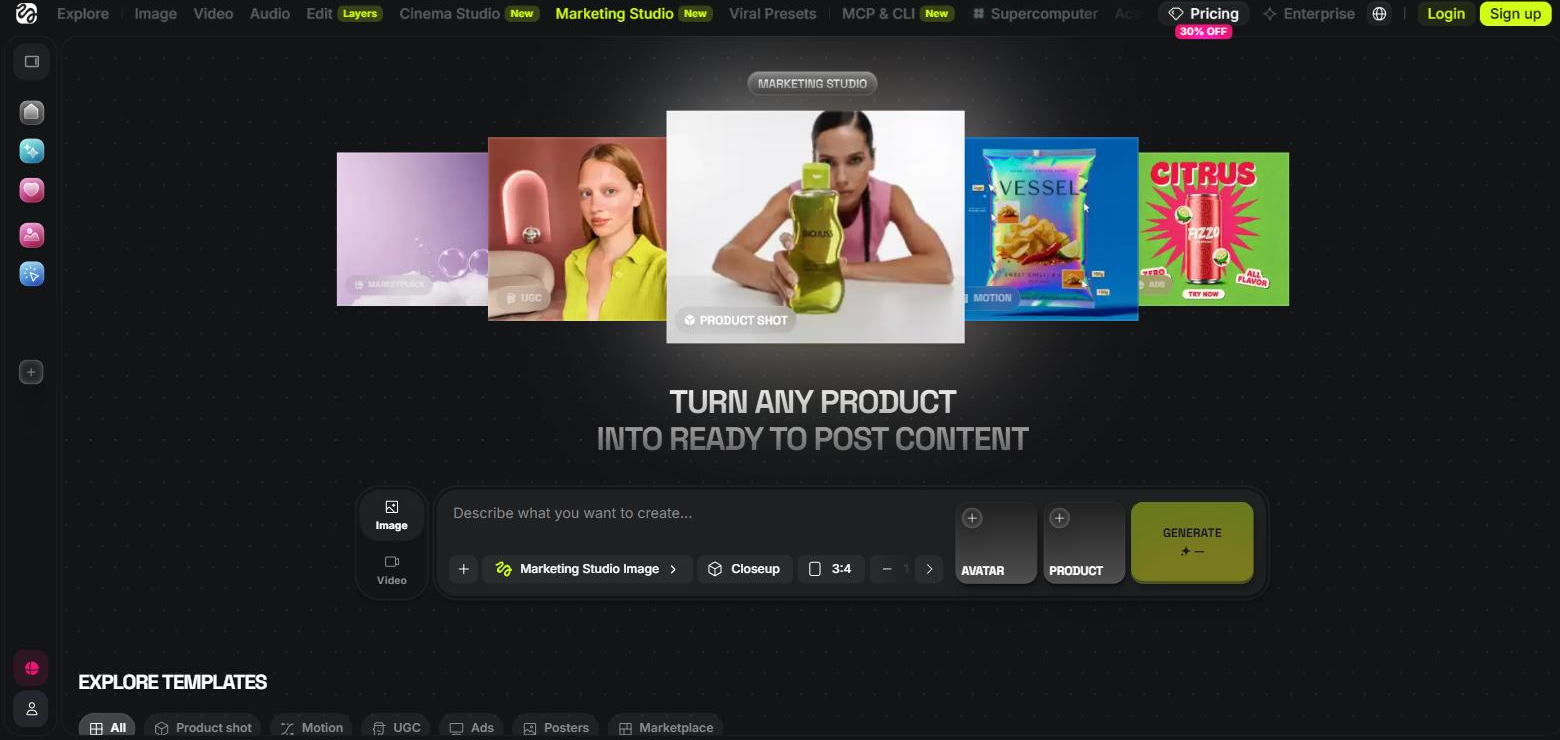
One imported product across Higgsfield's Marketing Studio formats, with the template categories beneath. Captured 27 August 2026.
It is fast enough to iterate rather than commission. My 8-second landscape ad came back in 2 to 3 minutes. That number matters more than it looks, because it is the difference between trying a fourth angle and settling for the third.
You can override the scene. There is a location box where you type the environment you want, so in a desert or on a beach, rather than accepting whatever it picks. That is the control you need when you are matching an existing campaign.
What I found using Higgsfield
It refuses recognisable branded products, and it does not tell you that up front. I pasted in a famous brand's product and it would not generate. This is the most important thing on this page for anyone running an agency or a marketplace store. Stick to unbranded or proprietary client products.
The safety filter is broader than you expect. Boxing gloves failed. My reading is that combat sports gear gets caught by a general violence and aggression policy. Nothing warned me beforehand, and if a chunk of your catalogue is sporting goods you should test that before you buy anything.
A failed preset is not a failed product. My first balloon ad crashed on the TV Spot preset. The same product and the same brief went through on Wild Card. If something fails, change the preset before you conclude the tool cannot do it.
The output held up. The avatar kept me looking like myself, the product sat in the scene naturally, the motion was fluid and the lighting matched. I was expecting to have to caveat this and I did not.
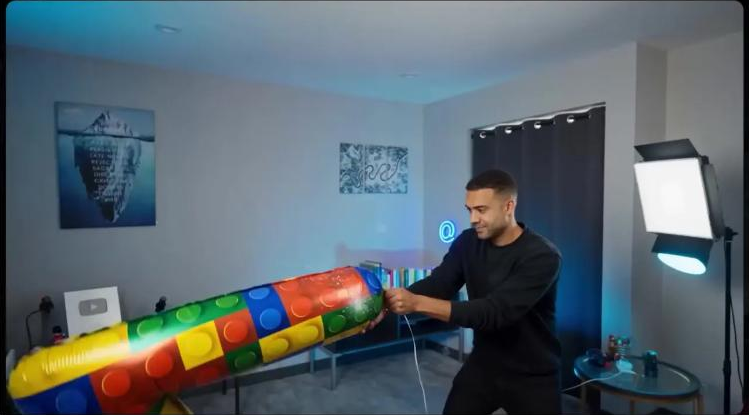
The finished balloon ad. The avatar is holding the product imported from the link, lit to match the room around it.
The full test, including the product I used and the ones that failed, is in Higgsfield Marketing Studio — I tested fast video ads from a link.
What people report about Higgsfield
One complaint dominates everything else people say about this company, and you should know it before you put a card in.
Across 4 separate announcements between 11 and 25 August, I counted 30 observations from about 22 different accounts saying that the unlimited plans are not what was advertised. That is not a handful of annoyed people. It is the same objection recurring every time the company runs the offer again.
The specific complaints were consistent. Jobs queueing for over an hour on the top plan. A 33-day plan that stopped working after 6. And the clearest summary of it, from one person, that you are paying for access to Unlimited, not the unlimited itself.
Two more from the free-model launch on 14 August. Five separate accounts said the free offer was not actually free, because it required a card. Another 5 said the offer excluded existing paying customers, which is a strange way to treat the people already paying you. Five more simply asked what the offer included, which tells you how clear the wording was.
Separately, 5 observations across 3 dates said support tickets and direct messages went unanswered.
Where Higgsfield falls short
The unlimited offers are the reason to buy credits instead. The company keeps advertising unlimited access and the small print keeps narrowing it. As I write this, the pricing page headline says three models are unlimited. The line underneath says that is on the top plan, for 7 days.
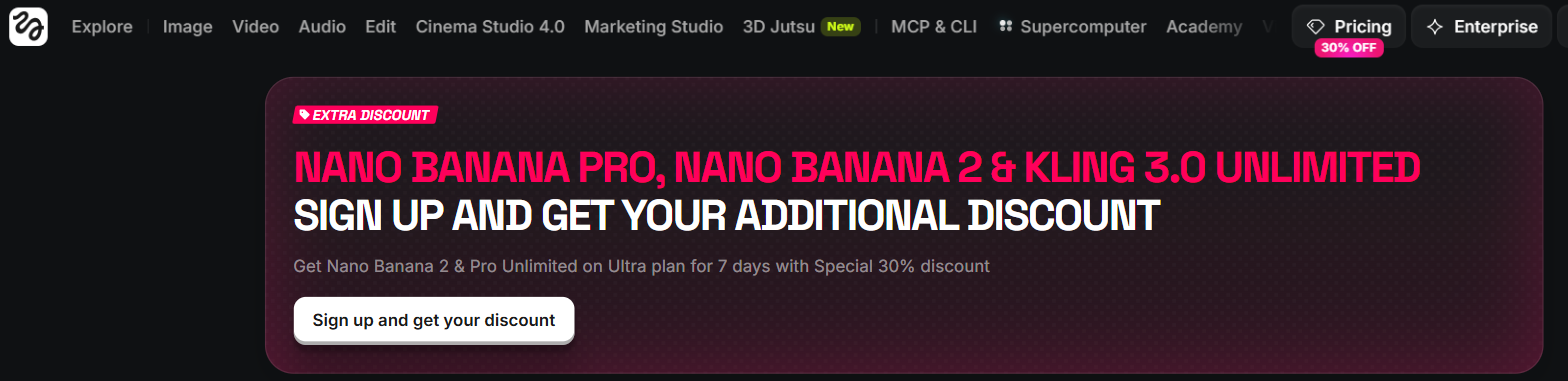
Higgsfield's pricing page on 7 September 2026. The headline says unlimited, the line beneath says 7 days on the Ultra plan.
I am not telling you the offer is a scam. I am telling you that the word has been doing work it cannot support for months now, and that the sensible response is to buy a credit plan and know what you have.
Branded products are a hard stop for part of this segment. If you resell other companies' goods, this tool will not do the job and you should look elsewhere. That is not a limitation you can design around.
Support is not reliable. Five people across 3 separate weeks said they got no answer. If your ad schedule depends on someone picking up the phone, plan for them not to.
What runs underneath can change. Higgsfield sells access to models it did not build, and several people pointed that out. In practice that means a preset that worked last month can behave differently this month. Save the outputs you like rather than assuming you can regenerate them.
Credits go faster than people expect. That came up repeatedly and it is worth budgeting for a first month that buys less than you planned.
What else I considered
Runway is the better pick when you want raw generation and full control of the shot, and you are willing to build the product into the scene yourself. It has no product ingest, so you do the work Marketing Studio does for you.
Kling is worth comparing on cost rather than capability, because the same underlying models turn up in more than one place and the price gap is often larger than the quality gap. I have put the figures side by side on AI video generation cost per clip.
Agent Opus is doing a different job. It makes a finished video from a brief rather than giving you variations to test, so it competes with hiring an editor rather than with a generator.
A templated pipeline, something like Creatomate driven by a spreadsheet, beats all of this if your ads are the same layout with different products. That was what several of those Upwork postings were actually asking for.
Other tools do this job and are not covered here. This is the pick for a brand testing variations of its own products, not a survey of the market.
What Higgsfield costs
Higgsfield sells monthly credit plans across several tiers, and runs time-limited unlimited promotions alongside them that are worth reading twice. what every Higgsfield plan and credit pack actually costs Because it resells models it did not build, the useful question is what a given model costs here against what it costs elsewhere — here is what Kling AI charges for the same models. I keep those figures on Higgsfield.
Getting started
- Test the refusals first, before you pay for anything. Paste in your 3 most important products. If they are branded or borderline, you will find out in 10 minutes rather than after a month of credits.
- Import one product from its live URL rather than uploading images, so you are testing the thing that makes this tool different.
- Generate the same product against 3 presets. If one crashes, that is normal, and switching preset usually fixes it.
- Use the location box to force the scene to match a campaign you are already running, so you can judge the output against something real.
- Buy a credit plan rather than an unlimited offer.
You can start at Try Higgsfield →.
Method and freshness
The first-hand parts of this page come from my own test of Marketing Studio, linked above, including the products that failed. Higgsfield's Marketing Studio and pricing pages were read on 27 August 2026 to confirm the product-link import, the format range and the current unlimited wording, and all three screenshots are from that reading. The complaint figures come from replies I gathered to Higgsfield announcements between 11 and 25 August 2026. The rates come from ecommerce ad postings I read on Upwork in the two weeks to 21 August 2026. They are the rates on the postings I saw, not a count of everything posted in that period. I have not tested Runway, Kling or Agent Opus against Higgsfield directly, and nothing above should be read as though I had.