The Best AI Video Generator for Creators Learning to Prompt
Last updated: 8 October 2026
Author: Greg Preece — I cover AI video tools and practical creator workflows.
I've made video for a living for ten years and I run a YouTube channel past 130,000 subscribers. Here's what I'd move to if you've already paid for an AI video tool and still can't get a shot you'd use.
If you're still learning to prompt, Higgsfield is the right pick, because for a lot of jobs it doesn't ask you to write a prompt at all.
That sounds like a dodge and it isn't. The reason you can't get a usable shot is almost never that you're bad at writing. It's that you're paying full price to find out what a sentence does. Higgsfield comes with a library of ready-made starting points and it shows you what an attempt will cost before you commit to it.
In short
Pick a preset instead of writing a prompt wherever one fits your job. Check the cost on the generate button before you press it. Work at low resolution while you're finding the shot, and pay for quality only once you've found it. Budget for two or three attempts per usable clip, because that's what I budget for.
What's on this page
- Who this is for, and who it isn't
- Why the first attempt keeps failing
- Why Higgsfield solves it
- Which model to generate with
- What I found using Higgsfield
- Where Higgsfield falls short
- What it costs
- Getting started
- How I put this together
Who this is for, and who it isn't
This is for you if you've already bought an AI video tool, you've burned through a chunk of what you paid for, and you still haven't got a clip you'd put in front of anyone.
It isn't for you if you already get what you want on the first or second try. It isn't for you if your work is one very specific look that no preset covers, since you'll be writing prompts either way.
Why the first attempt keeps failing
The money doesn't go on the shot you use. It goes on the ones you throw away.
People say this out loud constantly. "Most of my budget goes into fixing the first attempt". "I'd definitely experiment more if every failed generation didn't feel expensive". "Every tool I use makes me pick my retakes carefully". That last one is the real damage. Once an attempt feels expensive you stop experimenting, and experimenting is the only way anyone learns what a model responds to.
There's money behind this problem too. Four separate Upwork postings in the last month wanted somebody to sit down and coach a buyer through getting a usable shot, paying between 20 and 110 dollars an hour. People are hiring humans to solve it, which tells you how badly the tools are failing at it.
Why Higgsfield solves it
Three things, and the first matters most.
You often don't need a prompt. Higgsfield carries a preset library, and a preset is somebody else's working prompt with the guesswork taken out. Pick the look, feed it your clip or your product link, press go.
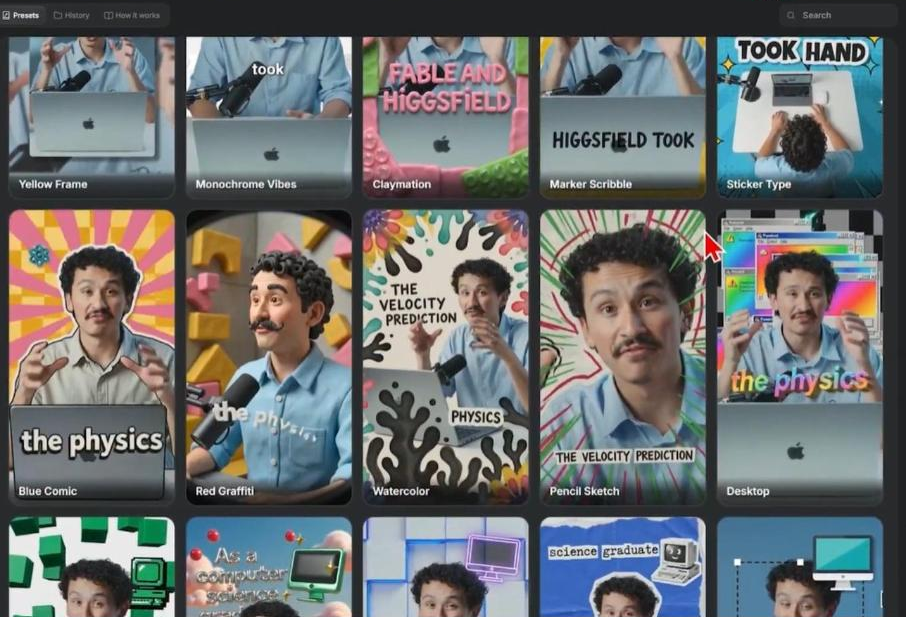
A preset library is somebody else's working prompt. Each tile is a finished look you can apply without writing anything.
You can see what an attempt costs before you make it. The generate button shows the cost of that specific clip, at that length and that resolution, before you press it. When you're learning, knowing the price of a guess beforehand is the difference between trying something and not bothering.
A failed attempt can be made cheap. Because Higgsfield resells many different models through one account, you can do your experimenting on a cheap one and switch to an expensive one once the shot works.
Which model to generate with
Of everything Higgsfield carries, Seedance 1.5 at 480p is the cheapest way to make an attempt, by a wide margin and on Higgsfield's own published rates as they stood on 8 October 2026. Wan 3.0 at 480p is the next cheapest.
So the way to use this platform while you're learning is to find the shot on Seedance 1.5 at low resolution, where a wrong guess costs you almost nothing, and only move up to a better model and a real resolution once the composition and the motion are right. The figures move, so check them rather than trusting this paragraph in six months.
What I found using Higgsfield
Presets did the whole job twice. I ran my own podcast clip through Shorts Studio using the clay preset, and the generation finished in a few minutes with a transformation that would have taken hours by hand. I built a product ad from an avatar, an Amazon link for a set of party balloons and a chosen style. There was no scriptwriting and no prompting.
Switching the preset fixed a failure. My first attempt at the balloon ad used the TV Spot preset and it failed outright. I switched to Wild Card, ran it again, and it went through. That's worth knowing because the instinct when a generation fails is to rewrite your prompt, and the fix was to change the starting point instead.
Two or three attempts is my own rule. On Shorts Studio I budget for two or three generations to get a clean one, because even short clips sometimes drop a word or add a stutter. My first generation of that podcast clip repeated a phrase that wasn't stuttered in the original. I also keep each generation to a standalone moment of about ten seconds or less, since longer clips are more error prone.
Things do just fail. In one of my motion graphics projects the dashboard logged three consecutive rendering errors before it produced two usable drafts.
Where Higgsfield falls short
Their "unlimited" plan can have long queue times One person put it like this. "Your 33-day unlimited plan traps paying users in endless queues". That's a serious thing to read on a page telling you to generate often.
Here's what I make of it. It doesn't match my own experience, because my generations have finished in a few minutes. But every one of those was a metered generation rather than an unlimited one, and that distinction is the whole story. Higgsfield's own pages say that turning unlimited off and switching to credits returns you to full speed, which is the vendor confirming that unlimited generations wait and paid ones don't. So it stops the person who buys an unlimited plan expecting speed, and it doesn't stop the person who buys credits and treats any unlimited window as a bonus. For the buyer this page is written for, who needs lots of quick attempts, buy the credits.
Failed renders can still cost you. Content that gets blocked comes back with the credits refunded, which is fair. A render that simply errors has still used your balance.
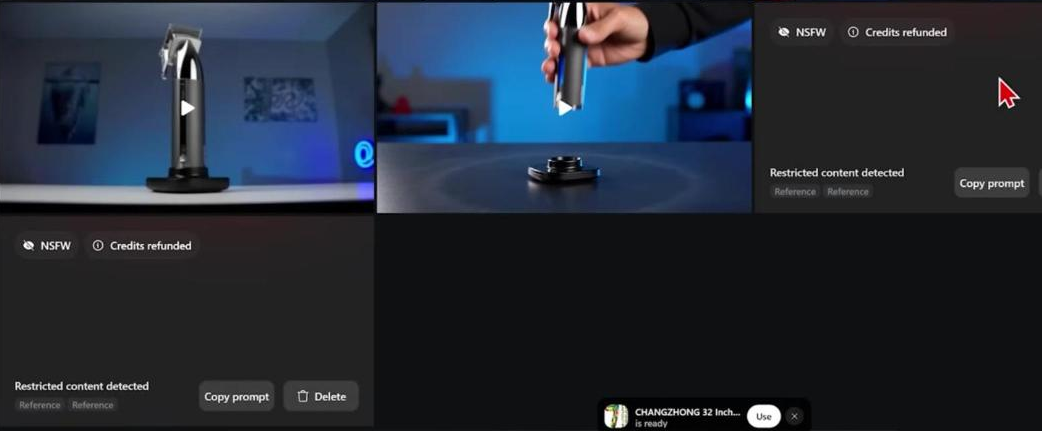
Blocked generations come back marked and refunded. Branded products and anything read as violent get stopped.
The cheapest paid plan won't tell you what it runs. It says access to selected models and doesn't list them, so you find out what you can't use after you've paid.
What it costs
Higgsfield meters everything in credits, and what a clip costs moves with the model you pick, how long it is and what resolution you ask for. That's the useful thing to understand, because it's what lets you make attempts cheap and finals expensive.
My page on what Higgsfield charges carries the current figures per model, and my page on what a clip costs across platforms puts them next to everyone else's.
Getting started
- Open the preset library before you open a blank prompt box. If something close to your job is in there, your prompt problem has gone away.
- Set the resolution low and the clip short while you're searching. Ten seconds or less, and treat each one as a standalone moment.
- Read the cost on the generate button every time, until you've got a feel for what your habits actually cost.
- When a generation fails, change the preset before you change the words. That's what worked for me.
- Move up to a better model and a proper resolution only once the shot is right.
You can start on Higgsfield and have a preset running before you've written a word.
How I put this together
What I say here about presets, cost and failures comes from my own use of Shorts Studio and Marketing Studio. The relevant write-ups are linked above. The model rates were read on Higgsfield's own pricing page on 8 October 2026.