I Tested the ElevenLabs GenFM Podcast Generator (With My Own Voice)
Last updated: July 2026
Author: Greg Preece — I test AI video and audio tools hands-on to help creators build authentic personal brands and streamline their production workflows.
If you are tired of the repetitive, robotic voices of Google NotebookLM, a powerful new alternative has arrived. ElevenLabs GenFM allows you to generate complete, multi-speaker podcasts in your own cloned voice from just a single link or document.
TL;DR: Why GenFM Beats NotebookLM
If you want a quick comparison, here is how ElevenLabs' podcast generator stacks up against Google's viral tool:
| Feature | Google NotebookLM | ElevenLabs GenFM |
|---|---|---|
| Pricing | Free | Free tier available; Creator tier required for custom voice clones |
| Voices Available | Only 2 pre-selected default hosts | Thousands of built-in voices + your custom Professional Voice Clone |
| Script Customization | None (generated directly to audio) | Fully editable, color-coded interactive script editor |
| Multilingual Support | Extremely limited | Supports up to 40 languages |
Table of Contents
- What Is ElevenLabs GenFM?
- How to Generate Your Own AI Podcast in 3 Steps
- The Script Editor: How to Customize and Regenerate Dialogues
- How to Set Up Your Professional Voice Clone
- Is ElevenLabs GenFM Worth the Creator Plan?
- Final Verdict: GenFM vs. NotebookLM
- Frequently Asked Questions
Prefer to watch? Here's the video. Prefer to skim? The full breakdown is below.
Try it here: Try ElevenLabs →
What Is ElevenLabs GenFM?
Google's NotebookLM became an overnight sensation by turning notes, PDFs, and links into highly conversational podcasts. However, because over 4 million people use it every month, the internet is now flooded with podcasts using the exact same two pre-selected voices.
GenFM is ElevenLabs' direct answer to this limitation. It is a multi-speaker AI podcast creator built inside the ElevenLabs ecosystem.
With GenFM, you don't just generate a generic discussion. You can program the hosts to speak in thousands of highly realistic, nuanced AI voices—or even use a digital clone of your own voice. Furthermore, GenFM outputs a fully written, editable script, allowing you to tweak individual sentences and regenerate the audio dynamically before exporting.
How to Generate Your Own AI Podcast in 3 Steps
Generating a custom podcast with ElevenLabs is incredibly straightforward. Here is exactly how I set up my first run.
Step 1: Open GenFM in Projects
First, log in to your ElevenLabs account. Navigate to the sidebar on the left and select Projects. From there, you will see a card labeled GenFM Generate a podcast. Click this option to get started.
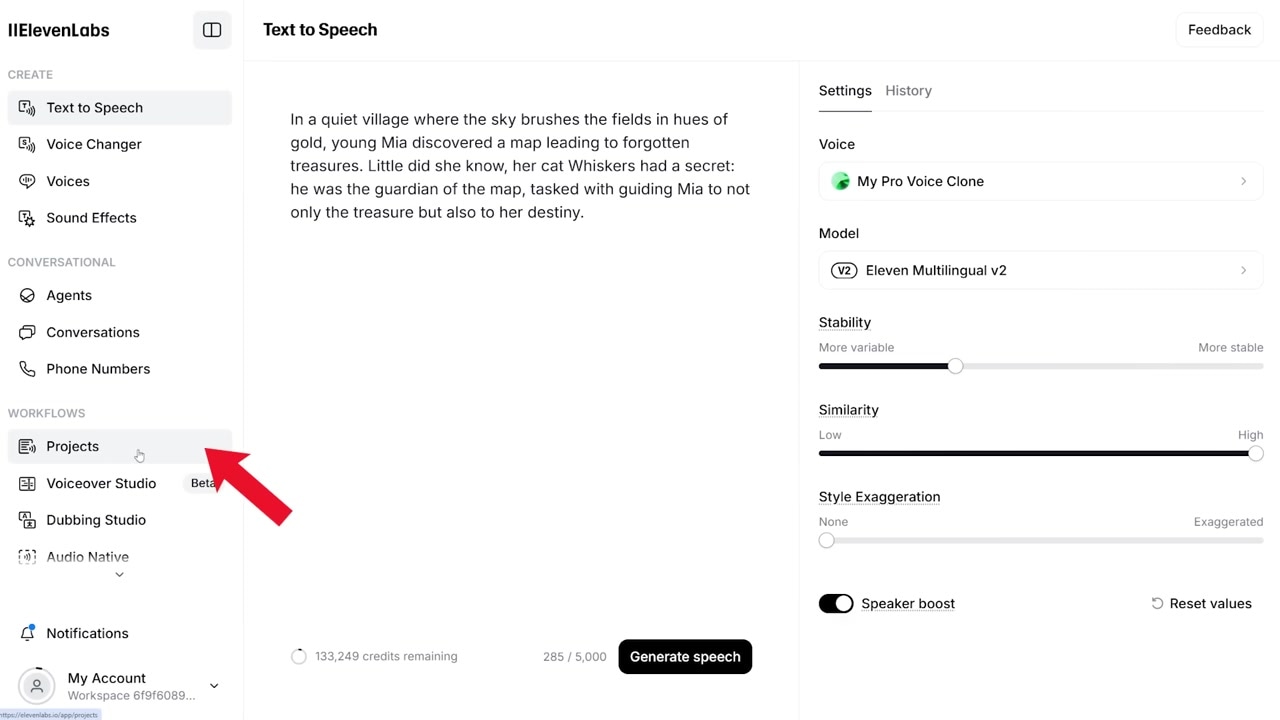
Caption: Locate GenFM within the "Projects" sidebar menu in ElevenLabs.
Step 2: Upload Your Content or Add a Link
Next, you need to feed GenFM the source information you want your hosts to talk about. You have two options here:
- Upload a Document: Upload files (like PDFs, TXT, or documents) directly from your device.
- Point to a URL: Enter a website link (such as a news article, blog post, or newsletter).
For my test, I simply dropped in the URL of a news article detailing ElevenLabs' voice cloning technology.
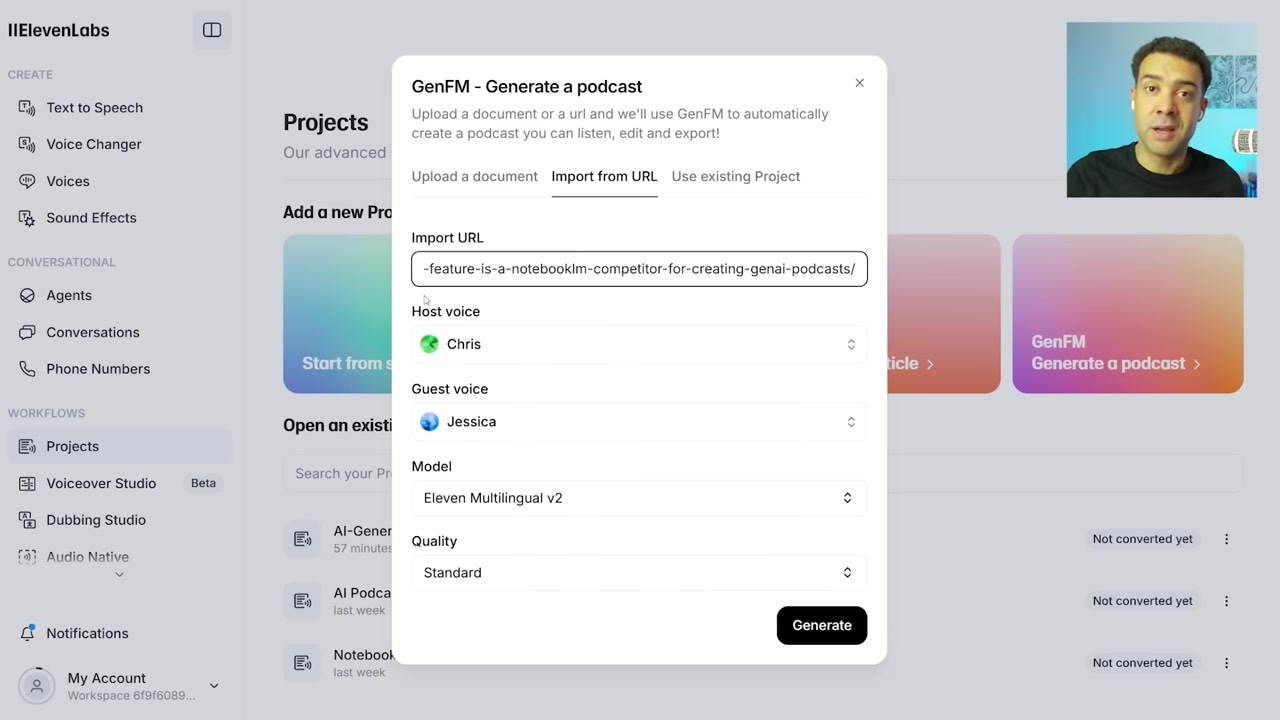
Caption: Provide content for your podcast by either uploading a document or inserting a website URL.
Step 3: Configure Your Host and Guest Voices
Once your content is ready, assign your speakers.
- The Host: To create a podcast in your own voice, set this to your custom Professional Voice Clone (I will show you how to generate this in the section below).
- The Guest: Choose an AI-generated companion co-host. For my guest, I chose a default natural female voice named Jessica.
Once configured, leave the remaining settings at default and click Generate. The AI will parse the source text and draft a natural conversational script in just a few minutes.
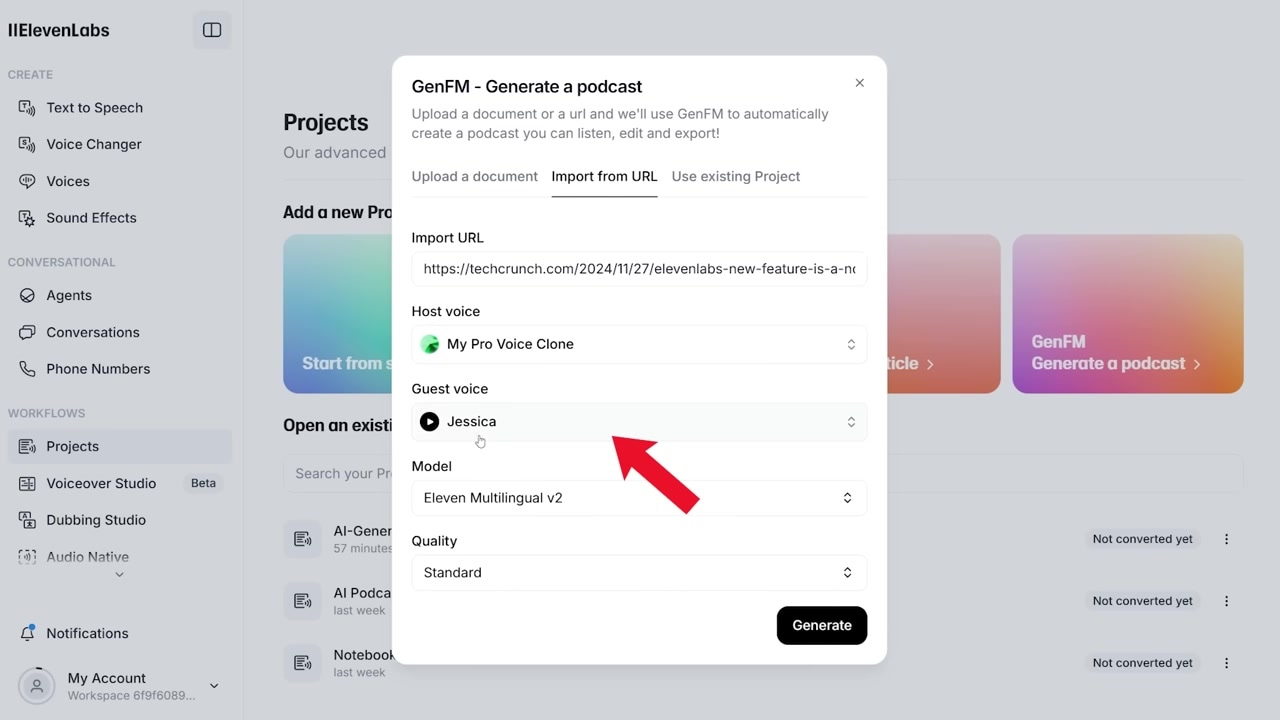
Caption: Assign your custom voice clone to the host position and choose an AI voice for the guest co-host.
The Script Editor: How to Customize and Regenerate Dialogues
One of NotebookLM’s biggest paint points is its complete lack of post-generation customization. If the AI hallucinated a fact, made an awkward transition, or mispronounced a key word, you were stuck with it.
GenFM solves this entirely. When generation completes, you are presented with a fully written, color-coded script.
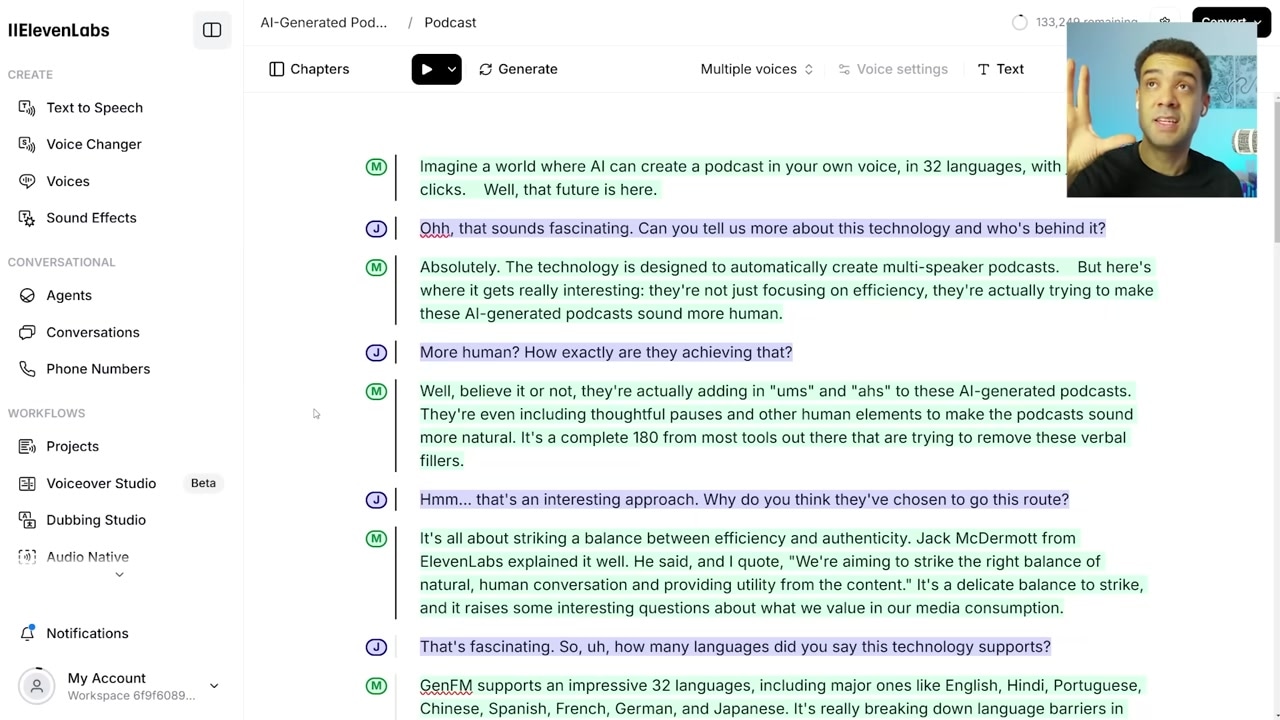
Caption: The GenFM interface displays a color-coded script (host in green, guest in purple) allowing you to edit text before regenerating the audio.
Here is how my script editing and regeneration workflow went:
- Identify the Edit: In my generated transcript, the host spoke about "32 languages." I wanted to update this to "40 languages" because the source article was slightly outdated.
- Text-Editing Capability: Instead of re-recording or throwing away the generation, I simply clicked directly on the script block, edited "32" to "40" in the text box, and hit Regenerate.
- Flawless Output: In seconds, the system updated only that specific sentence. The edited dialogue blended into the conversation seamlessly with perfect voice continuity.
How to Set Up Your Professional Voice Clone
To make GenFM truly authentic to your brand, you will want to generate the podcast using an exact digital duplicate of your own voice. ElevenLabs makes this straightforward, but there is a specific route you must follow to get a convincing result.
Getting Started with Professional Voice Cloning (PVC)
To clone your voice:
- Head to the main ElevenLabs dashboard.
- Click on Voices on the left menu.
- Click the Add a new voice button at the top.
- Choose Professional Voice Clone.
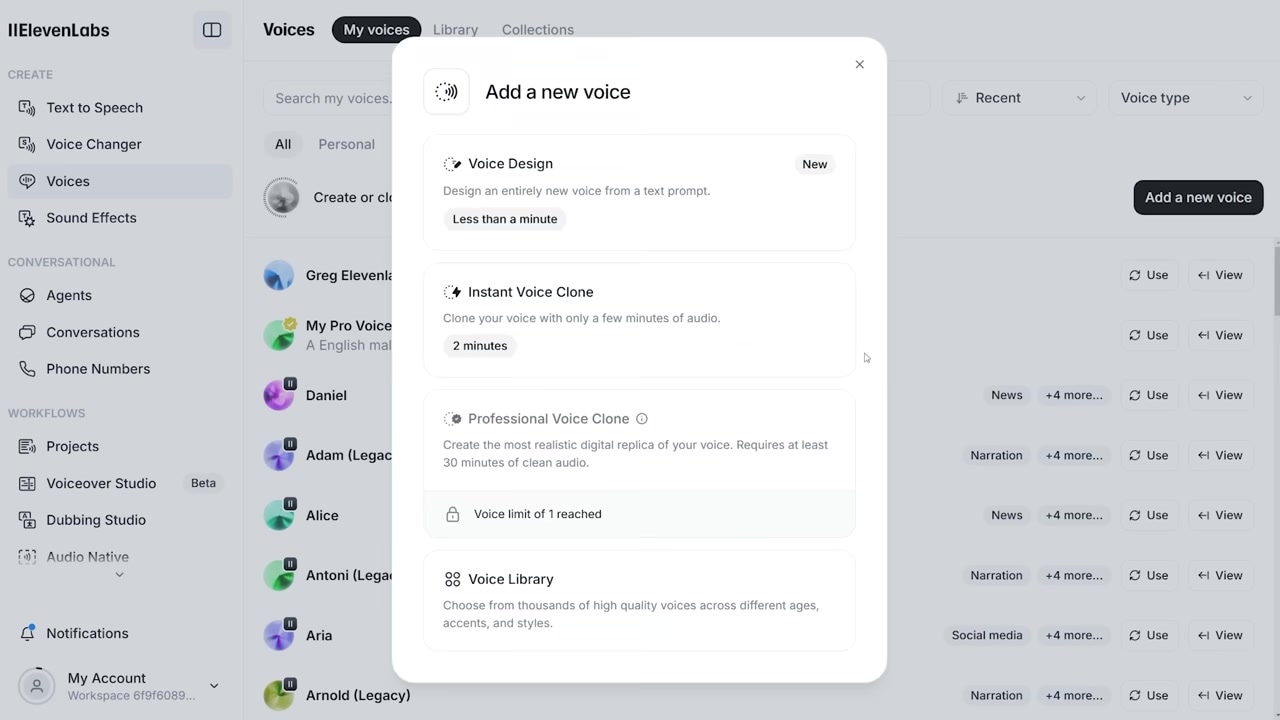
Caption: Initiate the voice-cloning workflow by selecting "Professional Voice Clone" under the Voices menu.
Note: Avoid using ElevenLabs' instant voice clone feature for this workflow. Standard instant voice clones lack the deep breathing nuances, pitch variations, and baseline realism required to pull off a highly convincing, natural conversational podcast.
Is ElevenLabs GenFM Worth the Creator Plan?
Unlike Gemini Notebook (formerly NotebookLM), which has a usable free tier, utilizing a custom Professional Voice Clone in ElevenLabs requires a paid tier. You must be subscribed to at least the Creator plan (normally $22/month, though ElevenLabs occasionally runs half-off sales—verify active pricing and promos directly on the official site).
At $22/month, this setup certainly isn't for casual hobbyists. However, if you are a serious content creator or business owner looking to scale your personal brand, it is a massive value add.
While I don't recommend using AI to completely replace your genuine, live-recorded podcast episodes, GenFM is an invaluable tool for:
- Increasing Output: Effortlessly maintaining a consistent publishing schedule even when you are traveling, sick, or busy.
- Content Repurposing: Instantly turning blog posts, articles, newsletters, and written guides into engaging conversational audio.
- Multilingual Reach: Reaching global demographics by outputting your custom host voice clone in up to 40 different languages.
Final Verdict: GenFM vs. NotebookLM
If you just want a quick, casual, and free podcast summary of an article, Google NotebookLM remains a great tool.
But if you want to scale your personal brand, create multi-speaker conversational content in your own cloned voice, and enjoy full editor-level control over what your hosts actually say, ElevenLabs GenFM is easily the superior professional tool.
If you are ready to build your professional voice clone and try out GenFM, get started below.
Try it here: Try ElevenLabs →
Frequently Asked Questions
Can I generate a multi-speaker podcast using only my voice?
Yes, but GenFM is optimized for a dynamic multi-speaker conversation. For the best listening experience, it is recommended to pair your custom professional voice clone with one of ElevenLabs' natural pre-made reader voices.
How many languages does ElevenLabs GenFM support?
As of July 2026, ElevenLabs supports high-quality text-to-speech and voice cloning generation in up to 40 languages, letting you localize your audio content globally.
Do I have to pay to use ElevenLabs GenFM?
You can access GenFM and use built-in voices with a free ElevenLabs account. However, to unlock the "Professional Voice Clone" feature to make the podcast host sound like you, you must subscribe to ElevenLabs' Creator tier.