How I Build SaaS Motion Graphics with Higgsfield in Under 5 Minutes
Last updated: July 2026
Author: Greg Preece — I test AI video tools hands-on to find workflows that save creators time and money.
Creating polished, sleek software-as-a-service (SaaS) motion graphics usually takes hours of tweaking in Adobe After Effects or thousands of dollars paid to a professional animator. In this guide, I'll show you how I use Higgsfield's hidden Vibe Motion tool to generate custom SaaS animations in minutes using simple text prompts.
TL;DR: Higgsfield Vibe Motion At a Glance
- The Core Tool: Higgsfield's Vibe Motion feature, a specialized text-to-motion engine.
- The Output: Generates layered, editable vector-like motion graphics rather than flat, static video renders.
- Key Benefits: Creates high-end minimal visual graphics in minutes; fully customizable typography and colors.
- The Catch: Higher-than-average render failure rates that still deduct from your credit balance; some live editing options are still buggy.
- Verdict: An incredible workflow asset for solo SaaS founders, marketers, and video creators who need premium, modern launch-style graphics on a budget.
Table of Contents
- How to Access Vibe Motion in Higgsfield
- My Tested Prompt Templates and Results
- The Magic of 'Vibecoding' vs. Traditional Video
- The Catch: Render Failures and Editor Limitations
- Is Higgsfield Vibe Motion Worth It?
Prefer to watch? Here's the video. Prefer to skim? The full breakdown is below.
Try it here: Try Higgsfield →
How to Access Vibe Motion in [Higgsfield](/articles/higgsfield-pricing)
When you land on Higgsfield's homepage, finding the tool isn't completely obvious. It's tucked away under their main video generation menus. Here is how I navigate to it:
- Log in to the Higgsfield homepage.
- Click on the Video tab in the main navigation.
- Scroll down to the bottom of the submenu and click the Vibe Motion link.
- Select Create from scratch to open the prompt canvas.
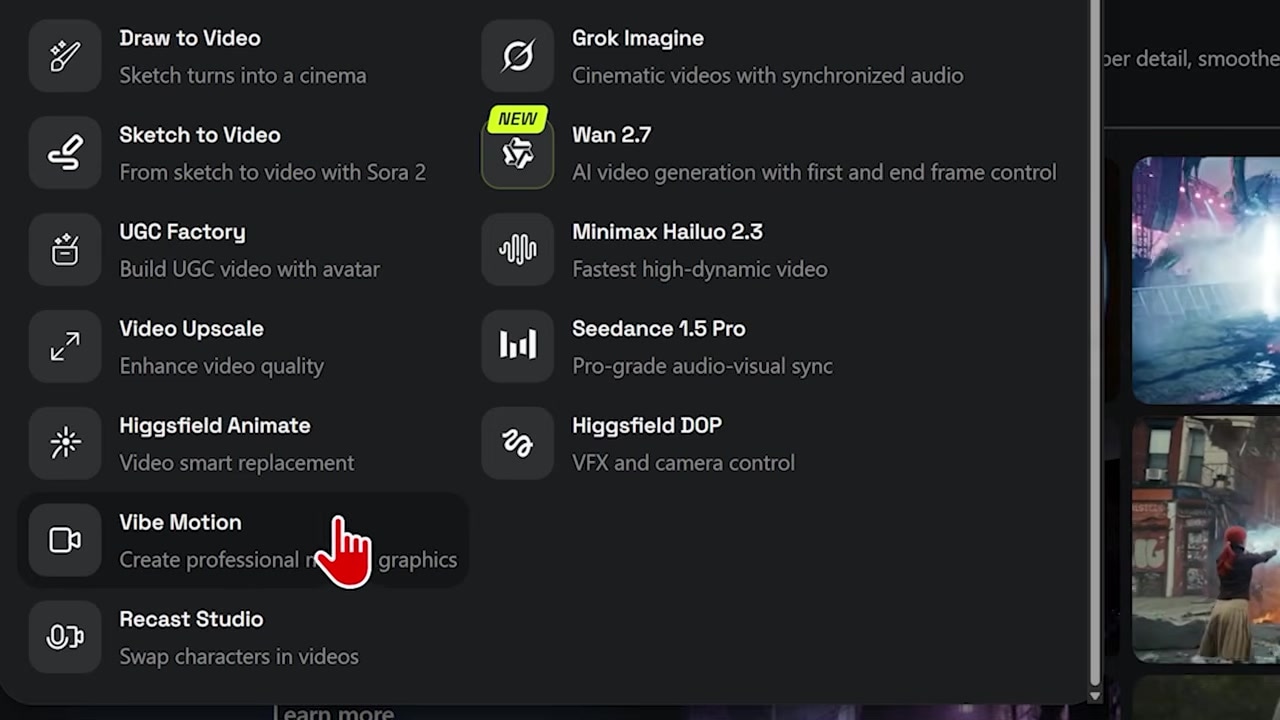
Caption: Navigating to the hidden Vibe Motion feature under the Video tab on Higgsfield’s homepage.
Once you are inside the design workspace, you will see a default demo animation on screen with a prompt box located at the bottom of the dashboard. This is where you enter your custom layout and timing instructions.
My Tested Prompt Templates and Results
To test what Higgsfield's animation engine can really do, I ran four distinct tests modeled after modern tech product launch aesthetics. You can copy and paste these prompts directly into your own Vibe Motion workflow.
1. The "Contact Me" Rounded-Rectangle Card
My goal here was to create a clean, modern card assembly animation complete with a floating cursor and subtle gradients.
The Prompt:
Duration: 5 seconds. Generate a clean white rounded-rectangle card assembling in the center of a soft grey-lavender gradient background, with stacked glowing shadow layers radiating outward behind it. On the left of the card, a circular purple-gradient avatar containing the attached headshot. On the right, a bold 'Content Creator' heading with smaller grey subtext below. Beneath that, a wide rounded 'Contact' button with a purple-to-blue gradient and white text. An arrow cursor glides in from the right and changes to a white pointing hand when it hovers directly over the center of the button.
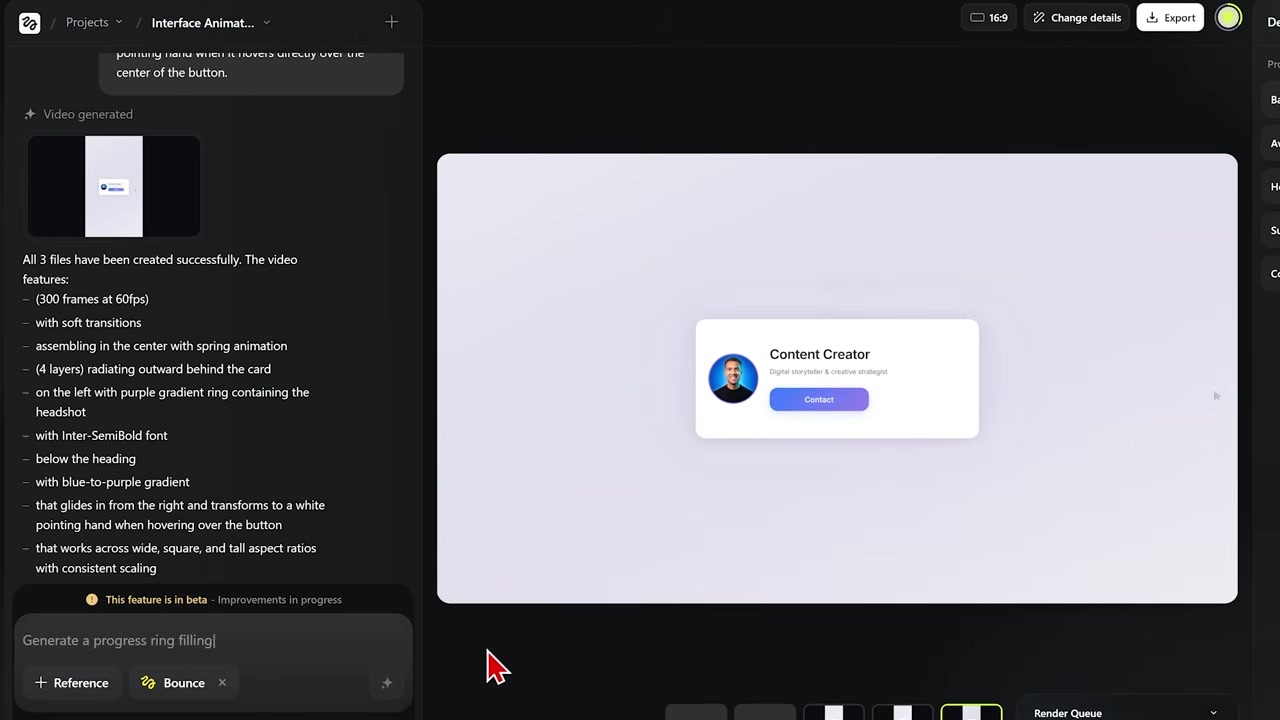
Caption: The completed 5-second contact-me card animation featuring a custom headshot, gradient background, and a clean cursor-hover effect.
2. The Icon-to-Card Slide Transition
This template is perfect for introducing software features. It starts with an icon layout, then slides them out of the way to present a structured block of information.
The Prompt:
Duration: 4 seconds. Start with the five attached icons in a centered horizontal row in the middle of the screen, evenly spaced. After a brief hold, the row slides up together and settles in the upper-middle of the frame while a clean white rounded-rectangle card slides up from below into the lower-center. Inside the card, header text appears at the top in a dark modern sans-serif, separated by a thin pale blue divider from text on the line below. Keep it clean, soft, and premium.
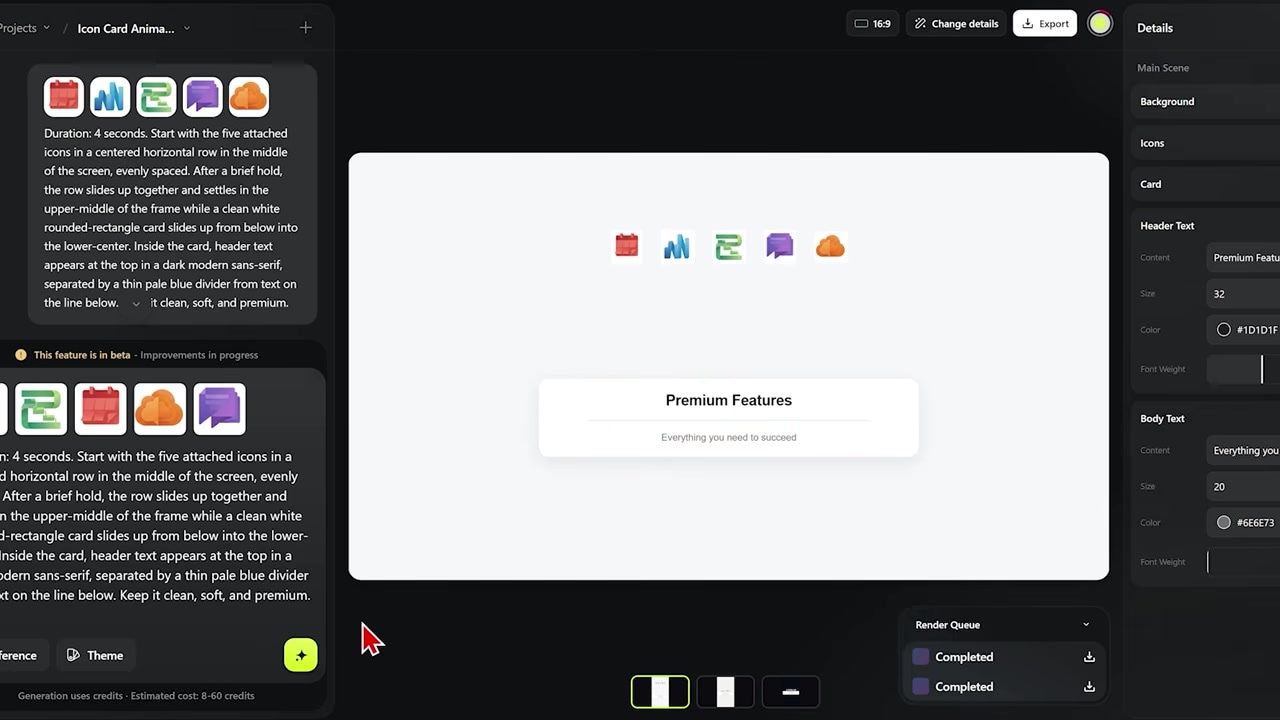
Caption: A multi-asset animation showing icons moving upward as a text-filled card emerges below.
3. The 3D Cursor Highlight Widget
If you want to walk viewers through your software interface or a dashboard mockup, this prompt demonstrates how to highlight multiple blocks of text step-by-step.
The Prompt:
Duration: 7 seconds. Generate a clean white widget floating on a deep navy-black background. Inside the widget there's a title at the top and three rectangular sections below it, each containing a line of text. Animate a 3D mouse cursor floating in and hovering over each section in sequence, highlighting each one as it goes. Use a soft gradient background. Keep everything smooth and clean.
4. The Claude-Style Mobile Chat Interface
I wanted to see if I could replicate the premium, editorial look of Claude's recent product launches. With a few custom style cues, I was able to generate a highly convincing mobile interface in under five minutes.
The Prompt:
Duration: 6 seconds. Warm beige background throughout. Editorial, minimalist, premium aesthetic. For the first 3 seconds, show a large centered smartphone chat interface on a white screen with a reddish-brown user bubble at the top, followed by two white reply bubbles typing out in sequence. The chat gently scrolls upward as new messages arrive. At the bottom of the phone, an input bar with a + icon and a reddish circular send button with a white up arrow. The phone should fill most of the screen. Then hard cut to a centered two-line dark brown-black display-serif large headline that fades in line by line: 'Or when it's time to check the build, but you're on the move'.
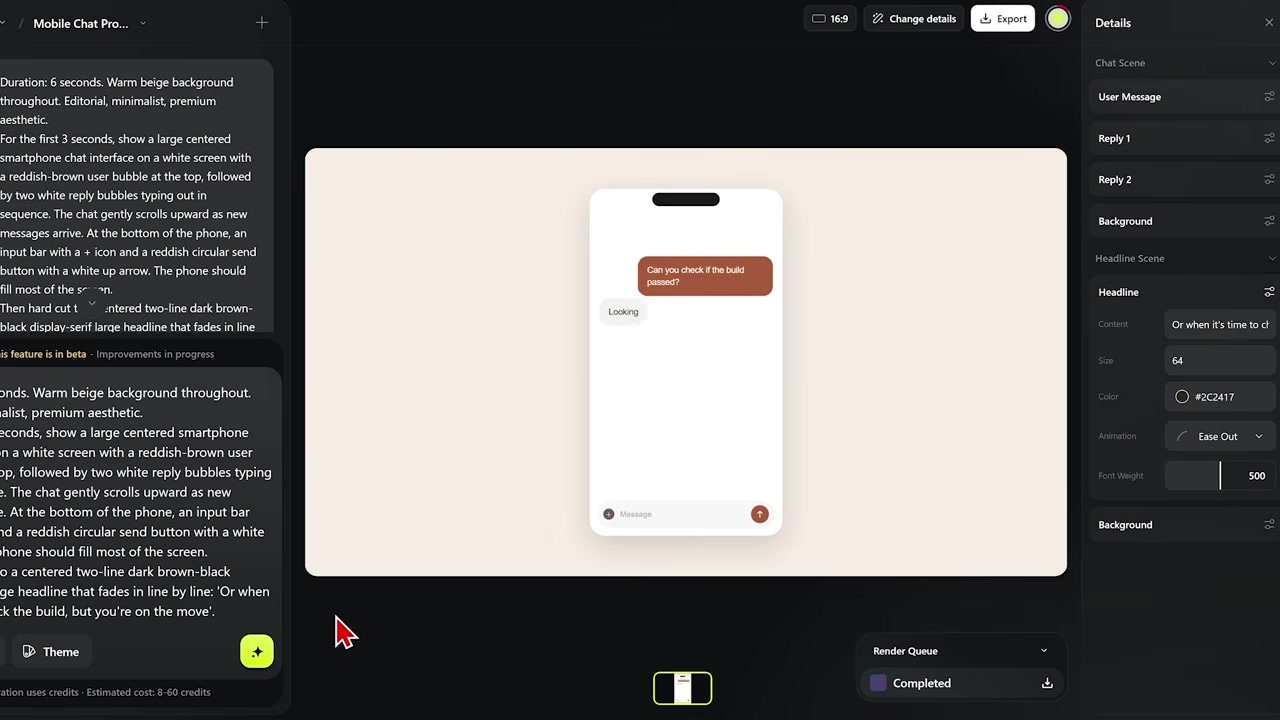
Caption: Recreating the Claude chat interface in Higgsfield with scrolling bubbles and fading editorial text.
The Magic of 'Vibecoding' vs. Traditional Video
Standard AI video generators outputs a locked, flattened video file. If there is a typo or the background color is slightly off, your only choice is to burn more credits and re-roll the entire prompt from scratch.
Higgsfield operates differently. The files generated inside Vibe Motion are actually real-time animation files built out of code.
When your graphic finishes rendering:
- You can physically select individual elements on the canvas.
- You can rewrite text dynamically in the side panel.
- You can alter the background color using hex codes or the color picker.
- You can change the size, fonts, and timing of elements live.
This hybrid approach bridges the gap between pure AI generation and code-based web editing.
The Catch: Render Failures and Editor Limitations
While I am highly optimistic about Vibe Motion's potential, it is currently in its early stages, and there are several major pain points you should watch out for:
1. Inconsistent Canvas Editing
The real-time customization doesn't always perform reliably. During my editing sessions:
- What worked: Tweaking body text and updating the canvas background colors applied perfectly.
- What failed: Attempting to adjust font weights (making text bolder or narrower) and resizing headlining typography often registered no changes on the preview screen at all.
2. High Render Failure Rates
The generative engine still experiences frequent processing drops. In my dashboard, one of my design projects logged three consecutive rendering errors before successfully outputting two drafts.
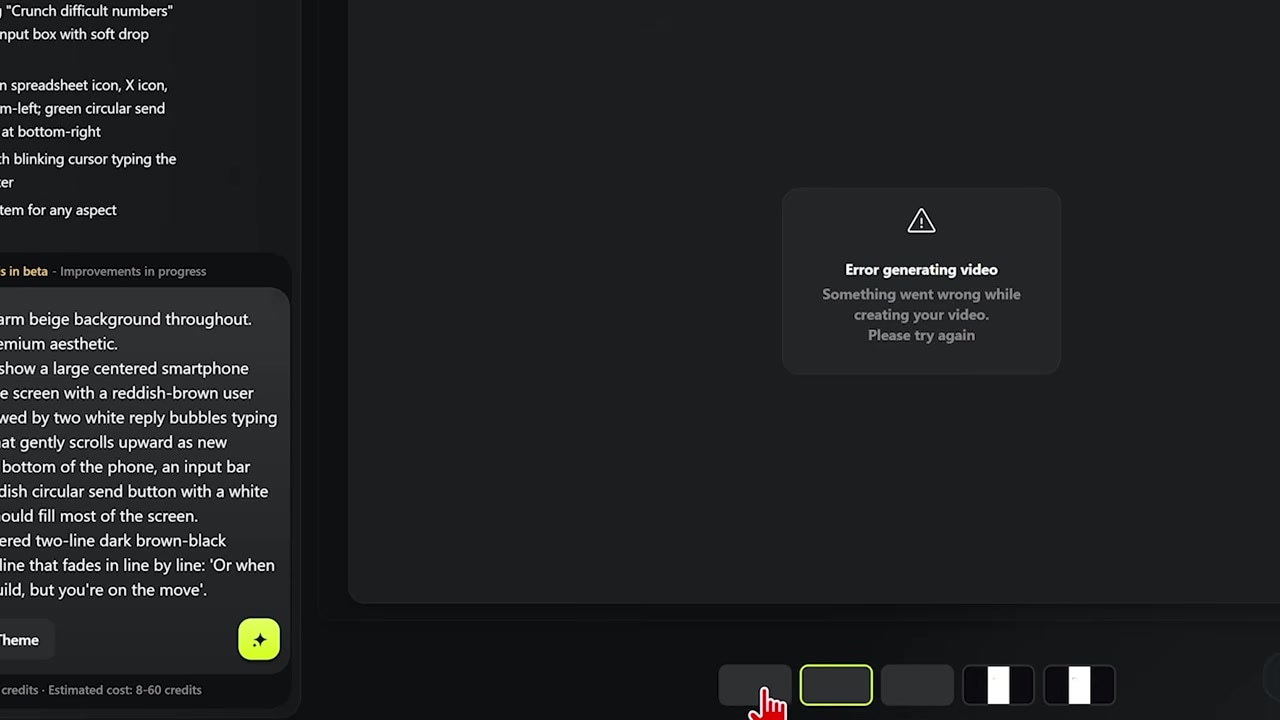
Caption: Real-world troubleshooting: An example of failed renders in the dashboard that still cost credit balances.
3. Credit Deductions on Fails
The most frustrating aspect of these processing drops is the billing system. As of right now, every failed render still deducts credits from your workspace allocation. Until the engine stabilizes, expect to lose a portion of your balance purely on backend processing errors.
Is Higgsfield Vibe Motion Worth It?
Even with the system failures and occasional UI bugs, the efficiency of Vibe Motion is undeniable. Writing a detailed text prompt takes less than five minutes. Accomplishing that same level of motion design manually inside Adobe After Effects would require hours of tedious keyframing, and hiring a skilled freelancer would easily run you hundreds of dollars.
For SaaS founders looking to launch new software features, or video creators trying to step up the production quality of their YouTube content, this is an incredibly powerful workflow hack.
Furthermore, you can pair Vibe Motion with Higgsfield Marketing Studio—a companion platform tool that allows you to instantly drop your products, software links, or custom avatars directly into high-converting UGC and commercial ad campaigns. Together, these tools are a glimpse into the future of fast, high-quality, and cost-effective digital marketing creation.
Try it here: Try Higgsfield →